Loading
Form preview
  • US Legal Forms
  • Form Library
  • More Forms
  • More Multi-State Forms
  • Src Login 2020

Get Src Login 2020-2026

How it works

  1. Open form

    Open form follow the instructions

  2. Easily sign form

    Easily sign the form with your finger

  3. Share form

    Send filled & signed form or save

How to fill out the Src Login online

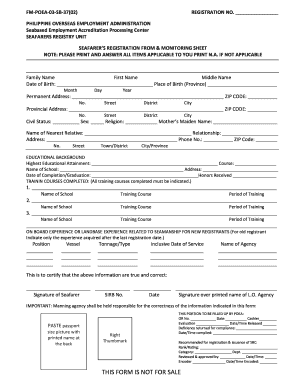
The Src Login form is a crucial document for individuals seeking registration with the Philippine Overseas Employment Administration. This guide will help you navigate the form's components and complete it accurately online.

Follow the steps to successfully complete the Src Login form.

  1. Click the ‘Get Form’ button to retrieve the Src Login form and open it in the online editor.
  2. Begin filling out the form by entering your family name, first name, and middle name in the designated fields.
  3. Provide your date of birth by selecting the month, day, and year from the provided options. Then, enter your place of birth, specifying the province.
  4. In the permanent address section, fill in your street number, street name, district, city, and ZIP code.
  5. Next, complete the provincial address section with the same details: street number, street name, district, city, and ZIP code.
  6. Indicate your civil status, sex, religion, and your mother's maiden name in the specified fields.
  7. Enter the name of your nearest relative, their relationship to you, along with their address, phone number, and ZIP code.
  8. For educational background, indicate your highest educational attainment, the course completed, name of the school, and the date of completion or graduation. Specify any honors received.
  9. List completed training courses in the allotted sections, including the name of the school, training course, and period of training.
  10. Detail your on-board experience or land-based experience related to seamanship, including position, vessel names, tonnage/type, inclusive dates of service, and name of the agency.
  11. Sign the form in the designated area and fill in your Sirb number and the date for verification.
  12. Ensure you paste a passport-sized picture with your printed name on the back and provide your right thumbmark.
  13. Lastly, review all information for accuracy before saving changes, downloading, or printing the completed form.

Complete your Src Login form online now for a smooth application process.

Get form

Experience a faster way to fill out and sign forms on the web. Access the most extensive library of templates available.
Get form

Related content

SCR Online Clearance System | Child Protective...
The Online Clearance System allows designated, authorized users access to electronically...
Learn more
Portal: Home
Login. Username. Password. Continue. Login. Need to login via a different method? Login...
Learn more
SRC Quick Setup Guide
Open a web browser and type the IP address of SRC. 2. Accept any security warnings that...
Learn more

Related links form

Lancaster Eagle Gazette Engagement Announcements Form Oregon Family Law Packet 4a Motion Requesting Modification Form GRPG 90-850 Appendix B Form 04-184 - HHSA Program Guides - Hhsa-pg Sdcounty Ca Assignor Handbook - Stsr

Questions & Answers

Get answers to your most pressing questions about US Legal Forms API.

Contact support

Creating a login and signup page in HTML with a database involves setting up a backend server and connecting it to your HTML forms. You would typically use languages like PHP or Node.js to handle form submissions and connect to a database like MySQL. Platforms like uslegalforms can simplify this process by providing templates and tools that help you craft an effective Src Login system tailored to your needs.

To obtain the src URL from a webpage, inspect the elements using browser tools, right-click the desired image or video, and select 'Copy Image Address' or 'Copy Video URL'. This action helps you quickly gather necessary resources for your project's Src Login page. Being efficient in gathering src URLs saves time and improves your workflow.

To get the src attribute of an image in HTML, you simply need to define the img tag with the src attribute pointing to the image URL. For instance, <img src='image-url.jpg' alt='Description'> will display the image directly. Utilizing clear and accurate image sources contributes to a seamless Src Login experience for your users.

To center a login page in HTML, you can use CSS to style your container. Set the display property to flex, align-items to center, and justify-content to center to achieve a neat, centered layout. This approach ensures that your users experience an organized and visually appealing Src Login form, enhancing usability and engagement.

Get This Form Now!

Use professional pre-built templates to fill in and sign documents online faster. Get access to thousands of forms.
Get form
If you believe that this page should be taken down, please follow our DMCA take down processhere.

Industry-leading security and compliance

US Legal Forms protects your data by complying with industry-specific security standards.
  • In businnes since 1997
    25+ years providing professional legal documents.
  • Accredited business
    Guarantees that a business meets BBB accreditation standards in the US and Canada.
  • Secured by Braintree
    Validated Level 1 PCI DSS compliant payment gateway that accepts most major credit and debit card brands from across the globe.
Get Src Login
Get form
  • Adoption
  • Bankruptcy
  • Contractors
  • Divorce
  • Home Sales
  • Employment
  • Identity Theft
  • Incorporation
  • Landlord Tenant
  • Living Trust
  • Name Change
  • Personal Planning
  • Small Business
  • Wills & Estates
  • Packages A-Z
  • Affidavits
  • Bankruptcy
  • Bill of Sale
  • Corporate - LLC
  • Divorce
  • Employment
  • Identity Theft
  • Internet Technology
  • Landlord Tenant
  • Living Wills
  • Name Change
  • Power of Attorney
  • Real Estate
  • Small Estates
  • Wills
  • All Forms
  • Forms A-Z
  • Form Library
  • Legal Hub
  • About Us
  • Help Portal
  • Legal Resources
  • Blog
  • Affiliates
  • Contact Us
  • Delete My Account
  • Site Map
  • Industries
  • Forms in Spanish
  • Localized Forms
  • State-specific Forms
  • Forms Kit
  • Real Estate Handbook
  • All Guides
  • Notarize
  • Incorporation services
  • For Consumers
  • For Small Business
  • For Attorneys
  • USLegal
  • FormsPass
  • pdfFiller
  • signNow
  • altaFlow
  • DocHub
  • Instapage
Form Packages
  • Adoption
  • Bankruptcy
  • Contractors
  • Divorce
  • Home Sales
  • Employment
  • Identity Theft
  • Incorporation
  • Landlord Tenant
  • Living Trust
  • Name Change
  • Personal Planning
  • Small Business
  • Wills & Estates
  • Packages A-Z
Form Categories
  • Affidavits
  • Bankruptcy
  • Bill of Sale
  • Corporate - LLC
  • Divorce
  • Employment
  • Identity Theft
  • Internet Technology
  • Landlord Tenant
  • Living Wills
  • Name Change
  • Power of Attorney
  • Real Estate
  • Small Estates
  • Wills
  • All Forms
  • Forms A-Z
  • Form Library
Customer Service
  • Legal Hub
  • About Us
  • Help Portal
  • Legal Resources
  • Blog
  • Affiliates
  • Contact Us
  • Delete My Account
  • Site Map
  • Industries
  • Forms in Spanish
  • Localized Forms
  • State-specific Forms
  • Forms Kit
Legal Guides
  • Real Estate Handbook
  • All Guides
Prepared for you
  • Notarize
  • Incorporation services
Our Customers
  • For Consumers
  • For Small Business
  • For Attorneys
Our Sites
  • USLegal
  • FormsPass
  • pdfFiller
  • signNow
  • altaFlow
  • DocHub
  • Instapage
Social Media
Call us now toll free:
+1 833 426 79 33
As seen in:
© Copyright 1999-2026 airSlate Legal Forms, Inc. 3720 Flowood Dr, Flowood, Mississippi 39232
  • Your Privacy Choices
  • Terms of Service
  • Privacy Notice
  • Content Takedown Policy
  • Bug Bounty Program