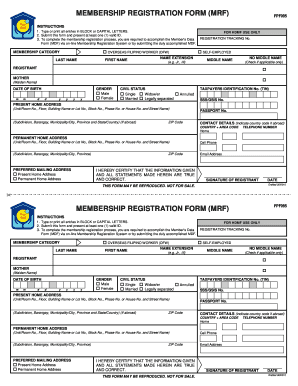
MEMBERSHIP REGISTRATION FORM MRF FPF095 INSTRUCTIONS 1. Type or print all entries in BLOCK or CAPITAL LETTERS. 2. Submit this form and present at least one 1 valid ID. 3. To complete the membership registration process you are required to accomplish the Member s Data Form MDF via on-line Membership Registration System or by submitting the duly accomplished MDF. MEMBERSHIP CATEGORY OVERSEAS FILIPINO WORKER OFW LAST NAME FIRST NAME FOR HDMF USE ONL.
Open form follow the instructions
Easily sign the form with your finger
Send filled & signed form or save
How to fill out the Pag Ibig Form online
Filling out the Pag Ibig Form online is a straightforward process that can help ensure your membership registration is submitted correctly. This guide will walk you through each section of the form, providing you with the necessary steps to complete it efficiently.
Follow the steps to complete your Pag Ibig Form online.
- Click ‘Get Form’ button to obtain the form and open it in your browser.
- Fill out the first section by entering your last name, first name, and any applicable name extensions. Ensure you use capital letters as specified in the instructions.
- Indicate your membership category by selecting either 'Overseas Filipino Worker (OFW)' or 'Self-Employed.'
- Provide your middle name, or check the box for 'No Middle Name' if appropriate.
- Next, enter your mother's maiden name in the designated field.
- Input your date of birth using the format mm/dd/yyyy, ensuring accuracy.
- Select your gender by marking the appropriate box.
- Choose your civil status from the options available—single, widow/er, annulled, married, or legally separated.
- Provide your Taxpayer Identification Number (TIN) and SSS/GSIS number if applicable.
- Fill in your present home address by providing all necessary details, including unit number, street name, barangay, and zip code.
- Complete your contact details by including your home telephone number and mobile number, along with the country and area code.
- If you have a permanent home address, fill it in the same detail as your current address.
- Indicate your preferred mailing address by checking either present or permanent home address.
- Ensure that you read the certification statement, then sign and date the form in the provided space.
- After completing the form, review your entries for accuracy. Save your changes, then proceed to download, print, or share the form as needed.
Take the next step towards your membership by completing the Pag Ibig Form online today.
Experience a faster way to fill out and sign forms on the web. Access the most extensive library of templates available.
Related content
Paano Mag Fill-up Ng PAG-IBIG Form/How To Fill Up PAG-IBIG Form/MDF FORM visit the up...
Paano Mag Fill-up Ng PAG-IBIG Form/How To Fill Up PAG-IBIG Form/MDF FORM Read the Full...
The filmstrip starts forming a "0" on the star while another filmstrip comes and forms a...
Get answers to your most pressing questions about US Legal Forms API.
How can I file my Pag-IBIG contribution online?
To file your Pag-IBIG contribution online, go to the Pag-IBIG Fund website and log into your account. Navigate to the contribution filing section and enter the relevant information accurately. Complete the process by submitting your Pag Ibig Form, ensuring your contribution is properly recorded.
How do I access my Pag-IBIG account online?
You can access your Pag-IBIG account online by visiting the Pag-IBIG Fund's official portal. Enter your login credentials, and you will have access to your account details, contributions, and benefits. If you haven’t registered yet, be sure to fill out your Pag Ibig Form to initiate your account.
How to apply for Pag-IBIG for the first time?
To apply for Pag-IBIG for the first time, visit the Pag-IBIG Fund website and complete the online registration process. Fill out the required personal information accurately. Don't forget to submit your Pag Ibig Form, as this is essential for your account to be established and for you to start enjoying the benefits.
How much is the Pag-IBIG contribution for OFW?
The Pag-IBIG contribution for Overseas Filipino Workers (OFWs) is generally 2% of your monthly salary, based on your choice of contribution ceiling. You can check the interest rates and specific contribution levels on the Pag-IBIG Fund's website. Make sure to complete your Pag Ibig Form accurately for correct processing of your contributions.
How can I submit my Pag-IBIG form online?
To submit your Pag-IBIG form online, access the official Pag-IBIG Fund website. Fill out the necessary details in the provided online form. Once complete, you can submit your Pag Ibig Form electronically, allowing for quick processing and confirmation of your submission.
How can I get my Pag-IBIG number online?
You can obtain your Pag-IBIG number online by visiting the Pag-IBIG Fund website. Use the online inquiry tool where you'll need to input your personal information. After submitting your Pag Ibig Form, your Pag-IBIG number will be sent to you via email or displayed on the screen.
How to update Pag-IBIG contribution online?
To update your Pag-IBIG contribution online, visit the Pag-IBIG Fund's official website and log into your account. Navigate to the contributions section and follow the prompts to make the necessary changes. Make sure to submit your Pag Ibig Form accurately to ensure your updates are processed smoothly.
Where can I get a Pag-IBIG form?
You can obtain a Pag-IBIG form from the official Pag-IBIG Fund website, where various forms are available for download. Additionally, local Pag-IBIG branches provide physical copies if you prefer to fill them out in person. Be sure to utilize the resources available online for the most up-to-date forms.
How can I get Pag-IBIG online?
You can get Pag-IBIG services online by visiting the official Pag-IBIG website. The site offers access to various services, including downloading forms and checking your contribution status. Filling out the Pag-IBIG form online makes the entire process more convenient for you.
How can I create a Pag-IBIG virtual account?
Creating a Pag-IBIG virtual account is straightforward. Visit the Pag-IBIG website and follow the prompts to set up your account. After completing the required Pag-IBIG form online, you will gain access to your virtual account, enabling you to manage your contributions and benefits efficiently.
Use professional pre-built templates to fill in and sign documents online faster. Get access to thousands of forms.
If you believe that this page should be taken down, please follow our DMCA take down process here.