Loading
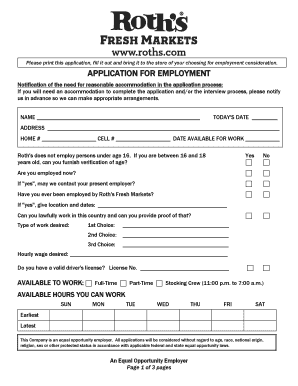
Get Roth's Application
How it works
-

Open form follow the instructions
-

Easily sign the form with your finger
-

Send filled & signed form or save
How to fill out the Roth's Application online
Completing Roth's Application online can streamline your job application process and ensure your information is accurately recorded. This guide provides step-by-step instructions to help you fill out the application effectively.
Follow the steps to fill out Roth's Application online
- Click ‘Get Form’ button to access the application and open it in the editor.
- Begin by providing your name in the designated field. Ensure that all personal information is accurate.
- Enter today’s date in the specified location to indicate when you are filling out the application.
- Fill in your address, including street address, city, state, and zip code for accurate communication.
- Provide your home and cell phone numbers, ensuring they are valid and where you can be reached.
- Indicate your availability for work by selecting the date you can start. Be truthful about your current employment status.
- If applicable, answer the questions regarding your age and employment history with Roth's, providing details where necessary.
- List the type of work you are interested in by indicating your first, second, and third choices of positions.
- Specify your desired hourly wage in the designated field.
- Answer the questions related to your driver's license status and any prior felony convictions. Provide explanations if applicable.
- Select your availability for full-time or part-time positions, and indicate any specific hours you can work throughout the week.
- In the education section, fill out information regarding your high school and any college attended, including years completed.
- Summarize any special skills, qualifications, volunteer activities, or language proficiencies relevant to the job.
- List three references who are non-relatives and can speak to your qualifications and work history, providing the required details.
- Outline your employment experience, starting with your current or most recent job. Include job titles, duties, and reasons for leaving.
- Carefully read the statements provided before signing your application to understand the implications of your responses.
- Sign and date the application to validate it, ensuring all information has been accurately recorded before submitting.
- At the final step, review your entries, save changes, download, print, or share the completed form according to your preference.
Start completing your Roth's Application online today for a smooth job application experience.