Open form follow the instructions
Easily sign the form with your finger
Send filled & signed form or save
How to fill out the Bank Details Format online
Filling out the Bank Details Format is an essential process for ensuring that payments are processed accurately and efficiently. This guide will provide you with step-by-step instructions to complete the form correctly and securely online.
Follow the steps to complete the Bank Details Format
- Click ‘Get Form’ button to obtain the form and open it in the editor.
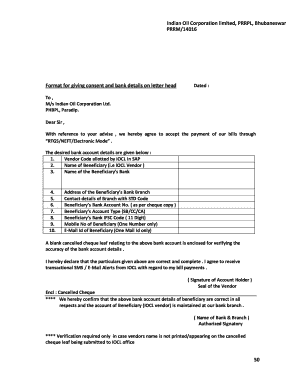
- Begin by entering the vendor code allotted by Indian Oil Corporation Limited in SAP, as this identifies you as a vendor.
- Input the name of the beneficiary, which typically is the name associated with the IOCL vendor.
- Provide the name of the beneficiary's bank to ensure that payments are directed to the correct financial institution.
- Fill in the address of the beneficiary's bank branch where the account is held.
- Input the contact details of the branch, including the STD code, for any necessary communication regarding your account.
- Enter the beneficiary's bank account number as shown on the associated cheque copy to ensure accuracy.
- Specify the beneficiary’s account type by marking 'SB' for savings, 'CC' for cash credit, or 'CA' for current account.
- Provide the beneficiary’s bank IFSC code, which is an 11-digit alphanumeric code that helps in processing electronic transfers.
- Lastly, enter the mobile number and email address of the beneficiary, ensuring only one contact number and email address is provided for receiving alerts.
- Attach a blank cancelled cheque leaf related to the above bank account for verification of accuracy.
- Declare that the information provided is correct and complete by signing the form. Include the seal of the vendor if applicable.
- At the end, you may save changes, download, print, or share the completed form as needed.
Complete your Bank Details Format online today for seamless payment processing.
Experience a faster way to fill out and sign forms on the web. Access the most extensive library of templates available.
Related content
Bank Information: Account Type: IBAN #. Account #. Checking. Savings. Bank SWIFT...
[Signature of Bank Official]. [Name of Bank Official]. [Name of Bank]. [Title of Bank...
The user selects the party and bank from the list, clicks Preview, and chooses the desired...
Get answers to your most pressing questions about US Legal Forms API.
How do I write my bank details?
When writing your bank details, ensure you include all pertinent information clearly and concisely. Start with your bank's name, followed by your account number and routing number. By paying attention to the bank details format, you can ensure that your information is processed efficiently.
What is bank details in IBAN format?
The bank details in IBAN format include a standard structure, consisting of a country code, check digits, and your account number. IBAN helps standardize bank account identification across borders. Utilizing this format enhances the accuracy of your international transactions.
What do you mean by bank details?
Bank details refer to the specific information needed to identify your bank account for transactions. This typically includes your account name, number, and routing information, among other identifiers. Understanding your bank details format is essential for conducting financial transactions safely.
How do you write bank details?
To write your bank details, start with your bank's name, followed by your account number and routing number. Additionally, if required, include your IBAN or other identifiers. Ensuring clarity and precision in the bank details format will help facilitate your transactions.
What do I put for bank details in my account name?
In the account name section of the bank details form, you should enter the name as it appears on your bank account. This should match your legal name to prevent any discrepancies. Using the correct bank details format helps streamline your banking process.
How to fill in bank details?
When filling in your bank details, first, identify the required fields on the form. Provide clear information such as your bank name, account number, and routing number. Using the correct bank details format is vital for ensuring your funds are transferred correctly.
What is the bank details form?
A bank details form is a document that collects essential information about a bank account. This form typically includes your account number, bank name, and sometimes, additional identifiers like IBAN or SWIFT codes. Completing this form accurately is crucial for transactions to proceed smoothly.
How to fill out bank details?
To fill out your bank details accurately, begin by gathering all necessary information. You need your account number, bank name, and routing number. Ensure that you follow the specific format required, as this will help avoid processing delays.
What is considered bank details?
Bank details encompass all the necessary information required to identify and access your bank account. This includes your account number, bank name, and routing number, formatted correctly for ease of use. Knowing what constitutes bank details allows you to prepare for various financial activities effortlessly.
How do I fill out my bank account details?
Filling out your bank account details requires caution and precision. Start by locating the right bank details format, then enter your account number, bank name, and other necessary information. Accuracy at this stage ensures your financial transactions are executed without any hitches.
Use professional pre-built templates to fill in and sign documents online faster. Get access to thousands of forms.
If you believe that this page should be taken down, please follow our DMCA take down process here.