Open form follow the instructions
Easily sign the form with your finger
Send filled & signed form or save
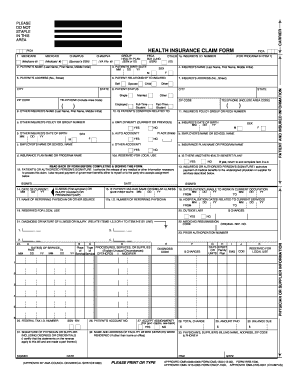
How to fill out the Cms 1500 Form Pdf Fillable online
Filling out the Cms 1500 Form is essential for submitting health insurance claims accurately. This guide provides clear, step-by-step instructions on how to complete this form online, ensuring you provide all necessary information.
Follow the steps to successfully complete the Cms 1500 Form online.
- Click the ‘Get Form’ button to access the Cms 1500 Form Pdf Fillable. Open the form in your preferred editor for online completion.
- Begin by entering the patient's information in section 2. Include their full name, birth date, and address, ensuring all details are accurate and up to date.
- Complete section 6 to indicate the patient's relationship to the insured. Choose the appropriate option from Self, Spouse, or Child.
- In section 8, specify the patient's status, selecting Full-Time, Part-Time, Student, or Other as applicable.
- Input the necessary details regarding any other insurance coverage in section 9. Provide the other insured's name and their policy details.
- Fill out section 11 to include the insured’s policy or group number, alongside their date of birth.
- In section 13, secure the authorized person's signature to authorize payment of benefits. This is crucial for processing the claim.
- Complete all your medical service information in section 24, detailing procedures, services, and diagnosis codes relevant to the claim.
- Review all filled information for accuracy and completeness. This can help avoid delays or denials in processing.
- Once all sections are correctly filled, use the options available to save changes, download a copy, print, or share the completed Cms 1500 Form.
Begin completing your Cms 1500 Form online today for a smoother claims process.
Experience a faster way to fill out and sign forms on the web. Access the most extensive library of templates available.
Related content
Form #. CMS 1500 ; Form Title. Health Insurance Claim Form ; Revision Date. 2012-02-01 ;...
This document is to help you provide valid information for timely payment of your claim...
Jun 27, 2011 — Throughout this document you will find cross-references in the text which...
Get answers to your most pressing questions about US Legal Forms API.
Can you handwrite on a HCFA 1500 form?
Yes, you can handwrite on a HCFA 1500 form, although it is recommended to do so carefully and neatly. Many find that using a CMS 1500 Form PDF fillable version helps avoid issues related to unclear handwriting. Choosing this option can improve the overall quality of the claim submission.
Can you write on a CMS 1500 form?
Yes, you can write on a CMS 1500 form. However, it is important to ensure that your handwriting is clear and legible. For greater accuracy, many users prefer to use a CMS 1500 Form PDF fillable template, which allows them to enter information digitally for a cleaner presentation.
Can I download a CMS 1500 form?
You can easily download a CMS 1500 form from various websites that provide templates, including those offering CMS 1500 Form PDF fillable options. This allows you the flexibility to fill out the form digitally before printing or submitting it. Always select a reliable source to ensure you have the most up-to-date version.
What is the correct format when entering an address onto a CMS 1500 form?
When entering an address on a CMS 1500 form, you should use standard formatting: include the street address, city, state, and zip code. Ensure that there are no abbreviations unless necessary, and remember to use commas appropriately. Following these guidelines is vital, and a CMS 1500 Form PDF fillable version can assist you in maintaining this format.
What fields are required on CMS 1500?
Required fields on the CMS 1500 include the patient's name, address, insurance information, and the provider's details. Each of these sections must be filled correctly to avoid delays in claims processing. Utilizing a CMS 1500 Form PDF fillable format can help guide you in completing all necessary fields efficiently.
Can I print my own CMS 1500 forms?
Yes, you can print your own CMS 1500 forms. There are many templates available online, including a CMS 1500 form PDF fillable version that you can fill out electronically before printing. This option allows for easy corrections and ensures that all necessary information is included clearly on the printed form.
What are the most common errors made when filling out a CMS 1500 claim form?
Common errors when filling out the CMS 1500 claim form often include incorrect patient information, such as misspelled names or wrong addresses. Additionally, providers may forget to include required fields like the patient's insurance details. It is essential to double-check the CMS 1500 Form PDF fillable options to ensure accuracy and compliance.
What are the most common errors or mistakes made when filling out the CMS 1500 claim form and how can these be avoided?
Errors often arise from missing insurance information or incorrect amounts billed. To avoid these mistakes, double-check all entries before submission. Using a Cms 1500 Form PDF fillable can greatly reduce the chances of such errors, as it allows you to review your form easily.
What is the most important component of completing the CMS 1500 form?
The most important component of completing the CMS 1500 form is ensuring that all required fields are filled out accurately. This includes patient demographics, procedure codes, and billing information. By utilizing a Cms 1500 Form PDF fillable, you can easily ensure that you do not overlook any crucial details.
What are the two most common claim submission errors?
The two most common claim submission errors include incorrect patient information and omission of necessary codes. These mistakes can delay the processing of your claim. By using a Cms 1500 Form PDF fillable, you can minimize errors and ensure that every detail is accurately captured.
Use professional pre-built templates to fill in and sign documents online faster. Get access to thousands of forms.
If you believe that this page should be taken down, please follow our DMCA take down process here.