Loading
Get Download The Sootheaway Migraine Diary 2020-2026
How it works
-

Open form follow the instructions
-

Easily sign the form with your finger
-

Send filled & signed form or save
How to fill out the Download The SootheAway Migraine Diary online
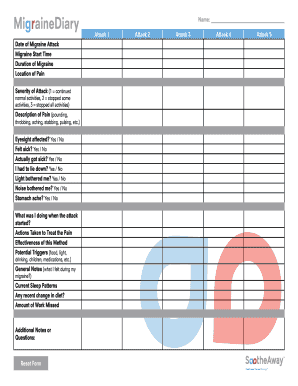
Filling out The SootheAway Migraine Diary online is a valuable tool for tracking migraine attacks and understanding their impact on daily life. This guide will walk you through each section of the diary to ensure you provide comprehensive and accurate information.
Follow the steps to accurately complete the migraine diary form
- Press the ‘Get Form’ button to access the document and open it in your browser.
- Start with the ‘Date of Migraine Attack’ field. Enter the specific date when the migraine occurred.
- Proceed to the ‘Migraine Start Time’ field. Record the exact time the migraine began.
- In the ‘Duration of Migraine’ section, provide an estimate of how long the migraine lasted.
- Fill in the ‘Location of Pain’ box by specifying where you experienced the pain (e.g., forehead, temples, etc.).
- Rate the ‘Severity of Attack’ by selecting a number from 1 to 3, based on how much the migraine affected your daily activities.
- Describe the pain in the ‘Description of Pain’ section using terms such as pounding, throbbing, or aching.
- Indicate whether your eyesight was affected by selecting 'Yes' or 'No' in the corresponding section.
- Answer the questions regarding nausea and sensitivity to light and noise by selecting 'Yes' or 'No.'
- Document any actions taken to treat the pain in the ‘Actions Taken to Treat the Pain’ field.
- Evaluate the effectiveness of the treatment method in the designated space.
- List potential triggers that might have contributed to the migraine in the ‘Potential Triggers’ section.
- Add any general notes about your experience during the migraine in the ‘General Notes’ field.
- Record your current sleep patterns and any recent changes in diet to provide more context.
- Fill in how much work you missed due to the migraine in the relevant section.
- Finally, provide any additional notes or questions you may have in the ‘Additional Notes or Questions’ area.
- Once you have completed the form, you have the option to save changes, download, print, or share the document as needed.
Start completing the SootheAway Migraine Diary online to better understand and manage your migraine experiences.
Creating a headache log involves consistently recording details about each headache you experience. You should note the date, time, symptoms, duration, and any treatments used. For a more structured approach, download The SootheAway Migraine Diary, which offers a user-friendly template that guides you in maintaining an insightful headache log.