Loading
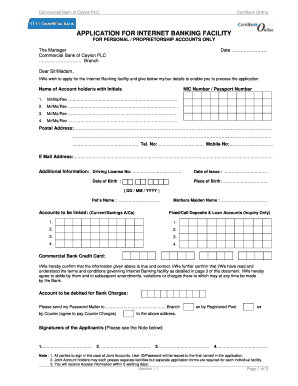
Get Commercial Bank Application Form
How it works
-

Open form follow the instructions
-

Easily sign the form with your finger
-

Send filled & signed form or save
How to fill out the Commercial Bank Application Form online
This guide provides a straightforward process for completing the Commercial Bank Application Form online. Follow these steps to ensure that your application for an Internet Banking facility is filled out accurately and efficiently.
Follow the steps to successfully complete the Commercial Bank Application Form.
- Click the ‘Get Form’ button to obtain the Commercial Bank Application Form and open it in the editor.
- Enter the date at the top of the form. This date should represent the day you are submitting your application.
- Address the form to 'The Manager' of Commercial Bank of Ceylon PLC along with the branch name.
- Fill in the details of the account holder(s), including their names and initials. Use neutral titles such as Mr., Ms., or Rev. as appropriate.
- Provide identification numbers for each account holder, such as NIC or passport numbers.
- Fill in the postal address, telephone number, and mobile number of the applicant(s).
- Enter the email address of the applicant(s) to receive important notifications related to the Internet Banking facility.
- Complete additional information, including the Driving License Number, Date of Birth, and Place of Birth in the specified fields.
- Specify the accounts to be linked, such as current or savings accounts, and add any fixed/call deposits or loan accounts if applicable.
- Confirm the accuracy of the provided information and read the terms and conditions regarding Internet Banking. Acknowledge by signing where indicated.
- Choose a preferred delivery method for receiving your Password Mailer, either by courier or registered post, and provide the necessary address.
- Complete the Two-Factor Authentication registration by entering your mobile phone number and email address for receiving OTPs.
- Fill in any additional details for bill payments, including the name of billing companies and accounts to be linked.
- Review all entries on the form for accuracy before submitting.
- Once completed, save your changes, download the form for your records, print it, or prepare to share it as instructed.
Start filling out the Commercial Bank Application Form online to access your Internet Banking facility today.
To fill out a bank application form online, go to the bank's website and locate the application section. Enter the requested information accurately, referencing your Commercial Bank Application Form as needed for details like your identity and financial status. After completing the form, review it for accuracy before submitting it.