Loading

Open form follow the instructions

Easily sign the form with your finger

Send filled & signed form or save
How to fill out the Confidential Cover Page Template online
Filling out the Confidential Cover Page Template accurately is essential for ensuring the secure transmission of sensitive information. This guide provides a step-by-step breakdown to help you complete the form with ease and confidence.
Follow the steps to accurately complete the Confidential Cover Page Template.
- Click the ‘Get Form’ button to obtain the form and open it in the online editor.
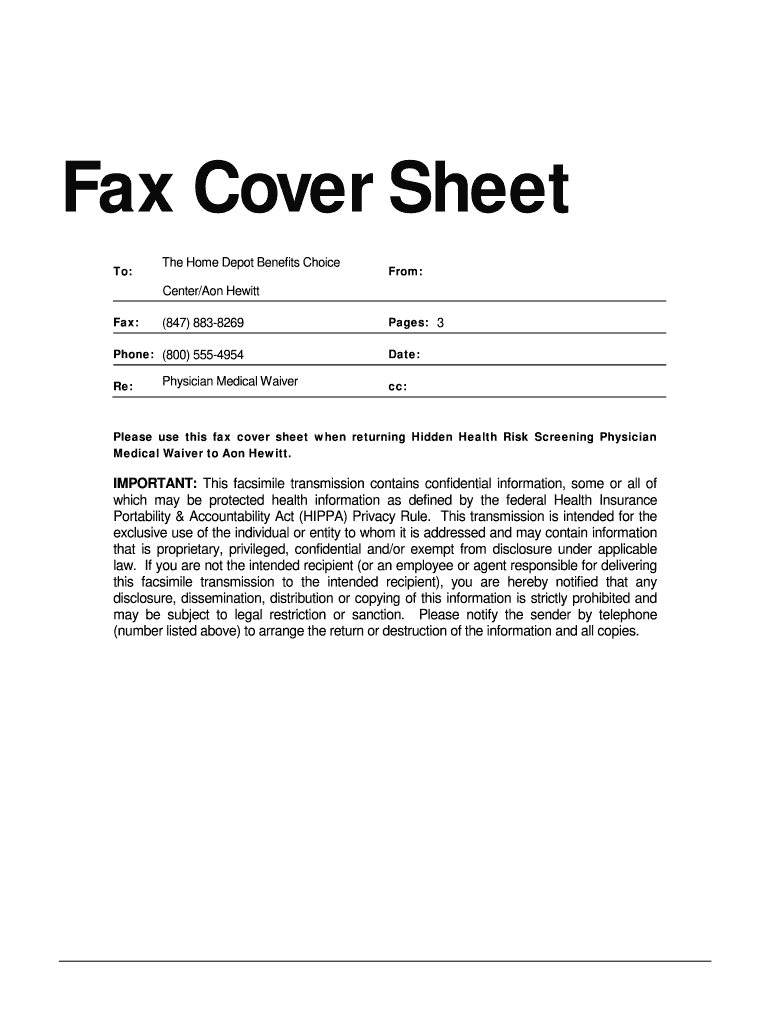
- In the 'To' field, enter the name of the recipient organization. For this template, it should be 'Quest Diagnostics'.
- In the 'From' field, enter your name or the name of the individual sending the fax.
- Fill in the 'Fax' field with the fax number of the recipient. In this case, it is '(877) 396-3645'.
- Indicate the total number of pages being sent in the 'Pages' field, which should be '2' for this document.
- In the 'Phone' field, enter a contact number for the sender, such as '(800) 354-1703'.
- In the 'Re' section, briefly describe the subject of your fax. Here, it is 'Home Depot Hidden Health Risk Physician Waiver'.
- Enter the current date in the designated 'Date' field.
- If necessary, use the 'cc' field to list anyone else who should receive a copy of the fax.
- Once all fields are complete, review the information for accuracy. You can then save your changes, download the document, print it, or share it as needed.
Start completing your documents online today for secure and efficient management.
Experience a faster way to fill out and sign forms on the web. Access the most extensive library of templates available.
Related content
It is the Proposer's position that the data contained in pages See Table Below of the...
The information contained in this facsimile transmission is privileged and confidential...
Aug 18, 2025 — The Confidential Employee Assessment File is a paperbound folio given to...
Get answers to your most pressing questions about US Legal Forms API.
How to write a confidentiality note?
To write a confidentiality note, start with a title indicating it is confidential, followed by a brief message outlining what is being kept secret. Be concise and direct to avoid any confusion. A Confidential Cover Page Template can be an excellent tool to provide a structured format for your note, reinforcing the importance of confidentiality.
How to fill out a cover fax sheet?
When filling out a cover fax sheet, include essential details such as the sender’s name, recipient’s name, and a brief description of the contents. Clearly mark the document as 'Confidential' to inform the recipient about the sensitivity of the contents. Using a Confidential Cover Page Template can help organize these details neatly, ensuring that the information is properly conveyed.
How do you note a document is confidential?
You can note a document as confidential by including a header or footer that states 'Confidential' on each page. Make sure the confidential label is clearly visible to the reader. A Confidential Cover Page Template, with designated areas for such markings, can enhance the clarity and professionalism of your document.
How to put private and confidential on a letter?
To mark a letter as private and confidential, position the phrases 'Private' and 'Confidential' prominently at the top of the letter. Ensure that these labels are easily visible and distinguish them with bold formatting. Utilizing a Confidential Cover Page Template will help present your letter professionally and effectively communicate its private nature.
How to write a confidential note?
To write a confidential note, begin by clearly noting the recipient’s name and including a subject line that indicates confidentiality. Use simple language to convey your message while ensuring that sensitive details are protected. Employ a Confidential Cover Page Template to give your note a professional appearance and emphasize its confidentiality.
How to write about confidentiality?
When writing about confidentiality, focus on outlining the importance of safeguarding sensitive information. Clearly state what information is considered confidential and describe any legal obligations that come with it. The use of a Confidential Cover Page Template can enhance your message by providing a formal structure to your document.
How do I indicate a document is confidential?
You can indicate that a document is confidential by adding a confidentiality notice on the cover page or at the top of each page. Use bold text to highlight the words 'Confidential' or 'Private.' A Confidential Cover Page Template can streamline this process, helping you to present the confidentiality notice in a professional and clear manner.
How to write a statement of confidentiality?
To write a statement of confidentiality, begin with a clear declaration indicating that the information is confidential. Use straightforward language to describe the nature of the information and the expectations for its confidentiality. Consider utilizing a Confidential Cover Page Template to format the statement effectively, ensuring that it is prominently displayed at the beginning of your document.
What is a confidential cover page?
In most simple words, we can define the confidential fax cover sheet as the sheet of paper we attach with the fax document for sharing information, which is completely private and not allows everyone to read or open it.
What are the types of classified information?
The three primary levels of classification (from least to greatest) are Confidential, Secret, and Top Secret.
Use professional pre-built templates to fill in and sign documents online faster. Get access to thousands of forms.
If you believe that this page should be taken down, please follow our DMCA take down process here.