
Open form follow the instructions

Easily sign the form with your finger

Send filled & signed form or save
How to fill out the Psychotherapy Superbill Template online
Filling out the Psychotherapy Superbill Template online is an essential step in documenting psychotherapy services and ensuring proper billing. This guide will walk you through each section and field of the form to help you navigate the process with ease and accuracy.
Follow the steps to complete the Psychotherapy Superbill Template.
- Press the ‘Get Form’ button to access the Psychotherapy Superbill Template and open it in your preferred online editor.
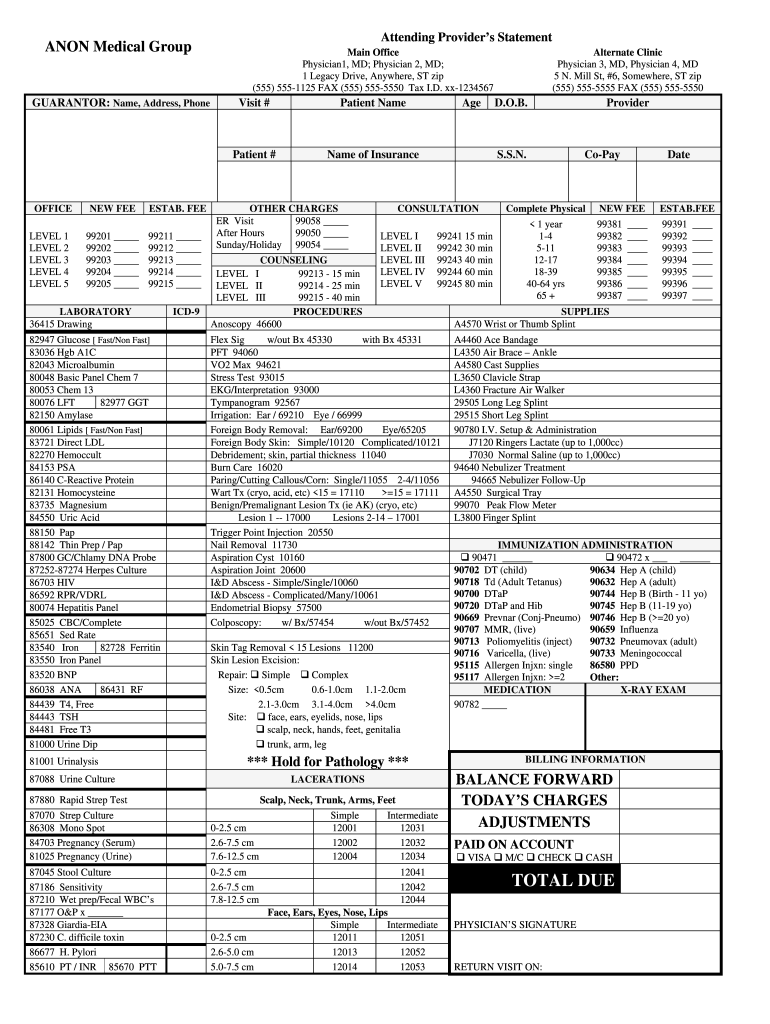
- Begin by entering the guarantor's details, including their name, address, and phone number. Make sure the information is accurate to avoid any billing issues.
- Fill in the attending provider's statement, including the names of the physicians and their contact information. This section validates the legitimacy of the services provided.
- In the 'New Fee' and 'Established Fee' sections, write in the corresponding codes for the services rendered. These codes should match the services provided during the therapy sessions.
- If applicable, complete the laboratory tests section by marking the relevant tests performed. This will ensure comprehensive billing and documentation.
- Under the ICD-9 section, enter the relevant diagnosis codes that pertain to the services provided. This is crucial for reimbursement processes.
- For any other charges or special procedures performed, list them in the designated sections, providing specific codes and fees as needed.
- Make sure to review all entered information for accuracy. This includes checking patient information and ensuring all necessary codes are filled in.
- After verifying the information, you can save your progress, download a copy for your records, print the completed form, or share it as required.
Start filling out your Psychotherapy Superbill Template online today for streamlined billing!
Experience a faster way to fill out and sign forms on the web. Access the most extensive library of templates available.
Related content
Camft Superbill Template: Streamlining Mental Health Billing with Ease Camft Superbill...
A superbill is an invoice that lists the therapy services a person has received, which...
Get answers to your most pressing questions about US Legal Forms API.
How do you complete a superbill?
Completing a superbill requires you to enter crucial details, such as patient information, diagnosis codes, and the services rendered. Use a comprehensive Psychotherapy Superbill Template to ensure you capture all necessary elements correctly. After filling out the information, review your superbill for accuracy before submitting it for insurance reimbursement or client records. Tools like US Legal Forms can provide useful resources to assist you in this process.
How to generate a superbill in SimplePractice?
Generating a superbill in SimplePractice is a quick and efficient process. Start by accessing your client’s session details, and then utilize the Psychotherapy Superbill Template provided within the software. The platform simplifies the creation of superbills, allowing you to generate them with just a few clicks and ensuring that all important information is included.
Can I edit a superbill in SimplePractice?
Yes, you can easily edit a superbill in SimplePractice. First, locate the Psychotherapy Superbill Template within the platform. From there, modify any patient-specific details and service codes as needed. This flexibility allows you to keep your superbills up-to-date and tailored to your practice's requirements.
How to create a superbill in Excel?
Creating a superbill in Excel is straightforward. First, download a Psychotherapy Superbill Template that is compatible with Excel. Then, input your specific information, including patient details and services provided. Excel allows flexibility in design, making it easy to adjust the template as needed for your practice.
Can I create my own superbill?
Yes, you can definitely create your own superbill. Begin with a downloadable Psychotherapy Superbill Template to kickstart the process. This way, you can tailor the document to meet your specific needs and preferences while ensuring all necessary components are included. Platforms like US Legal Forms offer ready-to-use templates that make this task simpler for you.
How to write a superbill template?
To write a superbill template, you need to identify the information that should be on the document, like patient details, procedure codes, and payment information. Start with a standard Psychotherapy Superbill Template to ensure you capture everything necessary for billing. Make sure the template is clear and easy to understand, allowing both you and your patients to benefit. Customized templates can be created using user-friendly platforms like US Legal Forms.
How do I create a superbill?
Creating a superbill involves gathering essential information such as patient details, diagnosis codes, and services provided. Start with a Psychotherapy Superbill Template to ensure you include all necessary elements. You can customize the template to fit specific billing requirements and personalize it for your practice. Utilizing tools like US Legal Forms can streamline this process significantly.
How do I print a superbill?
Printing a superbill is easy with a completed template. After filling in all necessary details in your Psychotherapy Superbill Template, simply go to the print option in your software or template platform. Ensure your format aligns with your preferred printing standards, making the final product clear and presentable for your records or for submission.
What is the superbill form?
The superbill form is a detailed document that healthcare providers use to communicate services rendered to patients and insurance companies. It serves as a record of services, including billing codes and diagnosis, facilitating the reimbursement process. A well-prepared Psychotherapy Superbill Template can help ensure that all necessary information is included for proper processing.
How to create a superbill in simple practice?
Creating a superbill in Simple Practice is straightforward. First, navigate to the billing section and select 'Superbills'. From there, you can customize the Psychotherapy Superbill Template by adding the necessary details like service codes and patient information. Once completed, you can save the template for future use, ensuring effortless billing.
Use professional pre-built templates to fill in and sign documents online faster. Get access to thousands of forms.
If you believe that this page should be taken down, please follow our DMCA take down process here.