Loading
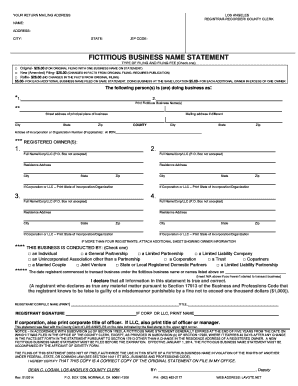
Get Download Application And Instructions For Dba Filing (pdf) 2020-2026
How it works
-

Open form follow the instructions
-

Easily sign the form with your finger
-

Send filled & signed form or save
How to fill out the Download Application And Instructions For DBA Filing (PDF) online
This guide provides clear instructions on how to accurately complete the Download Application And Instructions For DBA Filing (PDF) online. Whether you are a first-time business owner or simply need a refresher, this step-by-step approach will ensure your application is filled out correctly and comprehensively.
Follow the steps to complete your DBA filing application online.
- Click the ‘Get Form’ button to access the application form and open it in your preferred editing tool.
- Enter your return mailing address in the specified fields. Include your name, address, city, state, and zip code.
- Select the type of filing you are submitting by checking the appropriate box. Choose between 'Original,' 'New (Amended) Filing,' or 'Refiling.' Include the necessary filing fee next to your selection.
- List the fictitious business name or names you are registering. You may list more than one business name only if they are operated at the same address and under the same ownership.
- Fill in the street address of the principal place of business. If this address differs from the mailing address, include that information as well.
- Complete the registered owner's section by entering the full name, residence address, and if applicable, the state of incorporation for each owner. Remember to provide information for up to four owners or indicate if there are more by attaching an additional sheet.
- Indicate the type of business entity by checking the appropriate box that reflects the nature of your business operations.
- Insert the date you commenced to transact business under the fictitious business name(s). If you have not yet started, write 'N/A'.
- Sign the form where indicated. Ensure the signature corresponds with the type of registrant (individual, corporation, etc.) and include your title if applicable.
- Review the completed form for accuracy and ensure all required fields are filled. Once satisfied, save your changes, download a copy for your records, and print or share the document as needed.
Complete your DBA filing application online now to ensure your business name is officially registered.
An LLC in New York can have multiple DBAs, allowing you to conduct business under different names. Each DBA must be registered separately with the county clerk. For clarity and ease, you can Download Application And Instructions For DBA Filing (PDF) to ensure you're following the right procedures.