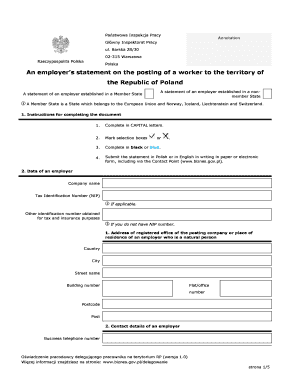
Get An Employer S Statement On The Posting Of A Worker To The ... - Pip Gov 2020-2025
How it works
-

Open form follow the instructions
-

Easily sign the form with your finger
-

Send filled & signed form or save
How to fill out the An Employer S Statement On The Posting Of A Worker To The ... - Pip Gov online
Filling out the An Employer S Statement On The Posting Of A Worker To The ... - Pip Gov is an essential task for employers looking to post workers in Poland. This guide provides clear, step-by-step instructions to assist you in completing the form accurately and efficiently.
Follow the steps to fill out the form correctly.
- Click 'Get Form' button to obtain the form and open it for editing. This action will allow you to access the document necessary for submission.
- Complete the form in capital letters as specified in the instructions. Ensure that you mark all selection boxes where applicable.
- Use a black or blue pen if filling out a paper version or ensure your text color is suitable if filling it out electronically.
- Provide the company name and Tax Identification Number (NIP). If you do not have a NIP number, include any other identification number obtained for taxation and insurance purposes.
- Fill out the address of the registered office of the posting company, including country, city, street name, building number, flat/office number, postcode, and post.
- Input your business telephone number and email address for contact details.
- If your correspondence address is different, complete that section with the same required details.
- In the content section, estimate the number of employees posted, their nature of services, and the proposed start and completion dates for their posting.
- If applicable, provide details about a representative in Poland, including their name, address, and contact information.
- Indicate where documents of posted workers will be stored within Poland.
- Complete information regarding data of any user-employer if the worker is to perform tasks for them.
- If you have appointed a proxy, provide their details including name, address, and contact information.
- Include information about the legal basis for your statement as stated in the required section.
- Attach necessary documents, including data of employees posted and a power of attorney document if a proxy is appointed.
- Fill out the name and date of the person submitting the statement, making sure to sign the form according to the instructions.
- Once all sections are completed, save changes, download, print, or share the form as needed.
Complete your forms online promptly to ensure compliance and a smooth posting process.
The mandate agreement is a formal arrangement outlining the responsibilities and duties of the parties involved in a contract of mandate. It specifies what tasks the mandatary must undertake and any payments due for these services. Having a clear mandate agreement is vital, particularly for organizations to ensure compliance when drafting An Employer's Statement On The Posting Of A Worker To The ... - Pip Gov.
Industry-leading security and compliance
-
In businnes since 199725+ years providing professional legal documents.
-
Accredited businessGuarantees that a business meets BBB accreditation standards in the US and Canada.
-
Secured by BraintreeValidated Level 1 PCI DSS compliant payment gateway that accepts most major credit and debit card brands from across the globe.