Loading
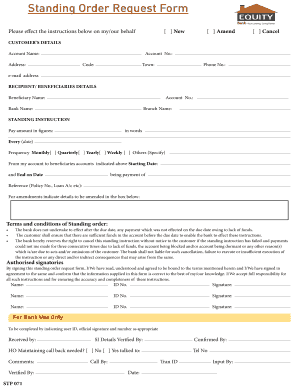
Get Equity Bank Kenya Standing Order Form
How it works
-

Open form follow the instructions
-

Easily sign the form with your finger
-

Send filled & signed form or save
How to use or fill out the Equity Bank Kenya Standing Order Form online
Filling out the Equity Bank Kenya Standing Order Form online is a straightforward process that allows users to set up regular payments easily. This guide provides step-by-step instructions on how to complete the form accurately and effectively.
Follow the steps to complete the standing order form online.
- Click ‘Get Form’ button to obtain the form and open it in the editor.
- Select whether this is a new standing order, an amendment, or a cancellation by marking the appropriate checkbox.
- Fill in the customer’s details. This includes the account name, address, account number, code, town, phone number, and email address.
- Provide the recipient or beneficiary's details by entering their name, account number, bank name, and branch name.
- Specify the standing instruction by entering the amount to be paid in both figures and words, along with the frequency (weekly, monthly, quarterly, yearly) and specify a starting and end date.
- Indicate the purpose of the payment in the 'being payment of' section and provide any reference details if applicable.
- If making amendments, fill in the details to be amended in the provided box.
- Review the terms and conditions of the standing order carefully and ensure you understand them.
- Sign the form by providing names, ID numbers, and signatures of all authorized signatories.
- Finally, save changes, download, print, or share the completed form as necessary.
Complete your documents online now and ensure your standing orders are set up smoothly.
To set up a standing order, you typically need your bank account details, the recipient's account information, and the amount you wish to transfer. Using the Equity Bank Kenya Standing Order Form simplifies this process with clear instructions. It's essential to also verify the frequency of payments, ensuring everything is set up according to your needs.