Open form follow the instructions
Easily sign the form with your finger
Send filled & signed form or save
How to fill out the Get The Sf3108a Form online
Filling out the Get The Sf3108a Form online can streamline the process and reduce paper clutter. This guide provides step-by-step instructions to help you navigate and complete the form efficiently.
Follow the steps to complete the Get The Sf3108a Form online.
- Click ‘Get Form’ button to obtain the form and open it in the editor.
- Begin by filling out your personal information in the designated fields, including your full name, contact information, and any relevant identification numbers. Ensure that all entries are accurate and up-to-date.
- Next, proceed to the section where you need to provide employment history. Include all relevant positions held, along with dates of employment. Be clear and concise in your descriptions.
- Continue to the section requesting details about your current benefits or entitlements. Review this section carefully, as it requires specific information that may need cross-referencing with your financial documents.
- Once you have completed all required sections, take a moment to review the entire form for any errors or omissions. It is essential to ensure that all information is correctly represented.
- Finally, after confirming everything is accurate, you can save the changes, download the completed form, print it, or share it as needed.
Start completing your Get The Sf3108a Form online today for a hassle-free experience.
Experience a faster way to fill out and sign forms on the web. Access the most extensive library of templates available.
Related content
Aug 17, 2017 — Information. Form Number: SF3108; Current Revision Date: 06/2013;...
Get answers to your most pressing questions about US Legal Forms API.
Are you filing a form 5500-EZ 5500-SF as a 1 participant plan?
Typically, if you are filing as a one-participant plan, you would use Form 5500-EZ rather than Form 5500-SF. This distinction is important to ensure proper compliance with reporting requirements. You should assess your plan's design to ensure you are filing the correct form. For assistance with this and to find resources like the SF3108a form, consider using uslegalforms for clear guidelines and helpful tools.
What is the difference between form 5500 and 5500-SF?
Form 5500 is for larger plans, while Form 5500-SF is a streamlined version for small plans with fewer than 100 participants. Understanding this difference is crucial for compliance and helps streamline your reporting responsibilities. The form you need is determined by your plan's size and type. If you're looking for more information or resources, you can visit uslegalforms to find out how to get the SF3108a form and other relevant documents.
Who must file form 5500-SF for health insurance?
Employers that offer health insurance and cover fewer than 100 participants must file Form 5500-SF. It's essential to understand the reporting requirements to remain compliant with federal regulations. By reviewing the guidelines, you can ensure that you are meeting your obligations. For further assistance, consider exploring uslegalforms to find out more about the filing process.
How to file Form 5500 SF?
To file Form 5500 SF, you must complete the document and submit it through the specified government portal. Make sure to gather all necessary information and documentation before you start. If you need help with this process, resources available at uslegalforms can provide templates and guidance. They can also help you understand how to get the SF3108a form if needed.
What is an SF 3100 form?
The SF 3100 form is used for designating beneficiaries under federal employee retirement plans. This document is crucial because it helps ensure your benefits go to the right individuals upon your passing. Understanding how to fill out this form correctly can ease the administration of your estate. For your convenience, you can find resources to help you get the SF3108a form on platforms like uslegalforms.
Can I file form 5500 myself?
Yes, you can file Form 5500 yourself. However, it involves specific guidelines and requirements that you need to understand thoroughly. To simplify the process, consider using resources such as uslegalforms, where you can find helpful instructions and receive guidance as you prepare to file your document. By doing this, you can ensure that you are effectively submitting the correct information.
How do I buy back military time for federal retirement?
Creditable Military Service Buy-Back for FERS Federal employees who are veterans can receive retirement credit for military service once they make a deposit into a civilian annuity covering their military service. The deposit will be processed through your agency's Personnel or Human Resources Office.
What is the catch 62 military buy back?
This is often referred to as “Catch 62.” The reduction to your CSRS annuity is 2% for each year of military service. For example, if you have 4 years of military service, when you reach age 62 your CSRS annuity will be reduced by 8%.
What form do I need to buy back military time?
The first step is generally to fill out Form RI 20-97 which you will send to the appropriate military branch. This is done to get an official record of your military time and earnings. That official record is used by your HR to give an estimate of what it will cost to buy back your time.
What is a SF 3108?
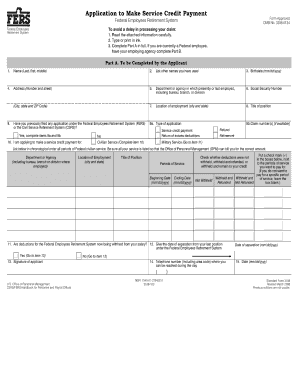
SF 3108. Application to Make Service Credit Payment (Federal Employees Retirement System) SF 3109. Election of Coverage (Federal Employees Retirement System)
Use professional pre-built templates to fill in and sign documents online faster. Get access to thousands of forms.
If you believe that this page should be taken down, please follow our DMCA take down process here.