Loading
Form preview
  • US Legal Forms
  • Form Library
  • More Forms
  • More Uncategorized Forms
  • High School Resume Builder

Get High School Resume Builder

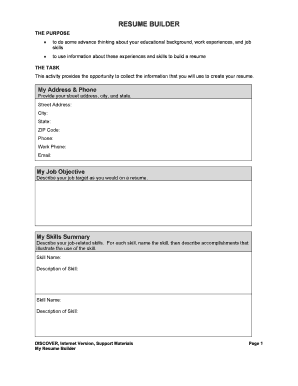
RESUME BUILDER THE PURPOSE to do some advance thinking about your educational background, work experiences, and job skills to use information about these experiences and skills to build a resume THE.

How it works

  1. Open form

    Open form follow the instructions

  2. Easily sign form

    Easily sign the form with your finger

  3. Share form

    Send filled & signed form or save

How to fill out the High School Resume Builder online

Creating a resume can be a pivotal step in your career journey, especially for high school students preparing to enter the workforce. This guide will walk you through the essential components of the High School Resume Builder to help you compile a comprehensive and effective resume.

Follow the steps to successfully fill out your resume builder.

  1. Click ‘Get Form’ button to access the High School Resume Builder form in an online format.
  2. In the 'My Address & Phone' section, enter your street address, city, state, ZIP code, phone number, and email address. Ensure all information is accurate and up-to-date.
  3. In the 'My Job Objective' field, clearly describe your job target as you would on a formal resume. This will guide the information you provide later.
  4. For 'My Skills Summary,' list relevant job-related skills. For each skill, include a brief description that highlights your accomplishments related to that skill.
  5. In 'My Educational History', provide the name of your high school, the expected graduation year, and your current GPA. If you have attended other educational institutions, include those as well.
  6. Under 'My Relevant Coursework', list any courses you have completed that relate to your job objective.
  7. In the 'My Work Experience' section, detail your job title, the company where you worked, its location, the start and end dates of your employment, and a brief description of your duties.
  8. List any special qualifications you may have in the 'My Special Qualifications' section, such as certificates or licenses relevant to your job target.
  9. In 'My Community Service,' document any volunteer work you have done, including the organization, your role, and the duration of your involvement.
  10. For 'My Extra-Curricular Activities,' record the activities, your role, and the corresponding dates.
  11. In 'My Awards or Honors', list any awards you have received, along with the organization and date.
  12. Finally, in 'My References', include the names and contact information of individuals who can speak to your abilities and character.
  13. Once you have filled out all sections, review your resume for accuracy and completeness. Save changes, and once satisfied, download or print your resume for future use.

Start building your professional future by completing your resume online today!

Get form

Experience a faster way to fill out and sign forms on the web. Access the most extensive library of templates available.
Get form

Related content

RESUME WORKSHEET
Complete each section as you want this information to appear on your resume itself. Be...
Learn more
CREATE A STRONG RESUME – Harvard FAS
A resume is a concise, informative summary of your abilities, education, and experience...
Learn more
Crafting your Resume
Jul 28, 2023 — It's time to create a resume! The following provides recommendations on...
Learn more

Related links form

Academy Of Dental Learning Form 570 - Baldwin Filters Form 4005 - Baldwin Filters Idea Submission Form - Stampede Innovation Committee

Questions & Answers

Get answers to your most pressing questions about US Legal Forms API.

Contact support

Writing a resume in high school involves gathering your academic details, experiences, and skills. Be honest and highlight your achievements, such as GPA or awards. A High School Resume Builder can simplify this process by offering templates and guidance, making it easier to create a polished document.

To create a resume for a 16-year-old, include pertinent education details, any part-time jobs or internships, and extracurricular activities. Emphasize skills and accomplishments that stand out, even if they are non-traditional. A High School Resume Builder can provide templates to help structure this information effectively.

To create a resume for a high school student without work experience, emphasize academic achievements, skills, and any community service or club participation. You can also include personal projects or hobbies that showcase your strengths. A High School Resume Builder can assist you in highlighting these aspects effectively.

To build a high school resume, start by collecting your basic information, including contact details and education. Next, include any relevant experiences, such as part-time jobs, internships, or volunteer work. Use a High School Resume Builder to help format your resume neatly and professionally.

When listing skills on a high school resume, group them into relevant categories such as 'Technical Skills,' 'Soft Skills,' and 'Leadership Skills.' Be clear and specific, and include any skills relevant to the jobs or activities you want to pursue. A High School Resume Builder can guide you in formatting this section effectively.

A 14-year-old can still create a substantial resume, even without traditional job experience. Focus on including volunteer work, school projects, and any extracurricular activities. Highlight skills such as teamwork, communication, and reliability. Using a High School Resume Builder can help in organizing this information neatly.

Zety's resume builder aims for ATS compatibility, but users should still validate that their final version meets ATS requirements. A high school resume builder like US Legal Forms may provide additional guidance and templates specifically crafted for this purpose. This way, you can ensure your resume makes a strong impression.

The best ATS-friendly resume format is a simple layout that utilizes a chronological or functional structure. Your high school resume builder should help you avoid complex elements that might confuse an ATS. Aim for clear sections, bullet points for easy reading, and ensure to use standard fonts.

Zety offers templates that aim for ATS compatibility, but it's essential to verify each template's formatting. You can use a high school resume builder like US Legal Forms that explicitly focuses on ATS-friendly designs. This will give you confidence that your resume can easily pass through ATS systems.

To check if your resume is ATS-friendly, run it through an online ATS checker or use simple formatting. Look for common elements such as proper headings, standard fonts, and a lack of images or graphics. A high school resume builder often has features to ensure you meet these criteria before submitting your application.

Get This Form Now!

Use professional pre-built templates to fill in and sign documents online faster. Get access to thousands of forms.
Get form
If you believe that this page should be taken down, please follow our DMCA take down processhere.

Industry-leading security and compliance

US Legal Forms protects your data by complying with industry-specific security standards.
  • In businnes since 1997
    25+ years providing professional legal documents.
  • Accredited business
    Guarantees that a business meets BBB accreditation standards in the US and Canada.
  • Secured by Braintree
    Validated Level 1 PCI DSS compliant payment gateway that accepts most major credit and debit card brands from across the globe.
Get High School Resume Builder
Get form
Form Packages
Adoption
Bankruptcy
Contractors
Divorce
Home Sales
Employment
Identity Theft
Incorporation
Landlord Tenant
Living Trust
Name Change
Personal Planning
Small Business
Wills & Estates
Packages A-Z
Form Categories
Affidavits
Bankruptcy
Bill of Sale
Corporate - LLC
Divorce
Employment
Identity Theft
Internet Technology
Landlord Tenant
Living Wills
Name Change
Power of Attorney
Real Estate
Small Estates
Wills
All Forms
Forms A-Z
Form Library
Customer Service
Your Privacy Choices
Terms of Service
Privacy Notice
Legal Hub
Content Takedown Policy
Bug Bounty Program
About Us
Help Portal
Legal Resources
Blog
Affiliates
Contact Us
Delete My Account
Site Map
Industries
Forms in Spanish
Localized Forms
State-specific Forms
Forms Kit
Legal Guides
Real Estate Handbook
All Guides
Prepared for You
Notarize
Incorporation services
Our Customers
For Consumers
For Small Business
For Attorneys
Our Sites
US Legal Forms
USLegal
FormsPass
pdfFiller
signNow
altaFlow
DocHub
Instapage
Social Media
Call us now toll free:
+1 833 426 79 33
As seen in:
  • USA Today logo picture
  • CBC News logo picture
  • LA Times logo picture
  • The Washington Post logo picture
  • AP logo picture
  • Forbes logo picture
© Copyright 1997-2026
airSlate Legal Forms, Inc.
3720 Flowood Dr, Flowood, Mississippi 39232
Form Packages
Adoption
Bankruptcy
Contractors
Divorce
Home Sales
Employment
Identity Theft
Incorporation
Landlord Tenant
Living Trust
Name Change
Personal Planning
Small Business
Wills & Estates
Packages A-Z
Form Categories
Affidavits
Bankruptcy
Bill of Sale
Corporate - LLC
Divorce
Employment
Identity Theft
Internet Technology
Landlord Tenant
Living Wills
Name Change
Power of Attorney
Real Estate
Small Estates
Wills
All Forms
Forms A-Z
Form Library
Customer Service
Your Privacy Choices
Terms of Service
Privacy Notice
Legal Hub
Content Takedown Policy
Bug Bounty Program
About Us
Help Portal
Legal Resources
Blog
Affiliates
Contact Us
Delete My Account
Site Map
Industries
Forms in Spanish
Localized Forms
State-specific Forms
Forms Kit
Legal Guides
Real Estate Handbook
All Guides
Prepared for You
Notarize
Incorporation services
Our Customers
For Consumers
For Small Business
For Attorneys
Our Sites
US Legal Forms
USLegal
FormsPass
pdfFiller
signNow
altaFlow
DocHub
Instapage
Social Media
Call us now toll free:
+1 833 426 79 33
As seen in:
  • USA Today logo picture
  • CBC News logo picture
  • LA Times logo picture
  • The Washington Post logo picture
  • AP logo picture
  • Forbes logo picture
© Copyright 1997-2026
airSlate Legal Forms, Inc.
3720 Flowood Dr, Flowood, Mississippi 39232