Loading
Open form follow the instructions
Easily sign the form with your finger
Send filled & signed form or save
How to fill out the North Dakota Tax Refund online
This guide provides comprehensive instructions for filling out the North Dakota Tax Refund application online. Designed for ease of use, it ensures that individuals have the necessary information to complete their refund requests accurately.
Follow the steps to effectively complete your tax refund form.
- Click ‘Get Form’ button to access the North Dakota Tax Refund document and open it for editing.
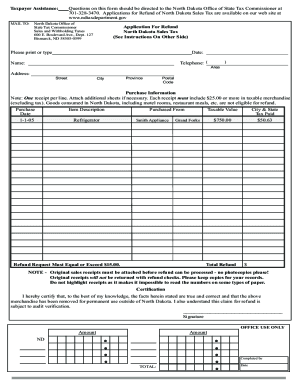
- Begin by entering the date of your purchase in the designated field of the form.
- In the name field, provide your full name as it appears on your identification or official documents.
- Fill in your telephone number, including the area code, to allow for communication if necessary.
- Complete your address by providing the street, city, province, and postal code information in the respective fields.
- For the purchase information section, record each taxable item on a separate line. Ensure that the total for taxable items exceeds $25.00 and describe each item purchased.
- Document the name of the vendor from whom the item was purchased in the corresponding section.
- List the taxable value of each item along with the tax paid in the provided fields.
- Calculate the total refund amount, ensuring it equals or exceeds $15.00, and write that figure in the designated spot.
- Attach original sales receipts to your application, ensuring they are not highlighted as this can obscure important information.
- Sign the certification section affirming the truthfulness of your claim and understanding of the process.
- After ensuring all information is complete and accurate, save your changes, download, print, or share the document as needed.
Complete your North Dakota Tax Refund application online for a smooth and efficient claims process.
Experience a faster way to fill out and sign forms on the web. Access the most extensive library of templates available.
Related content
Use Where's My Refund to check the status of your North Dakota Individual Income Tax...
The renter is entitled to a $360 refund. Homeowners must apply for a property tax credit...
Feb 1, 2018 — If you do not file electronically, file Form 7004 with the Internal...
Get answers to your most pressing questions about US Legal Forms API.
What is the easiest way to fill out tax return?
The easiest way to fill out your tax return for a North Dakota Tax Refund is to use reliable tax software or online forms available at uslegalforms. These tools offer step-by-step guidance and can help minimize errors. By following the prompts, you can complete your tax return efficiently and confidently.
How do I fill out where's my refund?
To fill out the 'Where's My Refund' section, visit the North Dakota Office of State Tax Commissioner's website. Enter your Social Security number, filing status, and the exact refund amount requested. This simple process will provide you with the latest update on your North Dakota Tax Refund status.
What day of the week does MN deposit tax refunds?
While this question pertains primarily to Minnesota, it is important to note that North Dakota Tax Refunds do not follow the same schedule. Refunds are typically processed on business days, and you can generally expect updates based on your filing method. Tracking your refund status regularly through reputable tax services can keep you informed.
Why is my refund delayed?
Your North Dakota Tax Refund may be delayed due to multiple factors, such as incomplete information or discrepancies with your tax details. Additionally, processing times can increase during peak tax seasons. If you have concerns about your refund status, visiting uslegalforms can help you find answers and rectify any issues efficiently.
How long does it take to get your tax refund in North Dakota?
Typically, if you file your tax return electronically, you can expect your North Dakota Tax Refund in about 7 to 14 days. Paper returns generally take longer, often up to eight weeks. To expedite the process, ensure all information is accurate and consider electronic filing through uslegalforms for faster results.
How much does North Dakota take out for taxes?
North Dakota's state income tax rates range from 1.1% to 2.9%, depending on your income level. Additionally, there may be other deductions that apply to your situation. Knowing these rates helps when estimating your North Dakota Tax Refund, and using our platform can provide tailored tax calculations.
How do I track my tax refund in North Dakota?
You can track your North Dakota Tax Refund online through the North Dakota Office of State Tax Commissioner’s website. Simply enter your details in the provided tracking section to view the status of your refund. If you're looking for detailed tracking features, consider using uslegalforms for updated information and guidance.
How do I fill out my tax details?
To fill out your tax details for the North Dakota Tax Refund, gather all necessary documents, such as your W-2s and 1099s. You can use tax software or visit uslegalforms for a straightforward form that guides you through the process. Ensure all information is accurate to avoid delays in receiving your refund.
Does North Dakota tax non-residents?
Yes, North Dakota does tax non-residents on income earned within the state. This includes wages from jobs or income generated from investments in the state. It’s essential to be aware of how this may impact your overall tax situation and potential North Dakota Tax Refund.
Can Canadians get sales tax back from North Dakota?
Yes, Canadians who make purchases in North Dakota may be eligible to get sales tax back on certain items. The process usually requires proof of exportation and specific forms to complete. If you want to navigate this efficiently, uslegalforms offers helpful tools to guide you through the necessary steps.
Use professional pre-built templates to fill in and sign documents online faster. Get access to thousands of forms.
If you believe that this page should be taken down, please follow our DMCA take down process here.