Loading
Get Citibank Rca Account Opening
How it works
-

Open form follow the instructions
-

Easily sign the form with your finger
-

Send filled & signed form or save
How to fill out the Citibank RCA Account Opening online
This guide provides clear, step-by-step instructions for filling out the Citibank RCA Account Opening form online. Whether you are a first-time user or familiar with digital banking, this resource aims to support you through the process.
Follow the steps to successfully complete your account opening application.
- Click ‘Get Form’ button to acquire the account opening form and access it for completion.
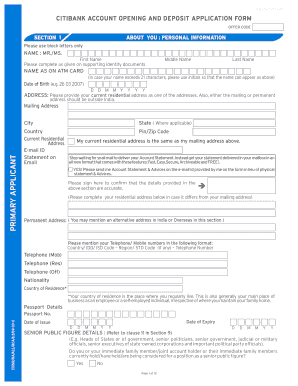
- In Section 1, enter your personal information using block letters. Fill in your first, middle, and last names as they appear on your official identification documents.
- Provide your date of birth in the format DD-MM-YYYY and your current residential address. Ensure one of your addresses is located outside of India.
- Select if your current residential address is the same as your mailing address, and fill in your email address for account statement delivery preferences.
- Complete your permanent address if it differs from your mailing address. Provide your telephone/mobile numbers using the specified format.
- Detail your nationality and country of residence, defined as the country where you regularly live or work.
- Provide your passport details, including passport number, date of issue, and date of expiry.
- If applicable, answer the Senior Public Figure question regarding yourself or immediate family members.
- In Section 2, indicate your employment status. Select your profession from the main and sub-categories. Fill in the relevant information about your employment details.
- Move to Section 3 for the joint applicant's personal information. Repeat the process of providing names, contact information, and employment details as outlined previously.
- Complete the sections for U.S. persons if applicable in Section 5.
- Specify your preferred city and branch for account opening in Section 6. Choose your account category from the options provided.
- In Section 7, outline the expected usage of your account, including transaction types and anticipated amounts for deposits and withdrawals.
- Fill in nomination details in Section 8 to designate a nominee for your account, if desired.
- Carefully read through the declarations in Section 9 and sign where indicated, confirming that all information provided is accurate.
- Finally, review the entire document for completeness, save any changes, and proceed to submit or print the form as required.
Complete your Citibank RCA Account Opening form online today and begin managing your finances efficiently.
Yes, you can open a joint account with Citibank, whether online or in person. You and the other account holder need to provide relevant information and identification to facilitate the process. This collective partnership makes your Citibank Rca Account Opening experience both simple and efficient.