Loading
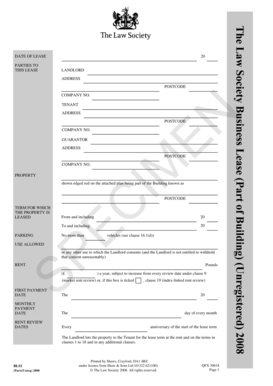
Get 20 Parties To This Lease Address Postcode ... - Prolog 2020-2026
How it works
-

Open form follow the instructions
-

Easily sign the form with your finger
-

Send filled & signed form or save
How to fill out the 20 PARTIES TO THIS LEASE ADDRESS POSTCODE ... - Prolog online
This guide provides clear and easy-to-follow instructions for filling out the 20 PARTIES TO THIS LEASE ADDRESS POSTCODE ... - Prolog online. Whether you are a first-time user or someone familiar with lease agreements, this guide will assist you in completing the document accurately.
Follow the steps to successfully complete your lease form.
- Press the ‘Get Form’ button to access the form and open it in the document editor.
- Fill in the date of lease at the top of the form, ensuring it reflects the actual date of agreement.
- In the 'Parties to this lease' section, clearly enter the full name of the landlord. Include their address and postcode as well.
- Next, provide the name, address, and postcode of the tenant. If applicable, include any registration or company number.
- If there is a guarantor, complete the relevant fields with their details, ensuring to include their address and postcode.
- Specify the property being leased, as well as its address and postcode. Ensure this matches any legal descriptions attached.
- Enter the term for which the property is leased, indicating the start and end dates clearly.
- Detail the parking provisions if applicable, including the maximum number of vehicles allowed.
- Indicate the use allowed for the property, ensuring it is compliant with any specific clauses mentioned.
- Complete the rent section, detailing the annual rent and any provisions for increases or reviews.
- Specify the first payment date, monthly payment date, and any rent review dates as outlined in the document.
- Review all entries for accuracy before saving your changes. You can download, print, or share the form as needed.
Complete your lease document online today for a seamless experience.