Open form follow the instructions
Easily sign the form with your finger
Send filled & signed form or save
How to fill out the Navpers 1306 93 online
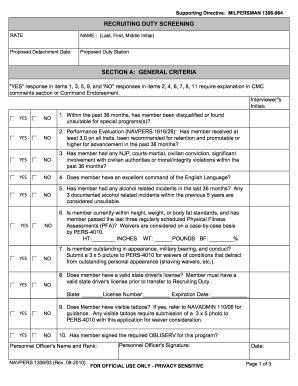
The Navpers 1306 93 is an important form used for recruiting duty screening in the U.S. Navy. This guide provides a step-by-step approach to filling out the form online accurately and efficiently, ensuring that all necessary information is provided for review.
Follow the steps to complete the Navpers 1306 93 online
- Click ‘Get Form’ button to obtain the form and open it in the editor.
- Enter the user's name in the format 'Last, First, Middle Initial' for proper identification.
- Specify the proposed detachment date and duty station clearly to avoid any miscommunication.
- In Section A, respond to each criterion with 'YES' or 'NO' as applicable. Note that any 'YES' in items 1, 3, 5, and 'NO' in items 2, 4, 6, 7, 8, 11 require further explanation in the comments section.
- If applicable, provide the required comments in the comments section based on the responses in Section A.
- In Section B, confirm the completion of medical and dental screenings by responding 'YES' or 'NO' as applicable and providing the required signatures from medical personnel.
- For Section C, ensure the member has been interviewed by the Command Financial Specialist and provide their details if required.
- In Section D, the Command Master Chief needs to assess the suitability of the member for recruiting duty. Initials and signatures must be completed.
- In Section E, obtain the necessary endorsements from the Commanding Officer, ensuring they assess and certify the suitability of the member for recruiting duty.
- After filling out all sections, review the form for accuracy. Once confirmed, save the changes, and proceed to download, print, or share the completed form as necessary.
Complete the Navpers 1306 93 form online today for a smooth application process.
Experience a faster way to fill out and sign forms on the web. Access the most extensive library of templates available.
Related content
Jul 13, 2018 — The Official Military Personnel File (OMPF) is primarily an...
Sep 17, 2007 — NAVPERSCOM (PERS-93). Requests for "successful competition" or...
Get answers to your most pressing questions about US Legal Forms API.
What is Navpers 1306?
Navpers 1306 is a form used for requesting administrative changes and actions within the Navy. This form is crucial for personnel wishing to make specific requests regarding their service. To understand how to fill out this form effectively and its relation to Navpers 1306 93, check resources available at US Legal Forms.
Where can I find Navy bibliographies?
Navy bibliographies can be accessed through educational military resources and official Navy sites. These references provide essential information on policies, programs, and regulations. To find comprehensive information related to forms, including the Navpers 1306 93, consider utilizing US Legal Forms for your research.
Where can I download Navpers 1070 602?
You can download Navpers 1070 602 from official Navy websites or through authorized military document services. This form deals with specific administrative actions and requirements. For quick access to not only this form but others like the Navpers 1306 93, visit US Legal Forms.
What is Navpers 1070 613 used for?
Navpers 1070 613 is used for documenting performance evaluations in the Navy. This form plays a vital role in assessing a service member’s qualifications and readiness. Familiarizing yourself with this form can be beneficial, especially when preparing documentation related to the Navpers 1306 93.
Where can I find military forms?
Military forms are available on various military service websites and administrative offices. These forms serve numerous purposes, from reporting to requests. To simplify your search for military forms, including the Navpers 1306 93 and others, visit US Legal Forms.
Where can I get Navy forms?
Navy forms can be obtained from Navy websites and local administrative offices. You can also find them through military installations across the country. If you want an organized database of all Navy forms, including those relevant to the Navpers 1306 93, check out US Legal Forms.
What is navpers 1300 16?
Navpers 1300 16 is a form used for transferring personnel within the Navy. This document streamlines the process of posting staff to new assignments. When you prepare for a transfer process, be aware of how the Navpers 1300 16 functions alongside the Navpers 1306 93.
Where can I find navres forms?
You can find Navres forms on the Navy Reserve Force website or through official Navy portals. These forms play a critical role in maintaining accurate records for reservists. For easy access to these forms, visit US Legal Forms, where various forms, including those related to Navpers 1306 93, are available.
What is the Navpers 1306 92 special program?
The Navpers 1306 92 special program supports the administrative needs of Navy personnel, focusing on special requests and applications. This program enhances the overall process of handling Navy personnel actions. If you’re looking for guidance on these procedures, consider reviewing resources available at US Legal Forms.
What is Navpers 1336 3?
Navpers 1336 3 is a form used for specific personnel actions within the Navy. It involves circumstances such as duty assignments and educational programs. Understanding the purpose of this form can help you navigate administrative tasks effectively, particularly when related to the Navpers 1306 93.
Use professional pre-built templates to fill in and sign documents online faster. Get access to thousands of forms.
If you believe that this page should be taken down, please follow our DMCA take down process here.