Loading

Open form follow the instructions

Easily sign the form with your finger

Send filled & signed form or save
How to fill out the Alexander Forbes Surplus online
This guide provides clear instructions for filling out the Alexander Forbes Surplus application form online. By following these steps, users can ensure that their information is submitted accurately and efficiently.
Follow the steps to complete the application form smoothly.
- Press the ‘Get Form’ button to access the Alexander Forbes Surplus application form and open it in the document management interface.
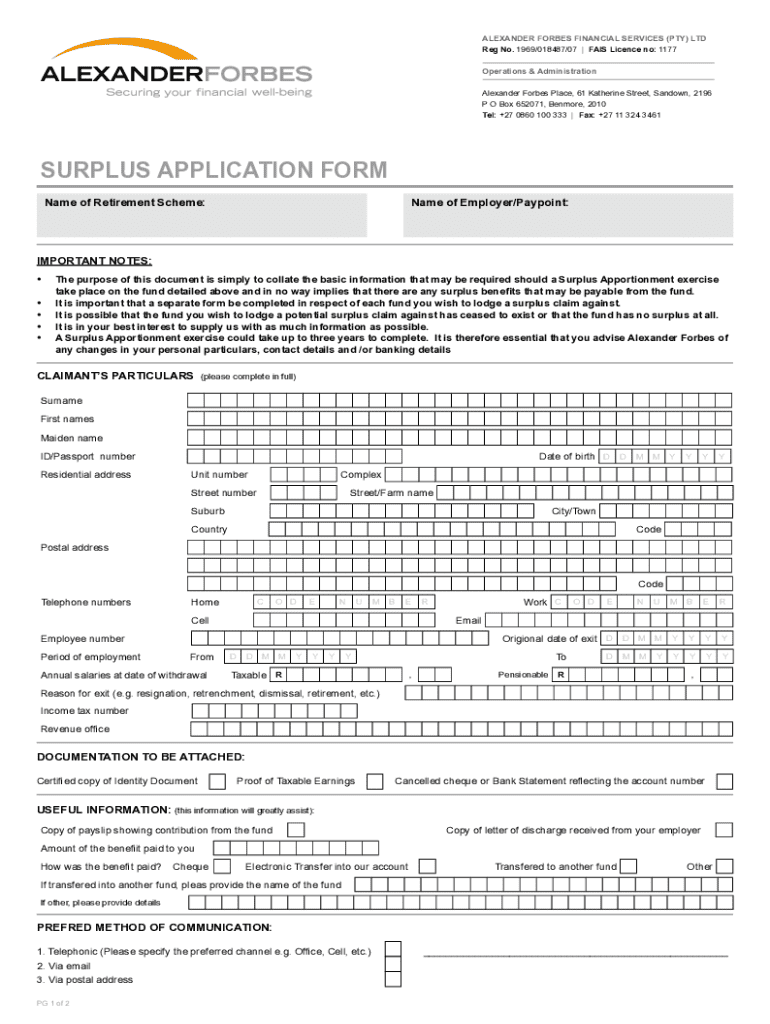
- Begin by filling in the claimant's particulars. This includes providing the surname, first names, and maiden name, along with the ID or passport number. Ensure accuracy in the residential address and contact information.
- Input the date of birth using the specified format (DD/MM/YYYY) and provide details such as unit number, street number, and suburb within the residential address section.
- Complete the section regarding employment details, including the employee number, period of employment, original date of exit, and annual salaries as of the withdrawal date.
- Indicate the reason for exit from employment (e.g., resignation, retrenchment) and provide the income tax number and revenue office details.
- Attach the required documentation, including a certified copy of the ID, proof of taxable earnings, and a cancelled cheque or bank statement showing the account number.
- Fill in the payment instructions section accurately. Specify the account holder's name, account number, branch code, and type of account (current or savings).
- Complete the relevant section if the benefit is to be transferred to another fund, ensuring all applicable details are provided.
- Review all entered information for accuracy. Once everything is filled out correctly, save the changes, and choose to download, print, or share the form as needed.
Complete your Alexander Forbes Surplus application online today to ensure your submission is processed correctly.
Experience a faster way to fill out and sign forms on the web. Access the most extensive library of templates available.
Related content
The employer surplus was initially valued at US$3,150,000 based on the quoted market...
A trustee of the Institution, Alexander Forbes, had recently bought a schooner named...
In May 2007, Forbes listed Duke Energy CEO Jim Rogers as receiving $10.2 million in total...
Get answers to your most pressing questions about US Legal Forms API.
Does Alexander Forbes still exist?
Yes, Alexander Forbes continues to operate and remains a significant player in the financial services sector. The firm has adapted over the years and continues to evolve to meet the needs of its clients. Engaging with Alexander Forbes Surplus remains a beneficial option for those looking to enhance their financial strategies and enjoy the expertise of a reputable firm.
How do I check my Alexander Forbes?
Checking your Alexander Forbes account is easy and can be done online or via the mobile app. Simply enter your login details, and you will have access to your financial portfolio, including contributions, returns, and the Alexander Forbes Surplus available to you. If you encounter any issues, customer service is ready to assist, ensuring you stay informed about your financial status.
How to check balance on Alexander Forbes?
To check your balance on Alexander Forbes, you can log into your account on the official website or mobile app. The platform offers straightforward navigation to access your account details and balances. For those who prefer direct assistance, contacting customer support can also provide a quick overview of your holdings. Keeping tabs on your Alexander Forbes Surplus ensures that you are on track with your financial objectives.
Can I withdraw funds from Alexander Forbes?
You can withdraw funds from Alexander Forbes, but the process may vary depending on the type of account you hold. Generally, individuals can access their funds upon meeting specific criteria set by their plans. To understand the withdrawal mechanisms in detail, exploring Alexander Forbes Surplus options might provide clarity, ensuring that you make informed financial decisions.
Is Alex Forbes the same as Alexander Forbes?
Yes, Alex Forbes and Alexander Forbes refer to the same entity, just with a variation in naming. This brand is well-known for its expertise in financial services, including retirement and investment solutions. So, if you're seeking information or services under Alex Forbes, know that you are engaging with the same trusted name behind Alexander Forbes Surplus. Both terms maintain the same reputation and commitment to your financial growth.
What companies are under Alexander Forbes?
Alexander Forbes has a diversified portfolio that includes several companies focused on financial services. These typically cover areas like employee benefits, investment management, and insurance services. Each branch aims to provide comprehensive solutions to clients, ensuring a cohesive strategy for better financial health. Whether you require advice on retirement plans or investment options, Alexander Forbes Surplus aligns with your financial goals.
What is the Whatsapp number for Alexander Forbes provident fund?
You can easily reach the Alexander Forbes provident fund team through their WhatsApp number, which is available on their official website. This provides a convenient channel for any inquiries or assistance you may need regarding your Alexander Forbes Surplus. Connecting via WhatsApp can help to quickly resolve your questions about your provident fund.
How to check provident fund balance Alexander Forbes?
To check your provident fund balance with Alexander Forbes, you should log in to your online account through their website. Look for the ‘Provident Fund’ tab, which will provide you detailed information about your balance. This will help you keep track of your Alexander Forbes Surplus and make informed financial decisions.
What is the difference between vested and non vested Alexander Forbes?
In the context of Alexander Forbes, vested benefits are those that you own and cannot lose, typically after a specified period of employment. Non-vested benefits, on the other hand, are those that you do not yet fully own, often depending on your length of service with your employer. Understanding these differences is vital for managing your Alexander Forbes Surplus effectively and planning for your financial future.
How to check balance on alexforbes?
To check your balance on Alexander Forbes, visit their official website and log into your account. Once you are logged in, navigate to the section labeled ‘My Investments’ or ‘Account Overview.’ Here, you will find the details of your Alexander Forbes Surplus balance, along with any other pertinent account information.
Use professional pre-built templates to fill in and sign documents online faster. Get access to thousands of forms.
If you believe that this page should be taken down, please follow our DMCA take down process here.