Loading
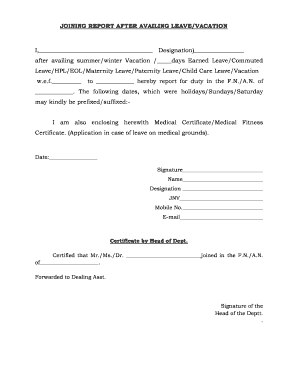
Get Joining Letter After Leave
How it works
-

Open form follow the instructions
-

Easily sign the form with your finger
-

Send filled & signed form or save
How to fill out the Joining Letter After Leave online
This guide provides clear and concise instructions on how to complete the Joining Letter After Leave online. By following these steps, users can ensure they submit the necessary documentation accurately and promptly.
Follow the steps to fill out the Joining Letter After Leave online seamlessly.
- Click ‘Get Form’ button to obtain the form and open it in the editor.
- Begin by entering your name in the designated field, ensuring you provide your full name as you wish it to appear.
- In the 'Designation' field, specify your job title or position within the organization.
- Indicate the type of leave you availed by checking the corresponding box (e.g., summer/winter vacation, earned leave, commuted leave, etc.).
- Fill in the dates of leave, indicating the start and end date in the designated spaces.
- Clearly state the specific date you are reporting back for duty in the 'F.N./A.N.' section.
- If applicable, list any holidays, Sundays, or Saturdays that should be included in your leave record.
- Upload any required certificates, such as a medical certificate, if your leave was for medical reasons. Make sure to attach these documents where indicated.
- Sign the document in the signature field and then enter the date of completion.
- Lastly, provide additional information such as your mobile number and email address for contact purposes.
- After filling out all the required sections, review your information for accuracy before saving your changes, downloading, printing, or sharing the form as needed.
Complete your Joining Letter After Leave online today to ensure a smooth transition back to work.
When emailing about your return after vacation, start with a friendly opening. Clearly state your intention to rejoin, mention your vacation dates, and specify your return date. It’s beneficial to express your excitement about reconnecting with colleagues and contributing again. This sets a positive tone for your reintegration.