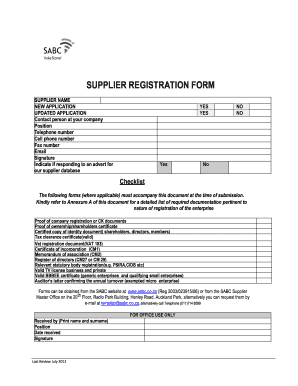
Get Sasol Supplier Database Registration
How it works
-

Open form follow the instructions
-

Easily sign the form with your finger
-

Send filled & signed form or save
How to fill out the Sasol Supplier Database Registration online
Completing the Sasol Supplier Database Registration is a crucial step for suppliers looking to partner with Sasol. This guide provides a clear and easy-to-follow framework for successfully filling out the registration form online.
Follow the steps to complete your registration efficiently.
- Press the ‘Get Form’ button to access the registration form and open it in your editor.
- Fill in the supplier name at the top of the form. Indicate whether this is a new application or an updated application by selecting the appropriate option.
- Provide the contact person’s details including their position, telephone number, cell phone number, fax number, and email address.
- Sign the form and indicate if you are responding to an advertisement for the supplier database by selecting 'Yes' or 'No'.
- Review the checklist section to ensure all required documentation is available for submission. Reference Annexure A for a detailed list of required documents tailored to your enterprise type.
- Complete the company details section, including legal name, trading name, company type, registration number, tax reference number, and any relevant insurance details.
- Detail ownership information by providing the required details for each owner up to three. Attach additional pages if there are more than three owners.
- Fill out the company contact details accurately, including contact person for requests for quotes (RFQ) and remittances, along with relevant phone numbers and email addresses.
- Indicate the commodities or type of service your company provides, including areas of delivery and main products or services.
- Complete the banking details section with the original bank letter as proof, ensuring your bank stamp or accompanying letter is dated within the month of registration.
- Fill out the broad-based black economic empowerment (BEE) information, including turnover and number of employees, and attach the relevant certificate issued by a SANAS approved institution.
- Review the terms and conditions, sign the declaration of interest, and confirm your understanding of the application contents.
- Before submitting, double-check that all required sections are completed, that the form is signed and dated, and ensure all documentation is attached.
- Submit the completed registration form and accompanying documents as instructed, and keep copies of everything for your records.
Ready to get started? Complete your Sasol Supplier Database Registration online today!
Sasol linkage refers to the connection between suppliers and Sasol's procurement systems. This linkage facilitates smoother interactions and ensures that vendors can efficiently participate in the Sasol Supplier Database Registration. By establishing this connection, suppliers gain access to various opportunities, enhancing their chances of securing contracts within Sasol's ecosystem. This is a vital step for vendors looking to collaborate with Sasol.
Industry-leading security and compliance
-
In businnes since 199725+ years providing professional legal documents.
-
Accredited businessGuarantees that a business meets BBB accreditation standards in the US and Canada.
-
Secured by BraintreeValidated Level 1 PCI DSS compliant payment gateway that accepts most major credit and debit card brands from across the globe.