Loading
Get Work History Form
How it works
-

Open form follow the instructions
-

Easily sign the form with your finger
-

Send filled & signed form or save
How to fill out the Work History Form online
The Work History Form is an essential document that captures your employment details for reference in various applications. This guide will provide clear and supportive instructions for completing the form accurately when filling it out online.
Follow the steps to complete your Work History Form online.
- Click ‘Get Form’ button to access the form and open it in your preferred editor.
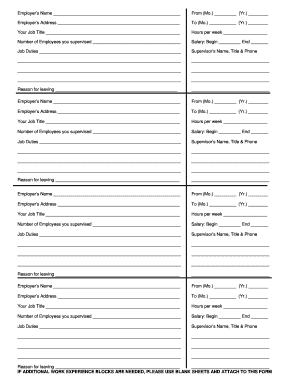
- Begin by filling in the employer's name in the designated field. This section should include the full name of the company or organization where you worked.
- Enter the employment start date by specifying the month and year. Ensure that the format is consistent with the instructions provided on the form.
- Provide the employer's address in the corresponding field. Include the full street address, city, state, and zip code.
- Fill in the employment end date in the designated area, using a month and year format as specified.
- Identify your job title during your employment by entering it in the relevant field.
- Specify the number of hours you worked each week in the designated section. This should reflect your average weekly hours.
- Indicate the number of employees you supervised while in the role, if applicable.
- Fill in your salary details, including the starting salary and the ending salary if applicable.
- Describe your job duties clearly in the space provided. Be specific about your responsibilities and tasks.
- Provide the name, title, and phone number of your supervisor in the corresponding fields.
- State the reason for leaving your employment in the designated section, offering a brief rationale.
- If you have worked for multiple employers, repeat the steps above for each employer using the additional blocks provided. If more space is needed, use blank sheets and attach them to the form.
- Once you have completed all sections of the form, make sure to save your changes, and you may choose to download, print, or share the document as needed.
Complete your Work History Form online today to ensure your documentation is in order.
Writing a work history involves compiling your employment details in a structured format. Begin with job titles and company information, followed by timeframes and specific tasks you performed. It’s important to focus on significant achievements. Consider using a Work History Form for guidance on how to format and present your information clearly and attractively.