Loading
Get Recibo De Honorarios Formato Word 2020-2026
How it works
-

Open form follow the instructions
-

Easily sign the form with your finger
-

Send filled & signed form or save
How to fill out the Recibo De Honorarios Formato Word online
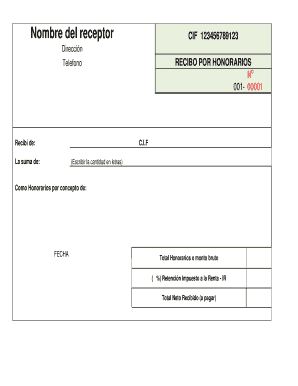
This guide will walk you through the process of completing the Recibo De Honorarios Formato Word online. This document is essential for issuing receipts for professional services rendered, ensuring clear and accurate financial records.
Follow the steps to successfully complete the form.
- Press the ‘Get Form’ button to access the document and open it in your preferred editor.
- Begin by entering the name of the recipient in the designated field labeled 'Nombre del receptor.' Make sure to provide their complete name.
- Input the CIF (tax identification number) of the recipient in the 'CIF' field. This number is crucial for tax purposes.
- Fill in the recipient's address by entering it in the 'Dirección' section. Ensure that the address is complete and accurate.
- In the 'RECIBO POR HONORARIOS' section, locate the 'No' field and enter the receipt number, starting with '001-00001.' Ensure the numbering is sequential for your records.
- Provide a contact telephone number in the 'Telefono' field for any inquiries related to the receipt.
- In the 'Recibí de' section, enter the name of the person or entity making the payment.
- Input the CIF of the payer in the corresponding 'C.I.F' field.
- In the 'La suma de' section, clearly state the payment amount in numeric form. Below this, write the same amount in words in the provided section (Escribir la cantidad en letras).
- Specify the nature of the fees in the 'Como Honorarios por concepto de' section. Briefly describe the services provided or the reason for the charges.
- Fill in the 'FECHA' field with the date on which the transaction is taking place.
- Calculate the total honorarios or gross amount and enter it in the appropriate field labeled 'Total Honorarios o monto bruto.'
- If applicable, note the percentage for 'Retención Impuesto a la Renta - IR' in the respective field. This indicates the tax withholding amount.
- Finally, calculate the total net amount received and enter this in the 'Total Neto Recibido (a pagar)' field.
- Once all fields are completed, review the document for accuracy. You can now save your changes, download the file, print it, or share it as needed.
Complete your Recibo De Honorarios Formato Word online today to manage your professional receipts efficiently.
Buenos días, entra al Portal de a SUNAT .sunat.gob.pe , selecciona la opción "Trámites y Consultas, ingresa con tu Clave SOL y entra a Comprobantes de Pago/SEE-SOL/Recibo por Honorarios Electrónicos / Consulta Emisor.