Open form follow the instructions
Easily sign the form with your finger
Send filled & signed form or save
How to fill out the Bizfile Sos Ca Gov Form Si 100 online
Filing the Bizfile Sos Ca Gov Form Si 100 is an essential step for corporations in California to maintain good standing. This guide provides clear, step-by-step instructions to help users fill out the form online efficiently.
Follow the steps to complete the Bizfile Sos Ca Gov Form Si 100 online.
- Press the ‘Get Form’ button to obtain the form and open it in the editor.
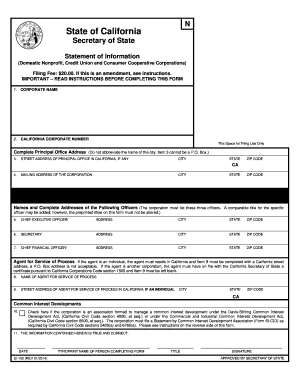
- Complete Item 1 by entering the name of the corporation exactly as it appears on record with the California Secretary of State.
- In Item 2, enter the corporation number issued by the California Secretary of State.
- For Item 3, provide the complete street address, city, and zip code of the corporation's principal office in California. Avoid using a P.O. Box.
- In Item 4, enter the mailing address of the corporation if it differs from the street address provided in Item 3.
- Complete Items 5-7 by entering the name and complete business or residential address of the corporation's chief executive officer, secretary, and chief financial officer respectively.
- In Item 8, enter the name of the agent for service of process in California. Ensure this individual agrees to serve in this capacity.
- If an individual is designated as the agent, provide their business or residential street address in Item 9. If another corporation is the agent, leave this blank.
- If applicable, complete Item 10 by checking the box if the corporation is formed to manage a common interest development.
- In Item 11, type or print the name and title of the person filling out the form and enter the completion date.
- Once all sections are completed, users can save changes, download, print, or share the filled form as needed.
Start filling out the Bizfile Sos Ca Gov Form Si 100 online today to ensure your corporation remains compliant.
Experience a faster way to fill out and sign forms on the web. Access the most extensive library of templates available.
Related content
To file a document or place an order online, click the Account Access Guide button below...
Get answers to your most pressing questions about US Legal Forms API.
Where to mail a certificate of dissolution in California?
To mail a certificate of dissolution in California, you should send it to the California Secretary of State's office. The mailing address is included on the form, and it's essential to ensure that you include the correct documentation and any required fees. For additional guidance, visiting Bizfile Sos Ca Gov provides helpful resources that can assist you in this process.
Can you file SI 100 online?
Absolutely, you can file SI 100 online through the Bizfile Sos Ca Gov platform. This service allows you to complete the form quickly and efficiently from the comfort of your home or office. Online filing reduces the chances of errors and speeds up the approval process, giving you a seamless experience.
Is bizfileOnline.sos.ca legit?
Yes, BizfileOnline.sos.ca is a legitimate platform provided by the California Secretary of State. It offers secure and efficient services for filing various business forms, including Form SI 100. Utilizing this resource gives you peace of mind knowing you are using an official and reliable site for your business's legal needs.
How to file a statement of Information in California online?
To file a Statement of Information online, visit Bizfile.sos.ca and select the Statement of Information option. Follow the prompts to complete your filing, ensuring that you enter all required information accurately. This online tool is user-friendly and guides you through the process of submitting the Form SI 100 seamlessly, making it convenient for business owners.
Where do I file ca form 100?
You can file the CA Form 100 through the California Secretary of State's website at Bizfile.sos.ca. This online platform provides an easy and efficient way to submit your documents. Simply navigate to the appropriate section, where you can find guidance and resources to help you complete your filing. Using Bizfile Sos Ca Gov Form Si 100 simplifies the process significantly.
Do I have to file a statement of Information in California every year?
Yes, California requires corporations to file a Statement of Information, or Form SI 100, every year. This filing ensures that the state has up-to-date information regarding your business. Utilize the convenience of the Bizfile Sos Ca Gov website to keep track of your filing deadlines and requirements.
What is a form Si 100 in California?
Form SI 100 is a Statement of Information that corporations in California are required to file. It contains important information about your business, including its address and key personnel. Filing this form through the Bizfile Sos Ca Gov platform helps maintain your corporation's good standing.
Where do I file ca form 100S?
CA Form 100S can be filed online through the California Secretary of State’s Bizfile Sos Ca Gov platform. Alternatively, you can send the completed form by mail to the designated address listed in the form instructions. Choose the method that works best for your preferences.
How to file California corporate disclosure statement online?
You can file your California corporate disclosure statement online by visiting the Bizfile Sos Ca Gov site. Navigate to the corporate section, select the appropriate forms, and fill out the necessary information. This efficient process helps you ensure compliance with state regulations.
How to file form SI 100 in California?
Filing Form SI 100 in California requires you to provide essential information about your corporation, such as its address and officers. You can access the form through the Bizfile Sos Ca Gov website for an easy online filing process. Ensure that you complete it accurately to avoid any penalties.
Use professional pre-built templates to fill in and sign documents online faster. Get access to thousands of forms.
If you believe that this page should be taken down, please follow our DMCA take down process here.