Loading

Open form follow the instructions

Easily sign the form with your finger

Send filled & signed form or save
How to fill out the Sprint Change Of Ownership online
Understanding the process of transferring ownership of a Sprint account is essential for users looking to make changes. This guide provides clear, step-by-step instructions for filling out the Sprint Change Of Ownership form online, ensuring that all necessary information is accurately submitted.
Follow the steps to complete the Sprint Change Of Ownership form online.
- Click the ‘Get Form’ button to obtain the form and open it in your online editor.
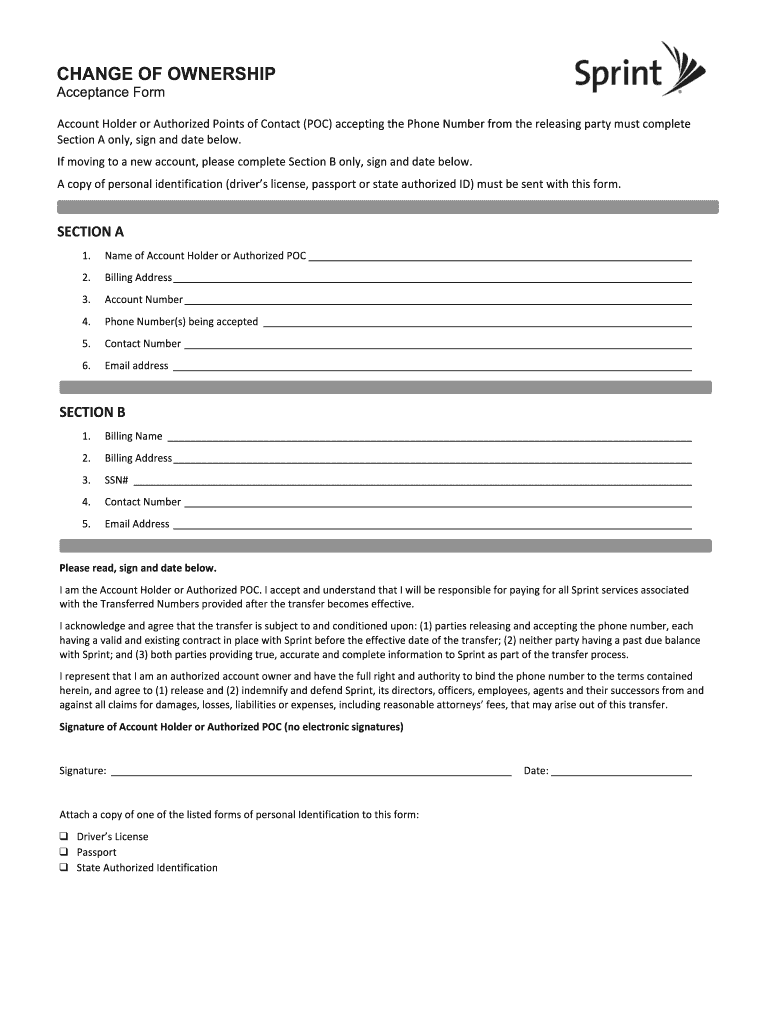
- Section A: Fill in your details as the Account Holder or Authorized Point of Contact. Provide your full name, billing address, account number, phone numbers being accepted, contact number, and email address.
- If you are moving to a new account, proceed to Section B. Here, enter the billing name, billing address, Social Security Number, contact number, and email address for the new account.
- Ensure you read the acknowledgment statement carefully. You must confirm your acceptance of the responsibilities that come with the transfer of ownership. Sign and date the form.
- Attach a copy of a personal identification document (driver's license, passport, or state-authorized ID) to the form.
- After completing all sections and attaching the necessary ID, review your form for any errors. Make sure all information is accurate.
- Finally, save your changes, download your completed form, print it out, or share it as required.
Complete your documents online with confidence and efficiency.
Experience a faster way to fill out and sign forms on the web. Access the most extensive library of templates available.
Related content
Aug 5, 2021 — Notification filed January 26, 2021, of the pro forma transfer of control...
Nov 23, 2021 — 1. A product owner orders the work for a complex problem into a product...
Billing. All Advantage Club accounts are required to be on eBill. Accounts receiving a...
Get answers to your most pressing questions about US Legal Forms API.
How do I change the name of the owner of the phone?
To change the name of the owner of the phone, reach out to Sprint customer support for guidance. They will guide you through the required documentation process, including any necessary forms. Completing this Sprint Change Of Ownership is crucial for ensuring the account remains active and properly assigned.
How do I transfer my mobile to another person?
Transferring your mobile to another person requires you to either visit a Sprint store or handle it through the Sprint customer service. You will need to provide proof of ownership and the new owner's information. This way, you can complete the Sprint Change Of Ownership without any hitches.
How do I change my SIM ownership from one person to another?
To change your SIM ownership, visit a Sprint store with both the current and new owner's identification. The staff will assist you in processing the Sprint Change Of Ownership for your SIM card, ensuring the new owner has full access to the service associated with the SIM.
How to change ownership on T-Mobile account?
If you wish to change ownership on a T-Mobile account, you should contact T-Mobile's customer support. They will provide the necessary steps, likely involving the submission of identification and account details. This ensures a smooth Sprint Change Of Ownership operation without complications.
How do you change the ownership of your mobile number?
Changing the ownership of your mobile number involves contacting Sprint customer service. They will guide you through the process, which typically includes verifying both the current and new owner's details. Completing this Sprint Change Of Ownership keeps your number assigned correctly and avoids service interruptions.
How do I change the ownership of a mobile?
To change the ownership of a mobile with Sprint, you need to visit a Sprint store or start the process online. You will require the current owner's identification and the new owner's information. This process ensures that the Sprint Change Of Ownership is secure and documented correctly.
Can I change the name on my T-Mobile account?
Changing the name on your T-Mobile account is achievable under the Sprint Change Of Ownership protocol. This procedure generally includes submitting proof of identity and the request to T-Mobile. Their customer service team is available to assist and guide you through this process to ensure everything is handled correctly.
Can I change the primary account holder on my T-Mobile account?
You can change the primary account holder on your T-Mobile account by following specific procedures aligned with the Sprint Change Of Ownership. Typically, this involves filling out forms and may require verification from both parties. It's recommended to contact T-Mobile directly for assistance and to ensure a seamless transition.
Can you transfer a T-Mobile account to another person?
Yes, transferring a T-Mobile account to another individual is an efficient way to manage the Sprint Change Of Ownership. This requires initiating a transfer request with T-Mobile's customer service, ensuring all account details are properly handed over. Completing this process will allow the new owner to manage the account without any issues.
How to change primary account holder on T-Mobile app?
To change the primary account holder on the T-Mobile app, navigate to your account settings and look for the account management section. This process is closely related to the Sprint Change Of Ownership guidelines. If you encounter any difficulties, T-Mobile support can assist you in making this update.
Use professional pre-built templates to fill in and sign documents online faster. Get access to thousands of forms.
If you believe that this page should be taken down, please follow our DMCA take down process here.