Loading
Form preview
  • US Legal Forms
  • Other Templates
  • More Forms
  • More Multi-State Forms
  • Chipotle Order Form 2020

Get Chipotle Order Form 2020-2026

How it works

  1. Open form

    Open form follow the instructions

  2. Easily sign form

    Easily sign the form with your finger

  3. Share form

    Send filled & signed form or save

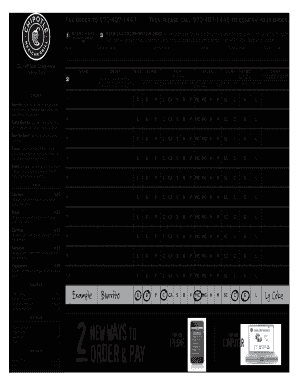
How to fill out the Chipotle Order Form online

Filling out the Chipotle Order Form online is an efficient way to customize your meal and ensure a smooth pick-up experience. By following the instructions provided in this guide, you can easily complete the order form at your convenience.

Follow the steps to successfully complete the Chipotle Order Form.

  1. Click 'Get Form' button to obtain the form and open it in the editor.
  2. Enter the date of your order in the designated field.
  3. Provide your company name and contact name to identify the order.
  4. Fill in your phone number to ensure contact regarding the order.
  5. Select the pick-up time for your order to ensure it is ready when you arrive.
  6. Specify the items you would like to order by choosing options from each section, such as rice, beans, meat, and extras. Indicate the flavor and size as necessary.
  7. If ordering multiple items, repeat the information for each dish in the subsequent sections provided in the form.
  8. Review all entries for accuracy before finalizing your order.
  9. Once completed, you can save changes, download the form, print it, or share it as needed.

Complete the Chipotle Order Form online today for a seamless ordering experience!

Get form

Experience a faster way to fill out and sign forms on the web. Access the most extensive library of templates available.
Get form

Related content

Consent Order - DCWP v Chipotle Mexican Grill...
Apr 30, 2022 — Chipotle violated the FWW Law and ESSTA by failing to provide compliant...
Learn more
Chipotle Order Form
This innovative printable form simplifies the ordering process, making it a breeze to...
Learn more
INSTRUCTIONS
1. The baking pan may not be positioned correctly on the unit. In order for the pan to...
Learn more

Related links form

Columbus Youth Symphonic Band Report Of Hotel Occupancy Tax Form.pdf - City Of Frisco - Friscotexas PUBLIC INFORMATION REQUEST - City Of Frisco REQUEST FOR AS-BUILT INFORMATION CITY OF FRISCO

Questions & Answers

Get answers to your most pressing questions about US Legal Forms API.

Contact support

To submit a group order at Chipotle, gather your team and head to the Chipotle Order Form online. Each person can select their preferred items, and the main organizer can review the total order before finalizing. This method streamlines the ordering process, ensuring everyone's preferences are met. Enjoy a delicious group meal without the hassle.

Placing an order at Chipotle is easy and can be done in various ways. You can visit a Chipotle location, use the mobile app, or access the website. To ensure accuracy, make use of the Chipotle Order Form to customize your meal to your liking. This process allows you to review your options and submit your order effortlessly.

For standard orders, there is no strict advance ordering requirement. However, if you are planning for a larger group or event, it is best to order at least a few hours ahead. Using the Chipotle Order Form helps you organize and secure all desired items efficiently. This way, you can avoid last-minute rushes and ensure a smooth pickup.

You can place a Chipotle group order up to 30 days in advance. This feature is ideal for planning events, gatherings, or meetings where you want to provide meals for multiple people. Simply use the Chipotle Order Form to finalize your order ahead of time. This ensures your group gets their favorite meals at the right time.

The best way to order Chipotle is by using the Chipotle Order Form available on their website or app. This allows you to customize your meal, choose ingredients, and review your selections before submitting. Also, consider placing your order during off-peak hours to avoid long waits. Enjoy a smooth and tasty experience with your Chipotle meal.

Chipotle catering is known for its fresh options and customizable menu, making it a popular choice for events. Many customers find it worthwhile due to its ease of ordering through the Chipotle Order Form and the ability to accommodate various dietary needs. If you're hosting an event, consider Chipotle catering for tasty and satisfying meals.

Yes, you can certainly do a group order on Chipotle. Utilize their Chipotle Order Form to gather everyone's preferences in one order. This option streamlines the process and makes managing multiple orders effortless.

To place a group order on UberEats using the Chipotle Order Form, start by selecting Chipotle from the app. Choose 'Group Order' in the options, and then share the link with your friends. Everyone can add their items, ensuring a seamless and organized meal.

For a Chipotle group order, you can use the Chipotle Order Form to create a single order for multiple people. Each participant can select their meal preferences online, making it easy to coordinate everyone's choices. Once complete, just review the combined order before payment.

To get started with your Chipotle Order Form, simply visit the Chipotle website or app. Select your desired items from the menu, customize your order, and add it to your cart. Don't forget to review your order before checking out and provide delivery or pickup information.

Get This Form Now!

Use professional pre-built templates to fill in and sign documents online faster. Get access to thousands of forms.
Get form
If you believe that this page should be taken down, please follow our DMCA take down processhere.
Get Chipotle Order Form
Get form
  • Adoption
  • Bankruptcy
  • Contractors
  • Divorce
  • Home Sales
  • Employment
  • Identity Theft
  • Incorporation
  • Landlord Tenant
  • Living Trust
  • Name Change
  • Personal Planning
  • Small Business
  • Wills & Estates
  • Packages A-Z
  • Affidavits
  • Bankruptcy
  • Bill of Sale
  • Corporate - LLC
  • Divorce
  • Employment
  • Identity Theft
  • Internet Technology
  • Landlord Tenant
  • Living Wills
  • Name Change
  • Power of Attorney
  • Real Estate
  • Small Estates
  • Wills
  • All Forms
  • Forms A-Z
  • Other Templates
  • Legal Hub
  • About Us
  • Help Portal
  • Legal Resources
  • Blog
  • Affiliates
  • Contact Us
  • Delete My Account
  • Site Map
  • Industries
  • Forms in Spanish
  • Localized Forms
  • State-specific Forms
  • Forms Kit
  • Real Estate Handbook
  • All Guides
  • Notarize
  • Incorporation services
  • For Consumers
  • For Small Business
  • For Attorneys
  • USLegal
  • FormsPass
  • pdfFiller
  • signNow
  • altaFlow
  • DocHub
  • Instapage
Form Packages
  • Adoption
  • Bankruptcy
  • Contractors
  • Divorce
  • Home Sales
  • Employment
  • Identity Theft
  • Incorporation
  • Landlord Tenant
  • Living Trust
  • Name Change
  • Personal Planning
  • Small Business
  • Wills & Estates
  • Packages A-Z
Form Categories
  • Affidavits
  • Bankruptcy
  • Bill of Sale
  • Corporate - LLC
  • Divorce
  • Employment
  • Identity Theft
  • Internet Technology
  • Landlord Tenant
  • Living Wills
  • Name Change
  • Power of Attorney
  • Real Estate
  • Small Estates
  • Wills
  • All Forms
  • Forms A-Z
  • Other Templates
Customer Service
  • Legal Hub
  • About Us
  • Help Portal
  • Legal Resources
  • Blog
  • Affiliates
  • Contact Us
  • Delete My Account
  • Site Map
  • Industries
  • Forms in Spanish
  • Localized Forms
  • State-specific Forms
  • Forms Kit
Legal Guides
  • Real Estate Handbook
  • All Guides
Prepared for you
  • Notarize
  • Incorporation services
Our Customers
  • For Consumers
  • For Small Business
  • For Attorneys
Our Sites
  • USLegal
  • FormsPass
  • pdfFiller
  • signNow
  • altaFlow
  • DocHub
  • Instapage
Social Media
Call us now toll free:
+1 833 426 79 33
As seen in:
© Copyright 1999-2026 airSlate Legal Forms, Inc. 17 Station Street, Suite 303, Brookline, MA 02445
  • Your Privacy Choices
  • Terms of Service
  • Privacy Notice
  • Content Takedown Policy
  • Bug Bounty Program