Open form follow the instructions
Easily sign the form with your finger
Send filled & signed form or save
How to fill out the Tp1 online
Filling out the Tp1 form online can be a straightforward process when you have clear guidance. This guide provides comprehensive, step-by-step instructions to help users understand each section of the form with ease.
Follow the steps to easily fill out the Tp1 form online.
- Click the 'Get Form' button to access the Tp1 form and open it in your preferred editor.
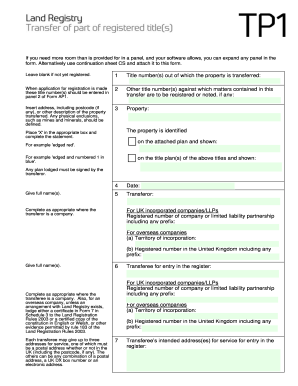
- Begin by entering the title number or numbers from which the property is being transferred. This information is crucial and must be entered in the designated panel of the accompanying Form AP1 when applying for registration.
- In the next field, list any other title numbers against which the matters contained in this transfer should be registered or noted. Ensure you include the complete address along with the postcode for the property being transferred.
- Identify the property by placing an 'X' in the appropriate box and provide a complete description, referring to any plans submitted. Physical exclusions like mines and minerals must be clearly defined.
- Provide the full name of the transferor and, if applicable, complete the appropriate sections regarding the transferor’s company or partnership registration details.
- Enter the transferee's details, including the respective registration number and any necessary addresses for service. For overseas companies, ensure to include the territory of incorporation.
- Indicate the consideration involved in the transfer, whether it is a specific sum or other receipts, by filling in the respective boxes.
- Confirm whether the transferor is providing a full title guarantee or a limited title guarantee by selecting the correct option.
- If the transfer involves multiple transferees, complete the declaration of trust section to clarify how the property will be held.
- Utilize the additional provisions panel to outline anything pertinent that relates to definitions, rights granted or reserved, or any restrictive covenants.
- Make sure the transferor and transferee(s) execute the document correctly, adhering to the formal requirements of executing a deed.
- After completing all the sections, review your entries for accuracy and completeness. You can then save your changes, download, print, or share the form as needed.
Start filling out your Tp1 form online today to ensure a seamless property transfer process.
Experience a faster way to fill out and sign forms on the web. Access the most extensive library of templates available.
Related content
by B Dutta · 2023 · Cited by 11 — We recently discovered a heat-stable microprotein in...
Team Project 1. Getting to Know You. Team Project 1 (TP1) is very simple: between the...
ENET_RX1_N. Page 5. The TP1 system has no user-serviceable parts. The TP1 contains a...
Get answers to your most pressing questions about US Legal Forms API.
What happens if you don't file a partnership tax return?
Failing to file a partnership tax return can lead to severe penalties and interest on any unpaid taxes. The IRS expects timely submission to maintain compliance, and missing this deadline can result in a significant financial burden. Moreover, not filing may affect your partners' Schedules K-1, complicating their tax situations too. Consider utilizing U.S. Legal Forms to avoid these issues related to your TP1 return.
How do you file a partnership tax return?
To file a partnership tax return, complete and submit IRS Form 1065, which details your partnership's income and expenses. Each partner must receive a Schedule K-1 reporting their share of the income or loss. Keeping accurate and up-to-date records will streamline this process significantly. You can use U.S. Legal Forms to locate the necessary documents to ensure your TP1 return is filed correctly.
What is TP1 return?
A TP1 return is a tax form used in Canada to report personal income and calculate taxes owed. It includes information about your income, deductions, and credits for the tax year. This form is essential for ensuring compliance with tax laws and can determine your tax liabilities or refunds. Using optimized resources like U.S. Legal Forms can help you efficiently prepare your TP1 return.
Can I file my partnership tax return online?
Yes, you can file your partnership tax return online using the IRS e-file service. This option allows for a faster and more efficient filing process, ensuring timely submission of your Form 1065. Many online tax preparation platforms support electronic filing, which simplifies the experience. By using U.S. Legal Forms, you can easily prepare and file your TP1 return online with confidence.
How to access T1?
You can access your T1 form by visiting the Canada Revenue Agency's official website. This form is crucial for personal tax returns, as it summarizes your income, deductions, and credits. Simply create or log into your CRA account to retrieve your T1 form conveniently. Using platforms like U.S. Legal Forms can also guide you through processing your TP1 forms efficiently.
How to file a sale of rental property?
When you sell a rental property, you need to report the sale on your tax return using Form 4797. This form captures the details of the sale, including gain or loss calculations. Additionally, ensure you account for any depreciation recapture, as it can impact your overall tax responsibility. Consider using U.S. Legal Forms for streamlined forms that cater to such TP1 transactions.
How do you file taxes as a partnership?
To file taxes as a partnership, you need to prepare Form 1065, also known as the partnership tax return. This form gathers details about your business income, deductions, and credits. After completing Form 1065, each partner receives a Schedule K-1, which reports their share of the profits or losses. It's essential to stay organized and timely to avoid penalties associated with your TP1 filing.
How to set up TP1 and TP2 in MT5?
Setting up TP1 and TP2 in MT5 involves adjusting your trading parameters to include these take-profit levels. Simply open your trading terminal, navigate to the 'Trade' tab, and input your desired TP1 and TP2 levels. This setup allows you to manage your trades effectively and take advantage of market movements.
How to transfer property ownership in the UK?
Transferring property ownership in the UK involves completing a property transfer form, such as the TP1. This process requires signature from both the seller and buyer, along with providing proof of identity and ownership. Consider using platforms like US Legal Forms to streamline this process and ensure compliance with all legal requirements.
What does TP1 mean?
TP1 refers to a specific property transfer form used in real estate transactions. It facilitates the transfer of ownership from one party to another while ensuring all legal requirements are met. Understanding TP1 is essential for anyone involved in property transactions, as it helps to avoid disputes and clarifies ownership rights.
Use professional pre-built templates to fill in and sign documents online faster. Get access to thousands of forms.
If you believe that this page should be taken down, please follow our DMCA take down process here.