Loading
Form preview
  • US Legal Forms
  • Form Library
  • More Forms
  • More Multi-State Forms
  • Pelvic Ultrasound Worksheet 2020

Get Pelvic Ultrasound Worksheet 2020-2026

How it works

  1. Open form

    Open form follow the instructions

  2. Easily sign form

    Easily sign the form with your finger

  3. Share form

    Send filled & signed form or save

How to fill out the Pelvic Ultrasound Worksheet online

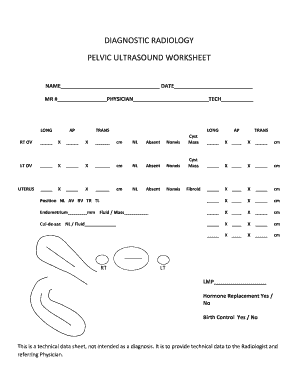
The Pelvic Ultrasound Worksheet is a vital document used to record important details concerning pelvic ultrasound imaging. This guide will provide a clear and supportive walkthrough on how to accurately fill out this form online.

Follow the steps to successfully complete the Pelvic Ultrasound Worksheet.

  1. Click ‘Get Form’ button to access the Pelvic Ultrasound Worksheet and open it in your preferred editing tool.
  2. Begin by filling in your name, the date, and your medical record number (MR #) at the top of the form. Ensure that your entries are accurate and legible.
  3. Indicate the physician’s name who referred you for the ultrasound and the name of the technician performing the procedure.
  4. In the next section, you will see measurement fields labeled for the right ovary (RT OV) and left ovary (LT OV). Enter the specified measurement (in centimeters) for each ovary and check any applicable options for normal status, absence, non-visibility, cyst, or mass.
  5. Following the ovary sections, proceed to the uterus measurement. Record the measurements for the uterus and check the status indicators as needed, including options such as normal, absent, non-visibility, and fibroid.
  6. Next, fill out the endometrium details, including its measurement in millimeters and any information regarding fluid or mass if applicable.
  7. Continue with the cul-de-sac section where you will indicate the normal condition or presence of fluid.
  8. Finally, enter the last menstrual period (LMP), and indicate whether you are on hormone replacement therapy and birth control by selecting yes or no for each.
  9. Once you have completed all sections of the form, be sure to review your entries for accuracy before saving, downloading, or printing the completed Worksheet.

Take the next step towards completing your health documentation by filling out the Pelvic Ultrasound Worksheet online today.

Get form

Experience a faster way to fill out and sign forms on the web. Access the most extensive library of templates available.
Get form

Related content

The clinical ultrasound report: Guideline for...
by M Necas · 2017 · Cited by 39 — This article summarises the best practice in...
Learn more
Downtime Documents
Abdomen Ultrasound Worksheet · Abdomen Doppler Ultrasound Worksheet · Pelvic Ultrasound...
Learn more
USER GUIDE
The user guide is intended for a reader familiar with ultrasound techniques and who has...
Learn more

Related links form

Boston Mutual Life Insurance Phone Number Form AUTHORIZATION TO DISCLOSE PROTECTED HEALTH INFORMATION - Alohacare HIPAA TRANSACTION SET FORM - AlohaCare - Alohacare Nevada Surplus Lines Association

Questions & Answers

Get answers to your most pressing questions about US Legal Forms API.

Contact support

During a pelvic ultrasound, you will typically lie down while a technician applies gel to your abdomen. They will use a probe to capture images of your pelvic organs. Understanding the process ahead of time can reduce anxiety, and having the Pelvic Ultrasound Worksheet can remind you of the topics to discuss with your healthcare provider post-ultrasound.

In some cases, you may be able to obtain a pelvic ultrasound without a referral, especially if you go to a direct access imaging center. However, many facilities still prefer or require a referral to ensure that this procedure is medically necessary. It’s beneficial to have the Pelvic Ultrasound Worksheet prepared, as it can articulate your needs clearly to the provider.

To get a pelvic ultrasound, you first need to consult with a healthcare professional who will evaluate your condition. They can then provide you with a request or referral for the ultrasound. Once you have that, you can schedule the procedure at a medical facility specializing in imaging. Using a Pelvic Ultrasound Worksheet after your appointment may help you keep track of the results and any follow-up steps.

To receive a pelvic ultrasound, you typically need to schedule an appointment with a licensed healthcare provider. They will assess your symptoms and determine if the ultrasound is necessary. Having a Pelvic Ultrasound Worksheet can simplify documenting your symptoms and history, ensuring effective communication with your provider.

Many insurance plans require a referral for a pelvic ultrasound. It’s important to check your specific policy to understand the requirements. If you're unsure, consider contacting your healthcare provider for assistance. Additionally, the Pelvic Ultrasound Worksheet can help you navigate this process smoothly.

If you do not have a full bladder during your pelvic ultrasound, the images may be less clear and comprehensive. A full bladder helps lift and separate pelvic organs, improving visibility for accurate diagnosis. If you are unsure about how to prepare, refer to the Pelvic Ultrasound Worksheet for guidance. Inadequate preparation can lead to the need for a repeat ultrasound, so it's best to follow the outlined instructions.

The guidelines for a pelvic ultrasound usually include drinking a specified amount of water before the procedure and avoiding certain foods or medications. Your Pelvic Ultrasound Worksheet outlines these important steps to ensure a smooth experience. Adhering to these guidelines helps healthcare providers obtain the best possible images. If you have questions, consult your medical team for personalized advice.

A pelvic scan and a pelvic ultrasound often refer to similar procedures, but they may differ in technique and detail. A pelvic ultrasound uses sound waves to create images of pelvic organs, while a pelvic scan may refer to a broader range of imaging techniques. It's important to review the instructions on your Pelvic Ultrasound Worksheet for clarity. Both methods aim to provide valuable information about your health.

Drinking 32 ounces of water before your pelvic ultrasound ensures your bladder is sufficiently full. This fullness is crucial for obtaining clear and accurate images of your pelvic organs. The Pelvic Ultrasound Worksheet reinforces the importance of hydration before the exam. Always adhere to the guidelines provided to optimize your ultrasound experience.

Before a pelvic ultrasound, it is generally recommended to drink approximately 32 ounces of water. This amount can vary based on specific instructions from your healthcare provider or the guidelines on your Pelvic Ultrasound Worksheet. Make sure to start drinking about an hour before your appointment for best results. A well-hydrated bladder significantly improves imaging quality.

Get This Form Now!

Use professional pre-built templates to fill in and sign documents online faster. Get access to thousands of forms.
Get form
If you believe that this page should be taken down, please follow our DMCA take down processhere.

Industry-leading security and compliance

US Legal Forms protects your data by complying with industry-specific security standards.
  • In businnes since 1997
    25+ years providing professional legal documents.
  • Accredited business
    Guarantees that a business meets BBB accreditation standards in the US and Canada.
  • Secured by Braintree
    Validated Level 1 PCI DSS compliant payment gateway that accepts most major credit and debit card brands from across the globe.
Get Pelvic Ultrasound Worksheet
Get form
Form Packages
Adoption
Bankruptcy
Contractors
Divorce
Home Sales
Employment
Identity Theft
Incorporation
Landlord Tenant
Living Trust
Name Change
Personal Planning
Small Business
Wills & Estates
Packages A-Z
Form Categories
Affidavits
Bankruptcy
Bill of Sale
Corporate - LLC
Divorce
Employment
Identity Theft
Internet Technology
Landlord Tenant
Living Wills
Name Change
Power of Attorney
Real Estate
Small Estates
Wills
All Forms
Forms A-Z
Form Library
Customer Service
Your Privacy Choices
Terms of Service
Privacy Notice
Legal Hub
Content Takedown Policy
Bug Bounty Program
About Us
Help Portal
Legal Resources
Blog
Affiliates
Contact Us
Delete My Account
Site Map
Industries
Forms in Spanish
Localized Forms
State-specific Forms
Forms Kit
Legal Guides
Real Estate Handbook
All Guides
Prepared for You
Notarize
Incorporation services
Our Customers
For Consumers
For Small Business
For Attorneys
Our Sites
US Legal Forms
USLegal
FormsPass
pdfFiller
signNow
altaFlow
DocHub
Instapage
Social Media
Call us now toll free:
+1 833 426 79 33
As seen in:
  • USA Today logo picture
  • CBC News logo picture
  • LA Times logo picture
  • The Washington Post logo picture
  • AP logo picture
  • Forbes logo picture
© Copyright 1997-2026
airSlate Legal Forms, Inc.
3720 Flowood Dr, Flowood, Mississippi 39232
Form Packages
Adoption
Bankruptcy
Contractors
Divorce
Home Sales
Employment
Identity Theft
Incorporation
Landlord Tenant
Living Trust
Name Change
Personal Planning
Small Business
Wills & Estates
Packages A-Z
Form Categories
Affidavits
Bankruptcy
Bill of Sale
Corporate - LLC
Divorce
Employment
Identity Theft
Internet Technology
Landlord Tenant
Living Wills
Name Change
Power of Attorney
Real Estate
Small Estates
Wills
All Forms
Forms A-Z
Form Library
Customer Service
Your Privacy Choices
Terms of Service
Privacy Notice
Legal Hub
Content Takedown Policy
Bug Bounty Program
About Us
Help Portal
Legal Resources
Blog
Affiliates
Contact Us
Delete My Account
Site Map
Industries
Forms in Spanish
Localized Forms
State-specific Forms
Forms Kit
Legal Guides
Real Estate Handbook
All Guides
Prepared for You
Notarize
Incorporation services
Our Customers
For Consumers
For Small Business
For Attorneys
Our Sites
US Legal Forms
USLegal
FormsPass
pdfFiller
signNow
altaFlow
DocHub
Instapage
Social Media
Call us now toll free:
+1 833 426 79 33
As seen in:
  • USA Today logo picture
  • CBC News logo picture
  • LA Times logo picture
  • The Washington Post logo picture
  • AP logo picture
  • Forbes logo picture
© Copyright 1997-2026
airSlate Legal Forms, Inc.
3720 Flowood Dr, Flowood, Mississippi 39232