Loading
Form preview
  • US Legal Forms
  • Other Templates
  • More Forms
  • More Multi-State Forms
  • Leadway Pension Pin 2020

Get Leadway Pension Pin 2020-2026

How it works

  1. Open form

    Open form follow the instructions

  2. Easily sign form

    Easily sign the form with your finger

  3. Share form

    Send filled & signed form or save

How to fill out the Leadway Pension Pin online

Filling out the Leadway Pension Pin form online is a straightforward process that enables users to update their personal information efficiently. This guide will walk you through each component of the form to ensure your details are accurately corrected.

Follow the steps to complete the Leadway Pension Pin form accurately.

  1. Click ‘Get Form’ button to obtain the form and open it in the editor.
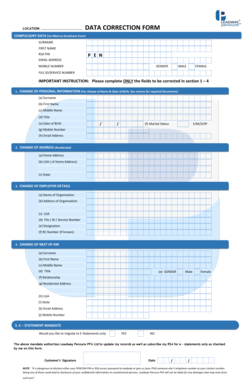
  2. Complete the compulsory data section. Enter your surname, first name, RSA PIN, email address, mobile number, and gender.
  3. If you have changes to your personal information, fill out section 1. Only enter the fields that require correction, such as surname, first name, middle name, title, date of birth, marital status, mobile number, and email address.
  4. For changes to your residential address, navigate to section 2. Provide your home address, local government area (LGA), and state.
  5. Proceed to section 3 for updates on employer details. Enter the name and address of the organization, LGA, file/service number, designation, and RC number if known.
  6. In section 4, update information about your next of kin. Fill in the surname, first name, middle name, title, gender, relationship, residential address, LGA, state, email address, and mobile number.
  7. Finally, in section 5, indicate whether you would like to migrate to e-statements by selecting 'Yes' or 'No.'
  8. Once all necessary fields are filled out, review the completed form for accuracy. After ensuring all information is correct, save your changes.
  9. Download, print, or share the completed form as required.

Start completing your Leadway Pension Pin form online today for a swift and efficient update process.

Get form

Experience a faster way to fill out and sign forms on the web. Access the most extensive library of templates available.
Get form

Related content

FFIListFull062017.csv
... Pension Fund Multi-Asset Credit Limited,CAYMAN ISLANDS KZ9EFA.00000.LE.826 ... Leadway...
Learn more
pension funds investment in nigeria: islamic...
This paper aims at giving an overview of Pension Fund investment under this contributory...
Learn more

Related links form

Residency Affidavit For Property Owners-Property Managers - Cherokee K12 Ga VIRGINIA HOUSING DEVELOPMENT AUTHORITY EXHIBIT F AFFIDAVIT Treasurer's Affidavit Affidavit Of Financial Support - Embry-Riddle Aeronautical University - Daytonabeach Erau

Questions & Answers

Get answers to your most pressing questions about US Legal Forms API.

Contact support

Retrieving your RSA PIN is straightforward. Visit your pension administrator's website or app, locate the RSA PIN retrieval section, and enter the required personal information. After verification, you will receive your Leadway Pension Pin in a secure manner, allowing you to manage your pension easily.

To locate your Leadway Pension Pin, visit the Leadway Pension official website or use their mobile application. If you have forgotten your PIN, you can follow the recovery steps provided online. This ensures you have your Leadway Pension Pin ready for any needed actions.

To find out your pension number, check any official correspondence received from your pension provider. Alternatively, log into your pension account online. If you are unable to find your pension number, contacting customer support can help, and you will need your Leadway Pension Pin for secure verification.

Finding your RSA PIN involves visiting your pension provider's website. You can request a PIN reminder, either through their online platform or customer service. Ensure that you have your identification ready, as you may need it to retrieve your Leadway Pension Pin.

To check your Leadway pension account, log in to the Leadway Pension portal using your credentials. Navigate to the account summary section to view your details. This will also allow you to access your Leadway Pension Pin for any necessary transactions.

To retrieve your RSA PIN from Access Pension, go to their official site and navigate to the RSA PIN retrieval section. You will need to provide some personal details for verification. Once confirmed, you will receive your Leadway Pension Pin via email or SMS.

To obtain your premium pension pin, you should first visit the Leadway Pension website. You can also reach out to their customer service for assistance. They will guide you through the process, ensuring you receive your Leadway Pension Pin efficiently.

To retrieve your RSA pin, visit the website of your pension fund administrator. Follow the dedicated pin retrieval process, where you'll be asked to input your details. If needed, customer service can provide additional support to ensure you successfully retrieve your RSA pin.

You may withdraw from your Leadway pension account under certain conditions, such as reaching retirement age or specific emergencies. It is advisable to check the terms outlined by Leadway to understand the withdrawal process fully. For additional support, consider using the uslegalforms platform to guide you through the necessary requirements.

To get your PAL Pension Pin online in Nigeria, visit the official PAL Pension website. Find the section dedicated to pin retrieval, input your identification information, and follow the instructions to obtain your pin. If you have any questions, reach out to PAL's support team.

Get This Form Now!

Use professional pre-built templates to fill in and sign documents online faster. Get access to thousands of forms.
Get form
If you believe that this page should be taken down, please follow our DMCA take down processhere.
Get Leadway Pension Pin
Get form
  • Adoption
  • Bankruptcy
  • Contractors
  • Divorce
  • Home Sales
  • Employment
  • Identity Theft
  • Incorporation
  • Landlord Tenant
  • Living Trust
  • Name Change
  • Personal Planning
  • Small Business
  • Wills & Estates
  • Packages A-Z
  • Affidavits
  • Bankruptcy
  • Bill of Sale
  • Corporate - LLC
  • Divorce
  • Employment
  • Identity Theft
  • Internet Technology
  • Landlord Tenant
  • Living Wills
  • Name Change
  • Power of Attorney
  • Real Estate
  • Small Estates
  • Wills
  • All Forms
  • Forms A-Z
  • Other Templates
  • Legal Hub
  • About Us
  • Help Portal
  • Legal Resources
  • Blog
  • Affiliates
  • Contact Us
  • Delete My Account
  • Site Map
  • Industries
  • Forms in Spanish
  • Localized Forms
  • State-specific Forms
  • Forms Kit
  • Real Estate Handbook
  • All Guides
  • Notarize
  • Incorporation services
  • For Consumers
  • For Small Business
  • For Attorneys
  • USLegal
  • FormsPass
  • pdfFiller
  • signNow
  • altaFlow
  • DocHub
  • Instapage
Form Packages
  • Adoption
  • Bankruptcy
  • Contractors
  • Divorce
  • Home Sales
  • Employment
  • Identity Theft
  • Incorporation
  • Landlord Tenant
  • Living Trust
  • Name Change
  • Personal Planning
  • Small Business
  • Wills & Estates
  • Packages A-Z
Form Categories
  • Affidavits
  • Bankruptcy
  • Bill of Sale
  • Corporate - LLC
  • Divorce
  • Employment
  • Identity Theft
  • Internet Technology
  • Landlord Tenant
  • Living Wills
  • Name Change
  • Power of Attorney
  • Real Estate
  • Small Estates
  • Wills
  • All Forms
  • Forms A-Z
  • Other Templates
Customer Service
  • Legal Hub
  • About Us
  • Help Portal
  • Legal Resources
  • Blog
  • Affiliates
  • Contact Us
  • Delete My Account
  • Site Map
  • Industries
  • Forms in Spanish
  • Localized Forms
  • State-specific Forms
  • Forms Kit
Legal Guides
  • Real Estate Handbook
  • All Guides
Prepared for you
  • Notarize
  • Incorporation services
Our Customers
  • For Consumers
  • For Small Business
  • For Attorneys
Our Sites
  • USLegal
  • FormsPass
  • pdfFiller
  • signNow
  • altaFlow
  • DocHub
  • Instapage
Social Media
Call us now toll free:
+1 833 426 79 33
As seen in:
© Copyright 1999-2026 airSlate Legal Forms, Inc. 17 Station Street, Suite 303, Brookline, MA 02445
  • Your Privacy Choices
  • Terms of Service
  • Privacy Notice
  • Content Takedown Policy
  • Bug Bounty Program