Loading

Open form follow the instructions

Easily sign the form with your finger

Send filled & signed form or save
How to fill out the City Of Cape Town Forms online
Filling out the City Of Cape Town forms online can seem daunting, but with the right guidance, it can be a straightforward process. This guide provides clear, step-by-step instructions to help you complete the forms efficiently and accurately.
Follow the steps to complete your online form with ease.
- Click the ‘Get Form’ button to access the form and open it in your editor.
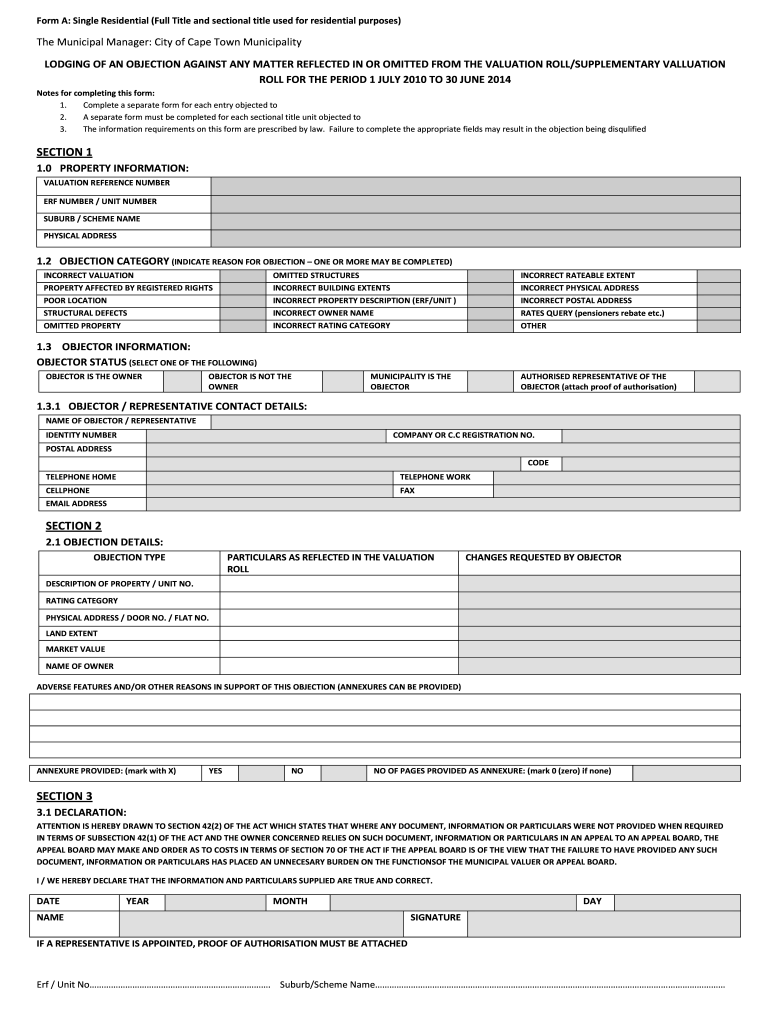
- Begin by filling out Section 1, which includes the property information. Provide details such as the valuation reference number, erf number or unit number, suburb or scheme name, and physical address.
- Next, indicate the objection category in Section 1.2. You may choose one or more reasons, such as incorrect valuation or poor location.
- In Section 1.3, select the objector status. You can choose from options like ‘objector is the owner’ or ‘municipality is the objector’. Fill in your details and contact information.
- Move on to Section 2 to detail your objection. List the particulars as reflected in the valuation roll and the changes you are requesting. Include any relevant descriptions of your property.
- Section 3 requires you to make a declaration. Confirm that the information you have provided is true and correct by signing and dating the declaration.
- If your objection applies to a sectional title, shift to Section 6 to provide necessary details regarding your unit, including the name of the managing agent and monthly levy.
- Complete any additional information in Section 4 regarding the property details, such as municipal account numbers or details of servitudes if applicable.
- Finally, review all sections to ensure completeness and accuracy. Save your changes, download a copy for your records, or print the form as needed.
Start filing your City Of Cape Town forms online today for a streamlined process.
Experience a faster way to fill out and sign forms on the web. Access the most extensive library of templates available.
Related content
Forms and Documents. File Central Voter Registration Request Form File Maine Online...
Going forward, CCT's intent is to develop data pipelines that transform raw data into more...
May 27, 2012 — The applicant, a coloured senior manager, alleged that he was...
Get answers to your most pressing questions about US Legal Forms API.
How do I get the building plans for my house?
To get the building plans for your house, contact your local municipality with information about your property. You may need to fill out specific City Of Cape Town Forms as part of this request. If you encounter challenges accessing these plans, platforms like uslegalforms can help guide you through the process, ensuring you have the right forms and information.
How to get building plans from city of Cape Town?
You can obtain building plans from the City of Cape Town by visiting the municipal planning office or accessing their online portals. It's important to complete the proper City Of Cape Town Forms to request this information. Providing accurate property details will ensure you receive the specific plans needed without unnecessary delays.
How do I report a fault to the city of Cape Town?
To report a fault to the City of Cape Town, you can use their online reporting system or call the relevant municipal department. Often, you will need to provide your contact details and describe the issue clearly. Additionally, using City Of Cape Town Forms can facilitate your reporting process by ensuring you include all crucial information, which helps in timely service delivery.
How do I send an email to the city of Cape Town?
To send an email to the City of Cape Town, use the official contact email provided on their website. Make your email concise and include relevant information regarding your inquiry or issue. It is helpful to attach any necessary documentation, possibly utilizing the City Of Cape Town Forms to clarify your request. Always include your contact details for a prompt response.
How long does it take to get building plans approved in Cape Town?
The approval process for building plans in Cape Town can take anywhere from a few weeks to several months. This timeline depends on the completeness of your submission and current municipal workload. To expedite the process, ensure your application includes all required City Of Cape Town Forms and documentation. Keeping open communication with the municipal office can also help clarify any outstanding issues.
How to get house plans from municipality in South Africa?
To obtain house plans from the municipality in South Africa, you must submit a request to your local municipal office. This typically involves completing specific forms, which can often be found on the official City Of Cape Town Forms website. Make sure to provide necessary details about the property, and be prepared for potential fees or processing times involved.
How much does a general worker earn in City of Cape Town?
In the City of Cape Town, the earnings of a general worker can vary based on experience and sector. Typically, a general worker can expect to earn between $1,200 and $1,700 per month. It is essential to consider factors such as job demands and the specific employer. For more detailed information, refer to City Of Cape Town Forms that document labor guidelines.
How do I register as a vendor at City of Cape Town?
Registering as a vendor at the City of Cape Town requires attention to detail. Begin by visiting the City’s official website to access the relevant City Of Cape Town Forms. Fill out the forms accurately with required documentation, and submit them to the designated department. This process is essential for establishing your vendor status.
How do I become a vendor in City of Cape Town?
To become a vendor within the City of Cape Town, start by gathering the necessary documents. Access the City Of Cape Town Forms through the official website and ensure you fulfill all requirements outlined. Then, submit the completed forms to the appropriate department, and wait for confirmation on your vendor status.
How to join City of Cape Town law enforcement?
Joining the City of Cape Town law enforcement requires commitment and the right application. First, visit the City’s recruitment page to find the latest opportunities. Download and complete the City Of Cape Town Forms that apply. Following the submission, prepare for any evaluations as part of the recruitment process.
Use professional pre-built templates to fill in and sign documents online faster. Get access to thousands of forms.
If you believe that this page should be taken down, please follow our DMCA take down process here.