Loading
Get Nhis Registration Portal 2020-2026
How it works
-

Open form follow the instructions
-

Easily sign the form with your finger
-

Send filled & signed form or save
How to fill out the Nhis Registration Portal online
Navigating the Nhis Registration Portal is essential for health care facilities seeking to register or re-accredit with the necessary authorities. This guide provides a step-by-step approach to effectively complete the registration process online.
Follow the steps to complete your registration successfully.
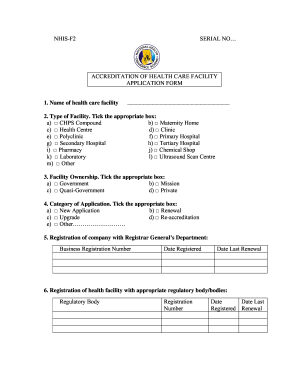
- Click 'Get Form' button to access the registration form where you can begin filling out the required information.
- Provide the name of the health care facility in the designated field.
- Select the type of facility by ticking the appropriate box, including options such as CHPS compound, clinic, pharmacy, and others.
- Indicate the ownership of the facility by ticking the relevant box for government, mission, quasi-government, or private.
- Choose the category of application by ticking the corresponding box for new application, renewal, upgrade, re-accreditation, or other.
- Enter the business registration number and the dates of registration and last renewal as required.
- Provide details for the health facility's registration with regulating bodies, including registration number and relevant dates.
- Fill in the address of the facility, including street, postal address, town/city, district, region, and contact numbers.
- Enter the name, position, contact number, and qualifications of the chief executive or administrator.
- Tick the boxes for the services offered by your facility, such as outpatient, inpatient, maternity, and other specialized services.
- Provide details of the bank account, including the bank name, branch, account name, and account number.
- List the key professional staff by type, such as medical practitioners, nurses, midwives, and indicate their respective numbers.
- Attach the required supporting documents as specified in the application form.
- Complete the declaration by signing and dating the form to affirm that the provided information is accurate.
- Save your completed form, download, print, or share it as required.
Take the next step in your registration process by completing your application online today.
To check your insurance in Ghana, you can utilize the Nhis Registration Portal, which allows you to input your details and retrieve your information. This online service offers a simple way to stay informed about your insurance status. Moreover, you can contact your insurance provider directly for additional assistance if needed.