Loading
Form preview
  • US Legal Forms
  • Other Templates
  • More Forms
  • More Uncategorized Forms
  • Military Wife Registration Form

Get Military Wife Registration Form

Se preference. Your status for consideration in all other positions in which your spouse preference was used shall become that of a Family Member . However, there is no limit to the number of times Military Spouse preference may be used for referral to a non-continuing position i.e. a flexible NAF position or an appropriated fund temporary or term limited position. Once you accept a non-continuing position military spouse preference may not be used for other non-continuing positions as long.

How it works

  1. Open form

    Open form follow the instructions

  2. Easily sign form

    Easily sign the form with your finger

  3. Share form

    Send filled & signed form or save

How to fill out the Military Wife Registration Form online

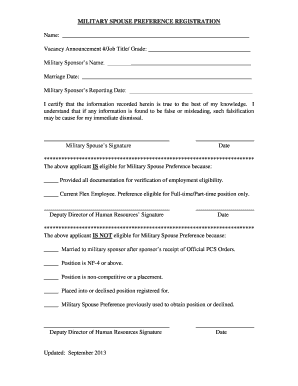
Completing the Military Wife Registration Form online is an essential step for military partners seeking job opportunities through the Military Spouse Preference Program. This guide provides clear instructions for each section of the form to ensure a smooth and efficient completion process.

Follow the steps to accurately complete the Military Wife Registration Form.

  1. Click ‘Get Form’ button to obtain the form and open it in the editor.
  2. Fill in your full name in the designated field to ensure proper identification.
  3. Enter the vacancy announcement number, job title, and grade for the position you are applying for. This information is crucial for linking your registration to the specific job opening.
  4. Provide your military sponsor’s name to establish your connection to the military spouse preference program.
  5. Indicate your marriage date in the specified field. This date should be prior to your sponsor's relocation date to demonstrate eligibility.
  6. Enter your military sponsor’s reporting date. This date is critical in determining your eligibility for preferences based on the timeline of your marriage and the sponsor's orders.
  7. Sign the form to certify that the information provided is accurate. Your signature validates your application and acknowledges your understanding of the criteria.
  8. Include the date of your signature in the designated section to complete the certification process.
  9. If you are eligible for Military Spouse Preference, ensure that you complete the verification section. Check the appropriate box and sign if required by the Deputy Director of Human Resources.
  10. Once everything is filled out, review the form for accuracy and completeness. Double-check your information against the requirements before finalizing your submission.
  11. Save changes made to the form, then download, print, or share it as necessary to submit your application.

Complete your Military Wife Registration Form online today to start your journey towards new job opportunities.

Get form

Experience a faster way to fill out and sign forms on the web. Access the most extensive library of templates available.
Get form

Related content

DPOR Military Spouse Expedited License Application
Jul 1, 2020 — MILITARY SPOUSE - EXPEDITED LICENSE APPLICATION. A406 ... State law...
Learn more
Military Spouse Leave Request Form
I have received official notice certifying that my spouse will be on leave from deployment...
Learn more
TENNESSEE MOTORCYCLE OPERATOR MANUAL
... military ID card (DD Form 2 or 2A). •. Discharge papers (DD-214). •. Military...
Learn more

Related links form

Itadaki Employment Application Form Myaceonline BALANCE TRANSFER APPLICATION FORM FOR ALLIANCE BANK ... Boone County Fiscal Court Employment Application - New Boone ...

Questions & Answers

Get answers to your most pressing questions about US Legal Forms API.

Contact support

To get a military ID for your spouse, you will need to visit the ID card office with the required documents. Filling out the Military Wife Registration Form can streamline this process by ensuring you provide all necessary information. It is important to bring the correct identification and proof of marriage to avoid any delays.

If your spouse loses her military ID, she should report the loss immediately to the appropriate military authorities. After reporting the loss, you can utilize the Military Wife Registration Form to apply for a replacement. This quick action ensures that her access to the base remains uninterrupted.

Yes, your spouse needs a military ID to have uninterrupted access to the base. This identification is crucial for security reasons. If your wife does not have one, she can fill out the Military Wife Registration Form to start the process of obtaining her ID.

Typically, access to a military base requires a military ID. In some cases, you can use the Military Wife Registration Form to apply for temporary access. This form serves as a formal request and can assist in ensuring a smooth entry process.

Generally, your wife will need a military ID to access the base. However, if she doesn't have one, the Military Wife Registration Form can help in applying for a temporary pass. This form provides essential information that helps officials make the necessary arrangements for her base access.

Yes, you can bring your wife on base, but certain regulations apply. To facilitate her access, you will need to complete the Military Wife Registration Form. This form may help in expediting the process and ensures that all necessary information is on record.

To secure a military ID card for your spouse, you must visit a military ID card office with relevant documentation, such as your marriage certificate. It is essential to ensure that all forms, including the Military Wife Registration Form, are completed accurately. This proactive step helps facilitate a smoother application process.

Yes, a military spouse ID is recognized as a valid form of identification. It allows military spouses to access various benefits and services. When applying for resources that require identification, presenting your military spouse ID can often fulfill requirements, including purposes outlined in the Military Wife Registration Form.

Obtaining a military spouse ID typically takes about 2 to 4 weeks after your paperwork is processed. This ID grants you access to military facilities and benefits. Ensure that you have completed the Military Wife Registration Form correctly to avoid delays in receiving your ID.

The duration for processing marriage paperwork in the military can vary, but it generally takes a few weeks. After you submit required documents, it usually depends on the branch's specific procedures and current workload. Completing the Military Wife Registration Form can help speed up the process by ensuring all necessary details are included from the start.

Get This Form Now!

Use professional pre-built templates to fill in and sign documents online faster. Get access to thousands of forms.
Get form
If you believe that this page should be taken down, please follow our DMCA take down processhere.
Get Military Wife Registration Form
Get form
  • Adoption
  • Bankruptcy
  • Contractors
  • Divorce
  • Home Sales
  • Employment
  • Identity Theft
  • Incorporation
  • Landlord Tenant
  • Living Trust
  • Name Change
  • Personal Planning
  • Small Business
  • Wills & Estates
  • Packages A-Z
  • Affidavits
  • Bankruptcy
  • Bill of Sale
  • Corporate - LLC
  • Divorce
  • Employment
  • Identity Theft
  • Internet Technology
  • Landlord Tenant
  • Living Wills
  • Name Change
  • Power of Attorney
  • Real Estate
  • Small Estates
  • Wills
  • All Forms
  • Forms A-Z
  • Other Templates
  • Legal Hub
  • About Us
  • Help Portal
  • Legal Resources
  • Blog
  • Affiliates
  • Contact Us
  • Delete My Account
  • Site Map
  • Industries
  • Forms in Spanish
  • Localized Forms
  • State-specific Forms
  • Forms Kit
  • Real Estate Handbook
  • All Guides
  • Notarize
  • Incorporation services
  • For Consumers
  • For Small Business
  • For Attorneys
  • USLegal
  • FormsPass
  • pdfFiller
  • signNow
  • altaFlow
  • DocHub
  • Instapage
Form Packages
  • Adoption
  • Bankruptcy
  • Contractors
  • Divorce
  • Home Sales
  • Employment
  • Identity Theft
  • Incorporation
  • Landlord Tenant
  • Living Trust
  • Name Change
  • Personal Planning
  • Small Business
  • Wills & Estates
  • Packages A-Z
Form Categories
  • Affidavits
  • Bankruptcy
  • Bill of Sale
  • Corporate - LLC
  • Divorce
  • Employment
  • Identity Theft
  • Internet Technology
  • Landlord Tenant
  • Living Wills
  • Name Change
  • Power of Attorney
  • Real Estate
  • Small Estates
  • Wills
  • All Forms
  • Forms A-Z
  • Other Templates
Customer Service
  • Legal Hub
  • About Us
  • Help Portal
  • Legal Resources
  • Blog
  • Affiliates
  • Contact Us
  • Delete My Account
  • Site Map
  • Industries
  • Forms in Spanish
  • Localized Forms
  • State-specific Forms
  • Forms Kit
Legal Guides
  • Real Estate Handbook
  • All Guides
Prepared for you
  • Notarize
  • Incorporation services
Our Customers
  • For Consumers
  • For Small Business
  • For Attorneys
Our Sites
  • USLegal
  • FormsPass
  • pdfFiller
  • signNow
  • altaFlow
  • DocHub
  • Instapage
Social Media
Call us now toll free:
+1 833 426 79 33
As seen in:
© Copyright 1999-2026 airSlate Legal Forms, Inc. 17 Station Street, Ste. 203, Brookline, MA 02445
  • Your Privacy Choices
  • Terms of Service
  • Privacy Notice
  • Content Takedown Policy
  • Bug Bounty Program