Loading
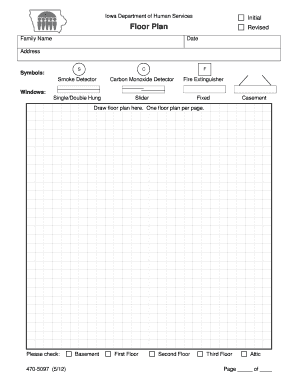
Get Floor Plan, Form 470-5097 - Dhs Iowa 2020-2026
How it works
-

Open form follow the instructions
-

Easily sign the form with your finger
-

Send filled & signed form or save
How to fill out the Floor Plan, Form 470-5097 - Dhs Iowa online
The Floor Plan, Form 470-5097 from the Iowa Department of Human Services is crucial for documenting residential layouts. This guide will help you navigate each component of the form, making it easier to complete online.
Follow the steps to successfully complete the Floor Plan form.
- Click ‘Get Form’ button to access the form and open it in the online editor.
- Begin by entering the family name at the top of the form. This is essential for identifying whose floor plan you are submitting.
- Indicate the address where the floor plan is applicable. Ensure all details are accurate to avoid any issues.
- Identify the symbols used in the floor plan. You will need to use notations for smoke detectors, carbon monoxide detectors, and fire extinguishers as applicable.
- Draw your floor plan in the designated area. It is important to represent the layout clearly, ensuring all rooms and significant features are shown.
- Label different areas of the home on the plan, such as 'basement', 'first floor', 'second floor', and 'attic'. You may have multiple pages for different levels.
- Lastly, review the entire form for accuracy. Once completed, you can save your changes, download, print, or share the floor plan as needed.
Complete your Floor Plan, Form 470-5097 online today for a seamless submission process.
To report a change to your Medicaid, Supplemental Nutrition Assistance Program (SNAP) or FIP case call 1-877-347-5678. For Child Care payments or registration call 1-866-448-4605 or click here to visit the Child Care portal. Call your worker for questions about your case.