Loading
Form preview
  • US Legal Forms
  • Other Templates
  • More Forms
  • More Uncategorized Forms
  • Tnb Convert Commercial To Residential Form

Get Tnb Convert Commercial To Residential Form

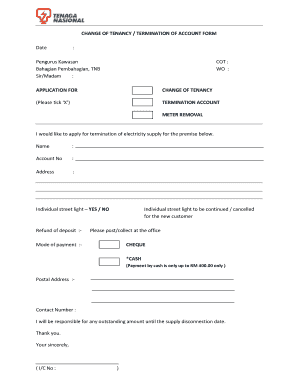
CCOUNT METER REMOVAL I would like to apply for termination of electricity supply for the premise below. Name : Account No : Address : Individual street light YES / NO Refund of deposit :- Individual street light to be continued / cancelled for the new customer Please post/collect at the office Mode of payment :- CHEQUE *CASH (Payment by cash is only up to RM 400.00 only ) Postal Address :- Contact Number : I will be responsible for any outstanding amount until the supply discon.

How it works

  1. Open form

    Open form follow the instructions

  2. Easily sign form

    Easily sign the form with your finger

  3. Share form

    Send filled & signed form or save

How to fill out the Tnb Convert Commercial To Residential Form online

Filling out the TNB Convert Commercial to Residential Form online can be a straightforward process if you follow the proper steps. This guide will walk you through each section of the form, ensuring that you can complete it with ease and confidence.

Follow the steps to successfully complete the form online.

  1. Click ‘Get Form’ button to access the form and open it in your preferred online editor.
  2. Begin filling out the form by indicating whether you are applying for a change of tenancy, termination of your account, or meter removal by checking the appropriate box.
  3. Provide your name in the designated field. Ensure that your name is spelled correctly to avoid any processing delays.
  4. Enter your account number, which can usually be found on your billing statements.
  5. Fill in your current address accurately, including street number, street name, city, and zip code.
  6. Indicate whether you have an individual street light on the premises by selecting ‘YES’ or ‘NO’.
  7. If applicable, specify how you would like your deposit refund handled by selecting either to post it or collect it at the office.
  8. Select the mode of payment for any outstanding amounts, choosing either cheque or cash, and remember that cash payments are limited to RM 400.00.
  9. Provide a postal address for correspondence, which may be different from your current address.
  10. Enter your contact number to ensure that your application can be processed smoothly and that you're reachable for any clarifications.
  11. Affirm your responsibility for any outstanding amounts until the supply disconnection date by acknowledging the statement in the form.
  12. Complete the form by entering your identification card number in the designated section.
  13. Review all the provided information for accuracy before saving your changes, downloading, printing, or sharing the completed form.

Start filling out the TNB Convert Commercial to Residential Form online today to ensure a smooth transition.

Get form

Experience a faster way to fill out and sign forms on the web. Access the most extensive library of templates available.
Get form

Related content

2020 All County Letters
2020 All County Letters. ACL 20-145 (December 29, 2020) CalFresh Elderly Simplified...
Learn more
Technical Manual for Sanitary Landfill Permits and...
The Solid Waste Facility Permit. Application Form can be obtained from the Division of...
Learn more
Thomas & Betts Ty-Rap® Catamount® Fastening...
priced cable bundling for a variety of commercial and residential construction...
Learn more

Related links form

ICPC-101 Form - Child And Family Services Agency - Cfsa Dc Community Meals Leeds Referral Form - Leeds Gov REPORT OF INCOME FROM PROPERTY OR BUSINESS - Placer Ca Dpr 619

Questions & Answers

Get answers to your most pressing questions about US Legal Forms API.

Contact support

The difficulty of converting a commercial property to residential use largely depends on local zoning laws and building codes. While the process can be complex due to regulatory requirements, using resources like the Tnb Convert Commercial To Residential Form simplifies the task. It is advisable to work with professionals who can navigate these challenges efficiently.

Converting a commercial property to residential use involves several steps, starting with a detailed assessment of the property’s current usage. You will need to ensure compliance with local regulations, and then you can complete the Tnb Convert Commercial To Residential Form. After obtaining approvals, engage with contractors to modify the space into a livable area, catering it to your needs.

You can indeed make a commercial building a home, but it involves specific legal and regulatory processes. First, you must check the zoning laws applicable to your area, followed by completing the Tnb Convert Commercial To Residential Form for approval. This allows you to create a customized living environment in a structure that once served a different purpose.

Yes, a commercial property can be converted into a residential space, but it requires adherence to local zoning laws and regulations. To proceed with this transformation, you will need to fill out the Tnb Convert Commercial To Residential Form. Once approved, this conversion can provide unique living spaces in prime locations previously meant for business.

In Malaysia, commercial electricity rates typically differ from residential rates due to factors like usage and demand. Commercial properties often consume more energy, leading to higher rates compared to residential properties. Understanding these differences is crucial when filling out the Tnb Convert Commercial To Residential Form. This knowledge helps you make informed decisions regarding energy costs.

Peak refers to time frames with high energy demand, while off-peak signifies periods of lower usage, usually resulting in reduced electricity rates. This concept is essential for managing electricity consumption wisely and saving on costs. By understanding these periods, you can optimize your energy usage effectively. For those considering changes, the Tnb Convert Commercial To Residential Form is an excellent resource to initiate your transition.

Peak and off-peak periods in TNB refer to the times of day when electricity usage varies. Peak periods are marked by increased demand and higher rates, while off-peak times offer cheaper rates due to lower demand. This understanding allows consumers to optimize their energy usage and costs. To make an informed switch from commercial to residential, look into the Tnb Convert Commercial To Residential Form for guidance.

In TNB's context, peak time refers to periods when electrical consumption is at its highest, generally from 7 AM to 11 PM. Off-peak hours, on the other hand, span the times when the demand is lower, often from 11 PM to 7 AM. This distinction can significantly impact your electricity bill. Therefore, utilizing the Tnb Convert Commercial To Residential Form can help you navigate the change effectively.

Peak electricity times occur when the demand for energy is highest, usually during the day and early evening. Conversely, off-peak times are when the energy demand drops, typically late at night and early morning. Understanding these times is crucial for managing your energy costs effectively. To streamline your transition, consider using the Tnb Convert Commercial To Residential Form.

A commercial title can be converted to a residential title, but the owner must be able to prove that the property is mainly or wholly used for dwelling.

Get This Form Now!

Use professional pre-built templates to fill in and sign documents online faster. Get access to thousands of forms.
Get form
If you believe that this page should be taken down, please follow our DMCA take down processhere.
Get Tnb Convert Commercial To Residential Form
Get form
  • Adoption
  • Bankruptcy
  • Contractors
  • Divorce
  • Home Sales
  • Employment
  • Identity Theft
  • Incorporation
  • Landlord Tenant
  • Living Trust
  • Name Change
  • Personal Planning
  • Small Business
  • Wills & Estates
  • Packages A-Z
  • Affidavits
  • Bankruptcy
  • Bill of Sale
  • Corporate - LLC
  • Divorce
  • Employment
  • Identity Theft
  • Internet Technology
  • Landlord Tenant
  • Living Wills
  • Name Change
  • Power of Attorney
  • Real Estate
  • Small Estates
  • Wills
  • All Forms
  • Forms A-Z
  • Other Templates
  • Legal Hub
  • About Us
  • Help Portal
  • Legal Resources
  • Blog
  • Affiliates
  • Contact Us
  • Delete My Account
  • Site Map
  • Industries
  • Forms in Spanish
  • Localized Forms
  • State-specific Forms
  • Forms Kit
  • Real Estate Handbook
  • All Guides
  • Notarize
  • Incorporation services
  • For Consumers
  • For Small Business
  • For Attorneys
  • USLegal
  • FormsPass
  • pdfFiller
  • signNow
  • altaFlow
  • DocHub
  • Instapage
Form Packages
  • Adoption
  • Bankruptcy
  • Contractors
  • Divorce
  • Home Sales
  • Employment
  • Identity Theft
  • Incorporation
  • Landlord Tenant
  • Living Trust
  • Name Change
  • Personal Planning
  • Small Business
  • Wills & Estates
  • Packages A-Z
Form Categories
  • Affidavits
  • Bankruptcy
  • Bill of Sale
  • Corporate - LLC
  • Divorce
  • Employment
  • Identity Theft
  • Internet Technology
  • Landlord Tenant
  • Living Wills
  • Name Change
  • Power of Attorney
  • Real Estate
  • Small Estates
  • Wills
  • All Forms
  • Forms A-Z
  • Other Templates
Customer Service
  • Legal Hub
  • About Us
  • Help Portal
  • Legal Resources
  • Blog
  • Affiliates
  • Contact Us
  • Delete My Account
  • Site Map
  • Industries
  • Forms in Spanish
  • Localized Forms
  • State-specific Forms
  • Forms Kit
Legal Guides
  • Real Estate Handbook
  • All Guides
Prepared for you
  • Notarize
  • Incorporation services
Our Customers
  • For Consumers
  • For Small Business
  • For Attorneys
Our Sites
  • USLegal
  • FormsPass
  • pdfFiller
  • signNow
  • altaFlow
  • DocHub
  • Instapage
Social Media
Call us now toll free:
+1 833 426 79 33
As seen in:
© Copyright 1999-2026 airSlate Legal Forms, Inc. 17 Station Street, Ste. 203, Brookline, MA 02445
  • Your Privacy Choices
  • Terms of Service
  • Privacy Notice
  • Content Takedown Policy
  • Bug Bounty Program