Loading
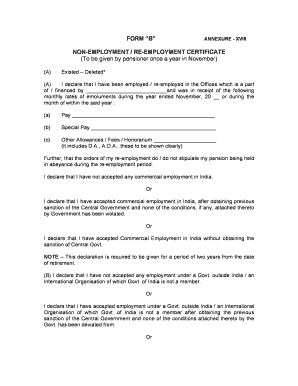
Get Non Employment Certificate
How it works
-

Open form follow the instructions
-

Easily sign the form with your finger
-

Send filled & signed form or save
How to fill out the Non Employment Certificate online
Filling out the Non Employment Certificate online is a straightforward process that ensures compliance with pension regulations. This guide will provide you with step-by-step instructions to help you complete the form accurately and efficiently.
Follow the steps to complete the Non Employment Certificate.
- Click ‘Get Form’ button to obtain the form and open it in your preferred editor.
- In the first section, you will need to provide details of your employment or re-employment. Specify the organization name that is part of or financed by the government.
- Next, you must declare whether your re-employment orders specify that your pension should be held in abeyance. Select the appropriate option based on your situation.
- Continue to the next section where you must declare any employment under a government outside India or with an international organization not part of the Government of India. Again, select the correct option based on your circumstances.
- Once you have completed all the sections, review the form to ensure all information is correct. After finalizing the entries, you can save your changes.
Complete your Non Employment Certificate online today to ensure timely compliance with pension requirements.
Filling out a proof of employment form involves providing your personal and employment details clearly and accurately. Include your job title, dates of employment, and other relevant information. Using a reliable service like uslegalforms can help streamline this process, ensuring you produce a valid Non Employment Certificate.