Loading

Open form follow the instructions

Easily sign the form with your finger

Send filled & signed form or save
How to fill out the FL 395 online
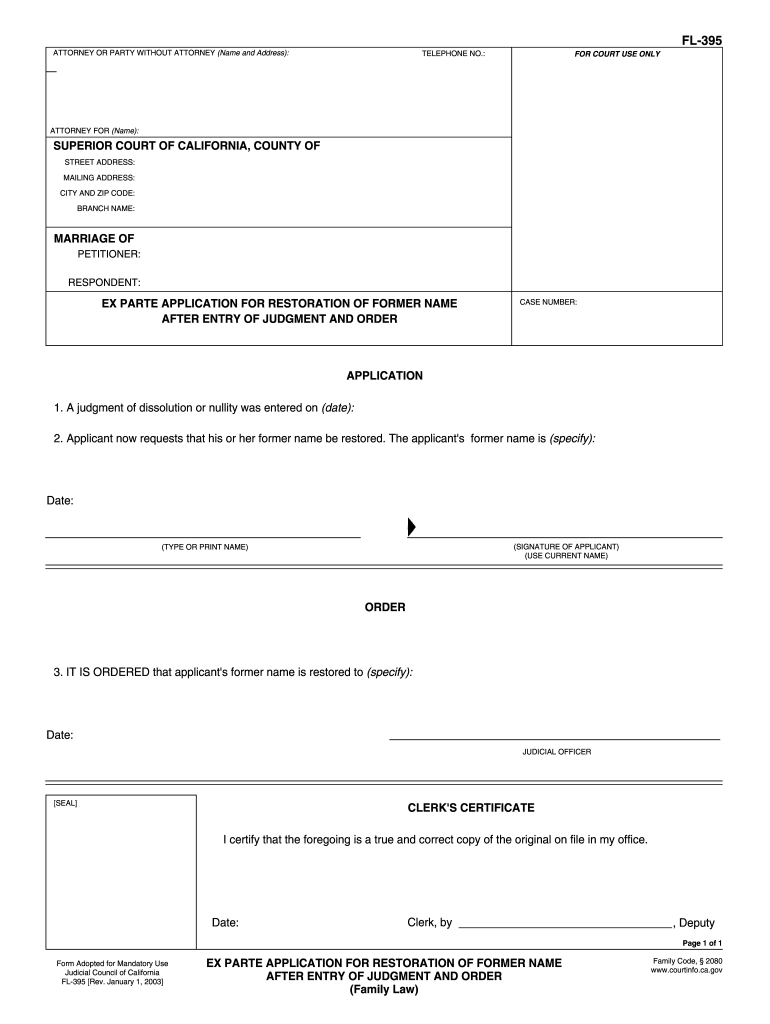
The FL 395 form is designed for individuals seeking to restore a former name after a judgment has been entered. This guide provides you with a clear, step-by-step approach to filling out the form online, ensuring you understand each component and can complete it successfully.
Follow the steps to fill out the FL 395 form online effectively.
- Press the ‘Get Form’ button to access the FL 395 document and open it in your preferred editor.
- In the first section, provide your name and address if you are representing yourself or your attorney's information if applicable.
- Fill in your telephone number to facilitate any necessary communication regarding your application.
- Indicate the name of your attorney, if applicable, under the 'Attorney For' section.
- Complete the court information, including the Superior Court of California, County name, street address, mailing address, city, and zip code.
- Enter the names of the petitioner and respondent in the marriage section.
- In the application section, specify the date when the judgment of dissolution or nullity was entered.
- Indicate your former name that you wish to be restored in the designated area.
- Date and sign the application where indicated, using your current name below your signature.
- In the order section, leave space for the judicial officer to specify your restored name and date.
- Ensure the clerk's certificate section can be filled in by the clerk, with the necessary date and signature.
- Once all sections are completed, choose to save any changes, download the completed form, print it for your records, or share as needed.
Complete your FL 395 form online today to streamline your application process!
Experience a faster way to fill out and sign forms on the web. Access the most extensive library of templates available.
Related content
2. Form Adopted for Mandatory Use. Judicial Council of California. FL-395 [Rev. January 1...
FL 395 - Study Abroad. 6 credit hours. Immersion in the language of study to perfect...
Use of a drive point sampling device for detailed characterization of a PCE plume in a...
Get answers to your most pressing questions about US Legal Forms API.
What is the 5 year rule in California?
The 5 year rule in California refers to the timeframe within which one must file for a name change following a divorce. After a divorce, individuals have five years to request a name change using FL 395. If you exceed this period, you may need to file a different type of petition to change your name, which can be more complex. It’s always recommended to act sooner rather than later to simplify the process.
What is FL-395?
FL 395 is a legal form used in California for petitions to change your name after divorce. This form allows the court to process your request efficiently and securely. It is important to complete this form accurately to avoid delays in the approval of your name change. Using reliable resources like UsLegalForms can help you fill it out correctly.
Where can I get form FL-395?
You can obtain form FL 395 online through the California courts’ website or through legal resources such as UsLegalForms. This form is readily accessible and easy to fill out, ensuring you have the necessary documentation for your name change. Additionally, you can visit your local courthouse for a physical copy, making it convenient for anyone in the state.
Are you required to change your last name after divorce?
No, you are not required to change your last name after a divorce in California. Many individuals choose to keep their married name for various personal or professional reasons. If you decide to change your name, you can easily use FL 395 to manage that process. Ultimately, the choice is entirely up to you.
How do I change my name after divorce in California?
To change your name after divorce in California, you will need to request this change in your divorce decree. You can use form FL 395 to submit your name change request. This form allows you to reinstate your maiden name or select a new name. Once the court reviews and approves your request, your new name will be legally recognized.
What is an example of ex parte motion?
An instance of an ex parte motion might be a request for temporary custody after a parent suddenly becomes unavailable. Such motions are often used to address immediate needs and can have significant implications for child welfare. Utilizing resources like FL 395 helps you articulate your request effectively, ensuring that critical matters are addressed swiftly by the court.
How to write an ex parte?
To write an ex parte motion, begin by clearly stating the specific relief you seek and outlining the reasons for your request. Include relevant facts that support the urgency of your situation, and ensure you reference applicable laws or previous court decisions. Forms like FL 395 can guide you through the required content and format, ensuring your motion is correctly presented to the court.
How to legally change your name after divorce in California?
To legally change your name after a divorce in California, you should include the name change request in your divorce papers or file a separate petition with the court. You may also need to submit forms such as FL 395 to ensure proper documentation. This process protects your legal rights and makes it easy to update your name officially.
Do I have to fill out an income and expense declaration?
Yes, you usually need to complete an income and expense declaration when you file for certain types of relief in family law cases. This form helps the court assess your financial situation, which is vital in matters like spousal support or child support. Forms like FL 395 provide you a clear path to gather and submit this essential information.
What is ex parte in simple terms?
Ex parte refers to actions taken by one party in a legal matter without the presence or involvement of the other party. This typically happens when urgent issues need to be addressed quickly, such as restraining orders or other emergency motions. Understanding how to navigate ex parte situations can be crucial, especially when using legal tools like FL 395.
Use professional pre-built templates to fill in and sign documents online faster. Get access to thousands of forms.
If you believe that this page should be taken down, please follow our DMCA take down process here.