How it works
  • Open form

    Open form follow the instructions

  • Easily sign form

    Easily sign the form with your finger

  • Share form

    Send filled & signed form or save

How to fill out the Sss Form E1 online

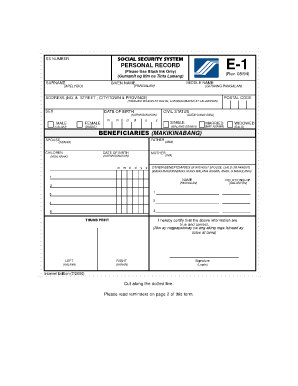
Filling out the Sss Form E1 online is a straightforward process that allows users to efficiently manage their personal records. This guide will provide you with detailed instructions on how to accurately complete each section of the form.

Follow the steps to complete your Sss Form E1 online.

  1. Click the ‘Get Form’ button to obtain the Sss Form E1 and open it in the designated editor.
  2. Enter your personal information in the form. Start by providing your name, including your given name, middle name, and surname in the appropriate fields. Ensure you use black ink if required.
  3. Fill in your Social Security number in the designated section. This keeps your record unique and secure.
  4. Complete your address details by entering your postal code, street number, city or town, and province in the relevant fields.
  5. Indicate your civil status by selecting your status from the available options: single, married, or widowed.
  6. Input your date of birth accurately in the specified format to avoid any discrepancies.
  7. Choose your sex by marking either male or female in the provided options.
  8. List your beneficiaries, starting with your father's name and date of birth, followed by your mother's name and date of birth. You may also include names and relationships for additional beneficiaries if applicable.
  9. Provide your thumbprint in the designated area to authenticate your application.
  10. Finally, review all the information you've entered for accuracy, then save your changes. You can download, print, or share the completed form as needed.

Take the first step towards managing your documents by completing your Sss Form E1 online today.

Get form

Experience a faster way to fill out and sign forms on the web. Access the most extensive library of templates available.

Related content

Printable Forms : Selective Service System

Use this form if you are man between 18-25 years old, living in the United States who...

Learn more
Selective Service Appeal Form

Status Information Letter from SSS (codes E1-E8), stating that you were not required to...

Learn more
TOUGH2 USER'S GUIDE, VERSION 2

by K Pruess · 1999 · Cited by 2454 — This document was prepared as an account of work...

Learn more
Questions & Answers

Get answers to your most pressing questions about US Legal Forms API.

Contact support

How do I get my E1 form SSS online?

To acquire your E1 form from SSS online, you need to visit the SSS official website and access the forms section. There, you can download the SSS Form E1 for online completion. After filling it out, follow the submission instructions for processing.

The E1 form is a registration form used by the Social Security System (SSS) in the Philippines. This form is essential for individuals who wish to obtain their SSS number and avail themselves of SSS benefits. Completing the SSS Form E1 accurately ensures you are recognized as a member.

Getting the SSS online form is straightforward. Simply visit the SSS website to locate the forms page, where you can find the necessary documents, including the SSS Form E1. Download the form, fill it out, and follow the relevant submission guidelines.

To access a SSS online form, visit the official SSS website and look for the forms section. There, you will find various forms, including the SSS Form E1. You can download the form directly and complete it at your convenience.

You can retrieve your SSS reference number online by logging into your My.SSS account on the SSS website. Once you are logged in, navigate to the relevant section, and you will find your reference number displayed. This number is essential for your transactions related to SSS Form E1.

Yes, you can go to an SSS branch without an appointment. However, keep in mind that visiting without an appointment may result in longer wait times, especially during busy periods. For a smoother experience, consider booking an appointment through the SSS online system.

To obtain your SSS Form E1, you can visit the official SSS website and navigate to their forms section. Additionally, you can also go to the nearest SSS branch to request a physical copy. Ensure that you have your valid IDs ready, as this will help streamline the process.

To apply for voluntary contributions to SSS online, log into your account and find the section related to contributions. Choose the option for voluntary contributions and follow the prompt to complete your application. Don’t forget to have your Sss Form E1 for reference during this process. If you encounter challenges, US Legal Forms offers support to simplify your application.

You can obtain SSS Form 1 from the official SSS website or by visiting your nearest SSS branch. Additionally, many online legal form platforms, including US Legal Forms, offer downloadable versions of SSS Form 1. Make sure to check for the most current version to ensure your submission is correct.

Submitting documents in SSS online involves logging into your account and selecting the document submission option. Follow the prompts to upload your files, ensuring they comply with the specified requirements. If Sss Form E1 is one of the documents you need to submit, having it prepared can save time. For additional help, US Legal Forms provides useful guidance.

Get This Form Now!

Use professional pre-built templates to fill in and sign documents online faster. Get access to thousands of forms.

If you believe that this page should be taken down, please follow our DMCA take down process here.

Get Sss Form E1