Loading
Get Gsis Members Request Form 2020-2026
How it works
-

Open form follow the instructions
-

Easily sign the form with your finger
-

Send filled & signed form or save
How to fill out the Gsis Members Request Form online
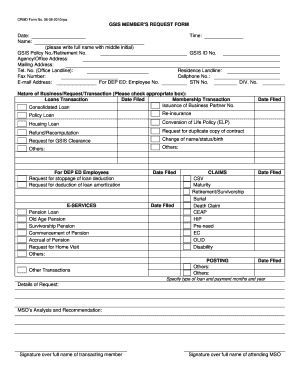
Filling out the Gsis Members Request Form online can be a straightforward process if you follow the correct steps. This guide provides clear and detailed instructions to help you complete the form efficiently.
Follow the steps to successfully submit your request
- Click ‘Get Form’ button to obtain the form and open it in the editor.
- Enter the date of your request in the designated field to provide a reference for your submission.
- Complete your full name along with your middle initial in the appropriate section to ensure accurate identification.
- Fill in your GSIS Policy No. or Retirement No. for accurate processing of your request.
- Provide your agency or office address, along with your mailing address if different, to facilitate communication.
- Input your office landline number for any official correspondence related to your request.
- Include your fax number, if applicable, to ensure you receive necessary documents swiftly.
- Provide your email address to receive updates and confirmations regarding your request.
- For DepED employees, include your employee number in the specified section to validate your status.
- Input your GSIS ID No. to assist with the identification process.
- Fill out your residence landline and cellphone numbers for further contact as needed.
- Select the nature of your request by checking the appropriate box—be specific about the type of transaction or service required.
- For loans or other specific requests, provide the relevant details such as type of loan, payment months, and years.
- In the details of request section, describe any additional information needed to facilitate your transaction clearly.
- Review your completed form for accuracy before signing over your full name to affirm the request.
- If applicable, the attending MSO should sign, indicating their review and acknowledgement of the request.
- Once all fields are filled, you may download, print, or share the form as necessary, ensuring to save your changes.
Complete the Gsis Members Request Form online to ensure a smooth processing of your request.
Enroll for eCard / UMID Card Bring two valid government-issued IDs (examples: LTO license, PRC license, passport, voter's registration ID) to a GSIS office nearest you. Accomplish an eCard enrollment form and submit to the GSIS personnel assigned in the eCard enrollment area.