We use cookies to improve security, personalize the user experience, enhance our marketing activities (including cooperating with our marketing partners) and for other business use.
Click "here" to read our Cookie Policy. By clicking "Accept" you agree to the use of cookies. Read less
Read more
Accept
Loading
Form preview
  • US Legal Forms
  • Form Library
  • More Forms
  • More Multi-State Forms
  • Autosweep Rfid Subscription Agreement Business Account 2020

Get Autosweep Rfid Subscription Agreement Business Account 2020-2025

How it works

  1. Open form

    Open form follow the instructions

  2. Easily sign form

    Easily sign the form with your finger

  3. Share form

    Send filled & signed form or save

How to fill out the Autosweep RFID Subscription Agreement Business Account online

Filling out the Autosweep RFID subscription agreement for a business account can be straightforward with the right guidance. This guide provides detailed, step-by-step instructions to ensure that users can successfully complete the form online, regardless of their prior experience.

Follow the steps to complete your Autosweep RFID subscription agreement.

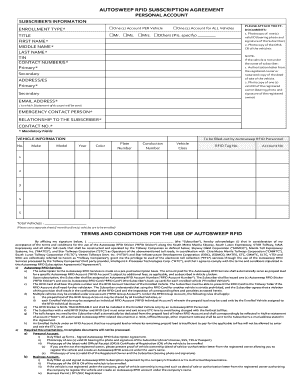
  1. Click ‘Get Form’ button to obtain the Autosweep RFID Subscription Agreement form and open it in the editor.
  2. Select the enrollment type from the options provided (One Account PER Vehicle or One Account for ALL Vehicles). Ensure you choose the option that best suits your needs.
  3. Fill in the subscriber's information. Required fields include title, first name, middle name (if any), last name, Tax Identification Number (TIN), and contact number (primary). Ensure accuracy as this information is crucial for processing your subscription.
  4. Attach the required documents as specified. This includes a photocopy of a valid ID with your photo and signature, as well as the Official Receipt (OR) and Certificate of Registration (CR) for the vehicles.
  5. If the vehicle is not registered under your name, include either an authorization letter from the registered owner or a notarized copy of the deed of sale along with their valid ID.
  6. Provide the primary and secondary addresses where you can be reached, alongside your email address for sending statements of account.
  7. Designate an emergency contact person, their relationship to you, and their contact number.
  8. Enter the vehicle information for each vehicle that you are enrolling. This includes details such as make, model, year, color, plate number, conduction number, vehicle class, RFID tag number, and account number.
  9. Confirm all information provided is accurate and complete. Check to ensure you have filled in all mandatory fields denoted with an asterisk (*).
  10. After reviewing your filled form, you can save any changes, download a copy, print it for your records, or share it accordingly.

Start filling out your Autosweep RFID Subscription Agreement form online today for a smoother toll experience.

Get form

Experience a faster way to fill out and sign forms on the web. Access the most extensive library of templates available.
Get form

Related content

Irwin Conipiiny - Corporate Information - Port...
Aug 30, 2012 — Acceptance of seller's offer will be only by Purchase Order Form ... Upon...
Learn more
Sample Official Receipt Philippines |...
Oct 19, 2020 — KPMG International - KPMG Global AUTOSWEEP. RFID SUBSCRIPTION Personal...
Learn more

Related links form

Map Skills Scavenger Hunt - Cherokee County School District Atlanta Public Schools Affidavit Of Residency Application In PDF - P-12 - New York State Education Department - P12 Nysed Www.acces.nysed.gov/ged/documents/attch-jHSE.pdf - SEO Test ... - Acces Nysed

Questions & Answers

Get answers to your most pressing questions about US Legal Forms API.

Contact support

Autosweep is owned by San Miguel Corporation, which oversees its operations within the toll collection sector. Their backup ensures reliability, safety, and excellent service for users. As a part of the Autosweep RFID Subscription Agreement Business Account, you can enjoy seamless travel experience on toll roads.

EZ Pass is not owned by a single entity; it is managed by a consortium of tolling agencies across various states. They collectively oversee the operations and functionalities of the system, including those that integrate well with services like the Autosweep RFID Subscription Agreement Business Account.

Easytrip is owned by the Manila North Tollways Corporation, a subsidiary of the Metro Pacific Tollways Corporation. Like Autosweep, Easytrip offers its own electronic toll collection system. Understanding who owns these services can help you decide which one best suits your needs.

Autosweep to Go is designed for casual users, offering basic features for quick access to toll roads. Conversely, Autosweep Premium caters to businesses, providing additional features and benefits tailored for heavy users, such as the Autosweep RFID Subscription Agreement Business Account, which includes easier management of multiple vehicles.

The owner of Autosweep is the San Miguel Corporation, a major company in the Philippines. They manage various toll operations, including the Autosweep RFID subscription service. This ownership ensures that the Autosweep RFID Subscription Agreement Business Account aligns with quality standards and customer service expectations.

To check your Autosweep RFID transactions, log into your Autosweep account online. The transaction history section provides a detailed view of all your past journeys and payments. This feature allows you to keep track of your expenses effectively under the Autosweep RFID Subscription Agreement Business Account.

Creating an account for your Autosweep RFID service is a simple process. Start by visiting the Autosweep website and click on the registration option. Fill out the required details for the Autosweep RFID Subscription Agreement Business Account, and follow the prompts to complete your setup.

For assistance with your Autosweep RFID inquiries, you can contact customer service via the official website. They provide various support options, including email and phone support. Quick access to help is essential for managing your Autosweep RFID Subscription Agreement Business Account effectively.

Your RFID transaction history is accessible through your Autosweep online account. After logging in, go to the transaction history page to view all your toll transactions. This feature is an important part of managing your Autosweep RFID Subscription Agreement Business Account.

You can easily acquire your Autosweep RFID receipt by accessing your account online. Once logged in, visit the history section where your previous transactions are listed. Simply select the transaction of interest to view and print the receipt linked to your Autosweep RFID Subscription Agreement Business Account.

Get This Form Now!

Use professional pre-built templates to fill in and sign documents online faster. Get access to thousands of forms.
Get form
If you believe that this page should be taken down, please follow our DMCA take down processhere.

Industry-leading security and compliance

US Legal Forms protects your data by complying with industry-specific security standards.
  • In businnes since 1997
    25+ years providing professional legal documents.
  • Accredited business
    Guarantees that a business meets BBB accreditation standards in the US and Canada.
  • Secured by Braintree
    Validated Level 1 PCI DSS compliant payment gateway that accepts most major credit and debit card brands from across the globe.
Get Autosweep Rfid Subscription Agreement Business Account
Get form
Form Packages
Adoption
Bankruptcy
Contractors
Divorce
Home Sales
Employment
Identity Theft
Incorporation
Landlord Tenant
Living Trust
Name Change
Personal Planning
Small Business
Wills & Estates
Packages A-Z
Form Categories
Affidavits
Bankruptcy
Bill of Sale
Corporate - LLC
Divorce
Employment
Identity Theft
Internet Technology
Landlord Tenant
Living Wills
Name Change
Power of Attorney
Real Estate
Small Estates
Wills
All Forms
Forms A-Z
Form Library
Customer Service
Terms of Service
Privacy Notice
Legal Hub
Content Takedown Policy
Bug Bounty Program
About Us
Blog
Affiliates
Contact Us
Delete My Account
Site Map
Industries
Forms in Spanish
Localized Forms
State-specific Forms
Forms Kit
Legal Guides
Real Estate Handbook
All Guides
Prepared for You
Notarize
Incorporation services
Our Customers
For Consumers
For Small Business
For Attorneys
Our Sites
US Legal Forms
USLegal
FormsPass
pdfFiller
signNow
airSlate WorkFlow
DocHub
Instapage
Social Media
Call us now toll free:
+1 833 426 79 33
As seen in:
  • USA Today logo picture
  • CBC News logo picture
  • LA Times logo picture
  • The Washington Post logo picture
  • AP logo picture
  • Forbes logo picture
© Copyright 1997-2025
airSlate Legal Forms, Inc.
3720 Flowood Dr, Flowood, Mississippi 39232
Form Packages
Adoption
Bankruptcy
Contractors
Divorce
Home Sales
Employment
Identity Theft
Incorporation
Landlord Tenant
Living Trust
Name Change
Personal Planning
Small Business
Wills & Estates
Packages A-Z
Form Categories
Affidavits
Bankruptcy
Bill of Sale
Corporate - LLC
Divorce
Employment
Identity Theft
Internet Technology
Landlord Tenant
Living Wills
Name Change
Power of Attorney
Real Estate
Small Estates
Wills
All Forms
Forms A-Z
Form Library
Customer Service
Terms of Service
Privacy Notice
Legal Hub
Content Takedown Policy
Bug Bounty Program
About Us
Blog
Affiliates
Contact Us
Delete My Account
Site Map
Industries
Forms in Spanish
Localized Forms
State-specific Forms
Forms Kit
Legal Guides
Real Estate Handbook
All Guides
Prepared for You
Notarize
Incorporation services
Our Customers
For Consumers
For Small Business
For Attorneys
Our Sites
US Legal Forms
USLegal
FormsPass
pdfFiller
signNow
airSlate WorkFlow
DocHub
Instapage
Social Media
Call us now toll free:
+1 833 426 79 33
As seen in:
  • USA Today logo picture
  • CBC News logo picture
  • LA Times logo picture
  • The Washington Post logo picture
  • AP logo picture
  • Forbes logo picture
© Copyright 1997-2025
airSlate Legal Forms, Inc.
3720 Flowood Dr, Flowood, Mississippi 39232