Loading
Get Borang Pna 42 2020-2026
How it works
-

Open form follow the instructions
-

Easily sign the form with your finger
-

Send filled & signed form or save
How to fill out the Borang Pna 42 online
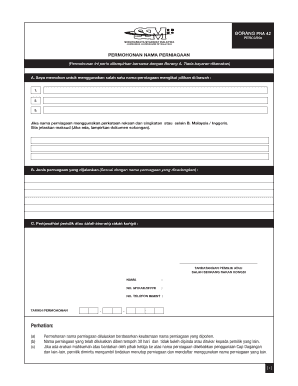
The Borang Pna 42 is a form for applying for a business name. This guide will walk you through the process of filling out the form online, ensuring that you understand each section and can complete it accurately.
Follow the steps to successfully submit your application.
- Click ‘Get Form’ button to obtain the form and open it in the editor.
- In section A, you will need to apply for one of the business names from the options provided. Fill in your preferred name in the spaces provided, ensuring it meets the criteria outlined.
- If the proposed business name includes invented words or abbreviations outside of Malay/English, please explain their meaning in this section and attach any supporting documents if necessary.
- For section B, describe the type of business that will operate under the proposed name. This should align with the business name choices you made in section A.
- In section C, the owner or one of the partners must confirm the application. Provide a signature, full name, MyKad/MyPR number, and mobile phone number.
- Indicate the application date in the specified format, ensuring it is accurate and up-to-date.
- Review all filled sections for accuracy. Once you are satisfied with your entries, you may save changes, download, print, or share the completed form as necessary.
Start completing your Borang Pna 42 online today!
Filling out a medical authorization form requires you to specify the patient's information and detail what health information you wish to authorize for release. Ensure that the patient understands the scope of the authorization and signs the form. With Borang Pna 42, you can access templates and information that can guide you in completing this form correctly.