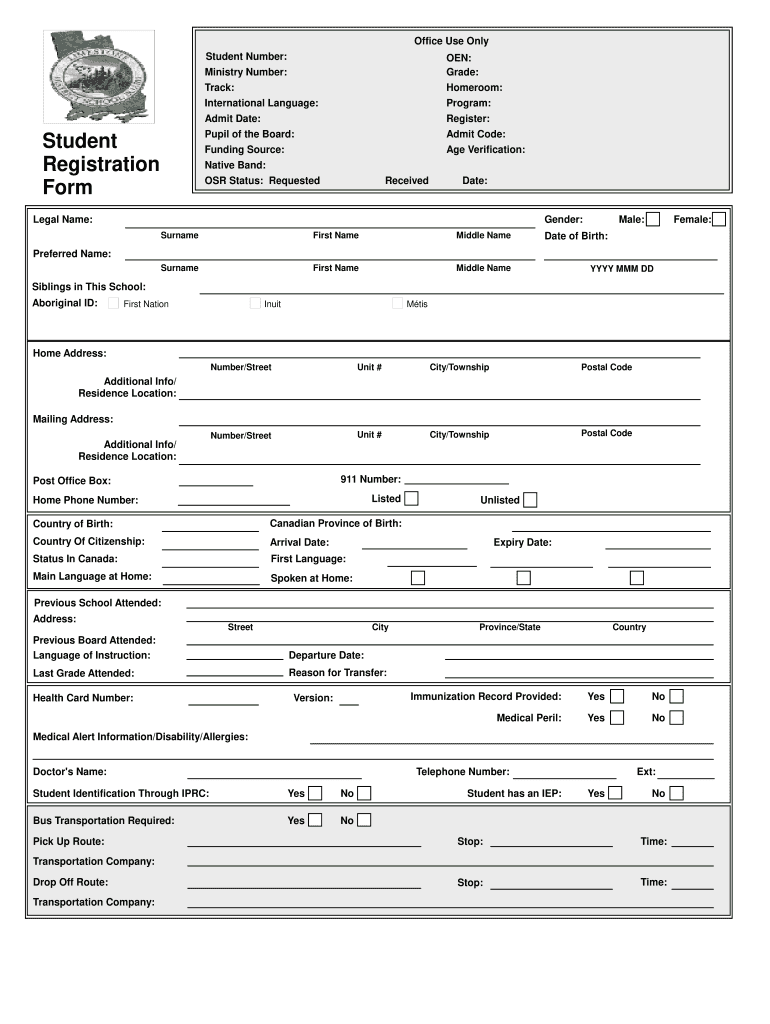
Form OEN: Grade: Age Verification: Native Band: OSR Status: Requested Received Date: Gender: Legal Name: Surname First Name Middle Name Surname First Name Middle Name Male: Female: Date of Birth: Preferred Name: YYYY MMM DD Siblings in This School: Aboriginal ID: First Nation Inuit M tis Home Address: Number/Street Unit # City/Township Postal Code Number/Street Unit # City/Township Postal Code Additional Info/ Residence Location: Mailing Address: Additional Info/ R.
Loading

Open form follow the instructions

Easily sign the form with your finger

Send filled & signed form or save
How to fill out the School Registration Form Online
Filling out the School Registration Form Online is a crucial step in ensuring that your child can be enrolled in school effectively. This guide provides clear, step-by-step instructions to help you navigate each section of the form with ease.
Follow the steps to complete the School Registration Form Online
- Click ‘Get Form’ button to obtain the form and open it in the editor.
- Begin by entering the student’s legal name in the designated fields for surname, first name, and middle name. Make sure to provide accurate information as it appears on official documents.
- Fill in the date of birth using the specified format (YYYY MMM DD) to ensure clarity for processing.
- Indicate the student’s gender as either male or female by selecting the appropriate option on the form.
- Complete the section for residential information, including home address, mailing address (if different), and whether the address includes a unit number.
- Provide details about the student’s previous educational experience, including the previous school attended, last grade completed, and the reason for transfer.
- Fill out medical information, including whether an immunization record is provided and details regarding any medical alerts or disabilities.
- Enter parent or guardian information, including names, relationships to the student, and contact details. Be sure to fill each emergency contact’s information, prioritizing according to their availability.
- Review all provided information for accuracy and completeness before proceeding,
- Finally, save changes, download, print, or share the form as required.
Complete your School Registration Form Online today to ensure timely enrollment.
Experience a faster way to fill out and sign forms on the web. Access the most extensive library of templates available.
Related content
Sep 20, 2025 — The following instructions are provided to assist Heritage schools with...
May 2, 2025 — Apply to Open a Charter Public School (New Operators) · Apply to Open a...
Get answers to your most pressing questions about US Legal Forms API.
What is the purpose of a registration form?
The purpose of a registration form is to collect essential information from participants or students for various activities. A School Registration Form Online serves to streamline the enrollment process, ensuring that all necessary data is collected in an organized manner. By utilizing such a form, schools can better manage their incoming information and improve the registration experience.
What is the best app to create fillable forms?
When looking for the best app to create fillable forms, US Legal Forms excels with its range of templates and customization options. Their School Registration Form Online provides a seamless experience for both form creators and users. You can easily incorporate features that enhance functionality while gathering data efficiently.
How do I create a simple registration form?
Creating a simple registration form involves defining the necessary fields and using a user-friendly platform like US Legal Forms. Choose a template such as the School Registration Form Online, customize it with your required information, and make it accessible for users. This approach minimizes confusion and streamlines the registration process for everyone involved.
What is the online registration form?
An online registration form is a digital document that allows individuals to provide information for enrollment or participation purposes. For instance, the School Registration Form Online simplifies the collection of student information, making it easy for schools to manage data efficiently. This method enhances organization and ensures that necessary details are securely gathered.
How to make a registration form online?
To make a registration form online, you can start by choosing a reliable form builder like US Legal Forms. Begin with a template such as the School Registration Form Online, customize it to fit your needs, and add necessary fields. Finally, share the form link with your audience to facilitate easy registration.
Which app can I use to create a registration form?
Many apps allow you to create a registration form, but US Legal Forms stands out with its dedicated solutions. They offer a School Registration Form Online that is easy to use and adaptable for various educational settings. This app simplifies the registration process, allowing schools and educators to focus on what matters most.
What is the best tool to create a form?
The best tool to create a form depends on your requirements, but many find that using platform services like US Legal Forms provides a user-friendly interface. They offer customizable templates for a School Registration Form Online that helps cater to different needs. You can easily tailor the form to your specific audience, and the process is straightforward, ensuring you spend less time on form creation.
How do I register my child for school in NYC?
To register your child for school in NYC, you need to complete the online registration process through the Department of Education's website. They provide a specific School Registration Form Online that gathers essential information. Be sure to have all required documentation ready for a smooth enrollment experience.
How to make an online registration form?
To create an online registration form, you can use various web-based tools that simplify form creation. Platforms like UsLegalForms offer templates and guides to help you design forms that capture necessary information for school enrollment. Once completed, the form can be submitted online, streamlining the entire registration process.
What age does a child start school in Maryland?
In Maryland, children typically start school at age five. The state requires that students enroll by the age of seven, but early registration is encouraged. Using a School Registration Form Online ensures you meet deadlines and secure a spot for your child in the educational system.
Use professional pre-built templates to fill in and sign documents online faster. Get access to thousands of forms.
If you believe that this page should be taken down, please follow our DMCA take down process here.