Get Undergraduate Admission And Registration Schedule For The ... 2020-2025
How it works
-

Open form follow the instructions
-

Easily sign the form with your finger
-

Send filled & signed form or save
How to fill out the Undergraduate Admission And Registration Schedule For The ... online
This guide aims to help users successfully complete the Undergraduate Admission And Registration Schedule For The ... online. By following these step-by-step instructions, users will be able to navigate each section of the form with ease.
Follow the steps to fill out your form accurately and efficiently.
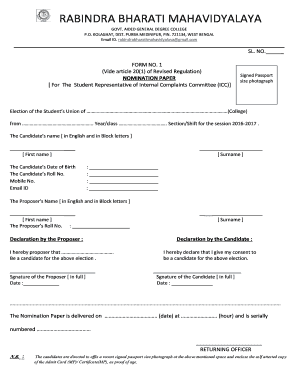
- Click ‘Get Form’ button to access the nomination paper and open it in your preferred editor.
- Begin by providing the candidate’s name in block letters. Make sure to include both the first name and surname accurately.
- Enter the candidate’s date of birth and roll number in the respective fields as required.
- Fill in the mobile number and email address of the candidate to ensure they can be contacted.
- Next, write the proposer’s name in block letters, including their first name and surname.
- Add the proposer’s roll number in the designated field.
- The proposer must provide a declaration. They should sign in full and date their signature to confirm their endorsement of the candidate.
- The candidate must also provide a declaration, signing in full and dating it to confirm their consent to stand for election.
- Complete the form by noting the date and hour on which the nomination paper is delivered, along with its serial number.
- Affix a recent signed passport-size photograph in the specified area, and ensure that a self-attested copy of the Admit Card or certificate is enclosed as proof of age.
- Once all fields are completed and documents are attached, save the changes, and consider downloading or printing the completed form for your records.
Take the next step towards your academic future by completing your admission and registration documents online today.
To add a class at City College of San Francisco, you'll first need to log into your student portal. From there, navigate to the registration section and search for the course you want to add. Make sure to meet any prerequisites before enrolling. If you need further assistance, uslegalforms can provide resources to streamline your registration process, complementing the Undergraduate Admission and Registration Schedule For The University.
Industry-leading security and compliance
-
In businnes since 199725+ years providing professional legal documents.
-
Accredited businessGuarantees that a business meets BBB accreditation standards in the US and Canada.
-
Secured by BraintreeValidated Level 1 PCI DSS compliant payment gateway that accepts most major credit and debit card brands from across the globe.