Loading
Get Fednet Login
How it works
-

Open form follow the instructions
-

Easily sign the form with your finger
-

Send filled & signed form or save
How to fill out the Fednet Login online
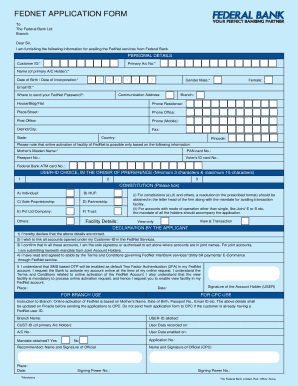
This guide provides clear instructions on how to fill out the Fednet Login application form online. Follow the outlined steps to successfully complete your application and access the Fednet services.
Follow the steps to fill out the Fednet Login application form effectively.
- Press the ‘Get Form’ button to obtain the application form and open it in your digital editing tool.
- Fill in your personal details, including your Customer ID and Primary Account Number. Ensure that you include the full name of the primary account holder.
- Provide your Date of Birth or Date of Incorporation as required, ensuring the date format is correct.
- Select your gender and enter your email address for the Fednet password communication. Fill in your complete communication address, including branch details.
- List multiple contact numbers such as residential and mobile phone numbers, along with the district, state, and pincode.
- Complete the security and identification sections by providing your Mother’s Maiden Name, PAN Card Number, and any necessary identification documents.
- Choose your preferred User-ID in the designated fields, ensuring that it meets the character requirements.
- Indicate your constitutional type by ticking the relevant box to specify whether you are applying as an individual, a trust, etc.
- Select the Fednet service details you wish to opt for (View & Transaction or View only).
- Read and agree to the declaration statements confirming the accuracy of the details and your acceptance of the terms.
- Finally, review all the provided information. Once you ensure its accuracy, save the document, download it, or print it for submission.
Complete your Fednet Login application online today for seamless banking services.
Related links form
Creating a net banking User ID and password is a simple process. Start by visiting the Fednet Login page and choosing the registration option. Fill in your personal information as required, and after setting your preferences, submit the form to create both your User ID and password.