Loading
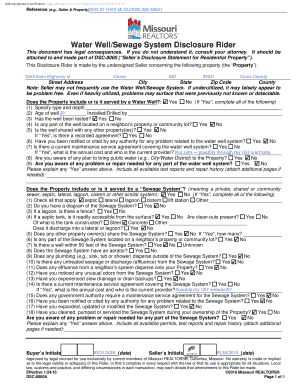
Get Water Well/sewage System Disclosure Rider 2020-2026
How it works
-

Open form follow the instructions
-

Easily sign the form with your finger
-

Send filled & signed form or save
How to fill out the Water Well/Sewage System Disclosure Rider online
Properly completing the Water Well/Sewage System Disclosure Rider is essential for ensuring transparency in real estate transactions. This guide provides step-by-step instructions to assist you in filling out the form accurately and efficiently.
Follow the steps to complete the Water Well/Sewage System Disclosure Rider.
- Click the ‘Get Form’ button to obtain the form and open it in the digital document manager.
- Begin by filling in the property details, including the street address, city, state, zip code, and county. Ensure all information is accurate, as these details will be referenced throughout the document.
- Indicate whether the property includes or is served by a water well. If 'Yes,' provide specific information about the well including type, depth, age, testing history, and any maintenance service agreements.
- Next, address questions related to the sewage system. Determine if the property has a sewage system, specifying the type, service conditions, and any known issues.
- Carefully review any sections related to government notifications or citations, ensuring you disclose accurately any problems that have been reported to authorities.
- After completing all relevant sections, it’s important to add any necessary explanations regarding any 'Yes' answers provided in the form. Attach additional documents or explanations if needed.
- Review the completed form for accuracy and completeness before proceeding to save your changes or export the document in your desired format.
- When satisfied, choose to download, print, or share the form as required for your transaction.
Start completing your Water Well/Sewage System Disclosure Rider online today to ensure a smooth real estate transaction.