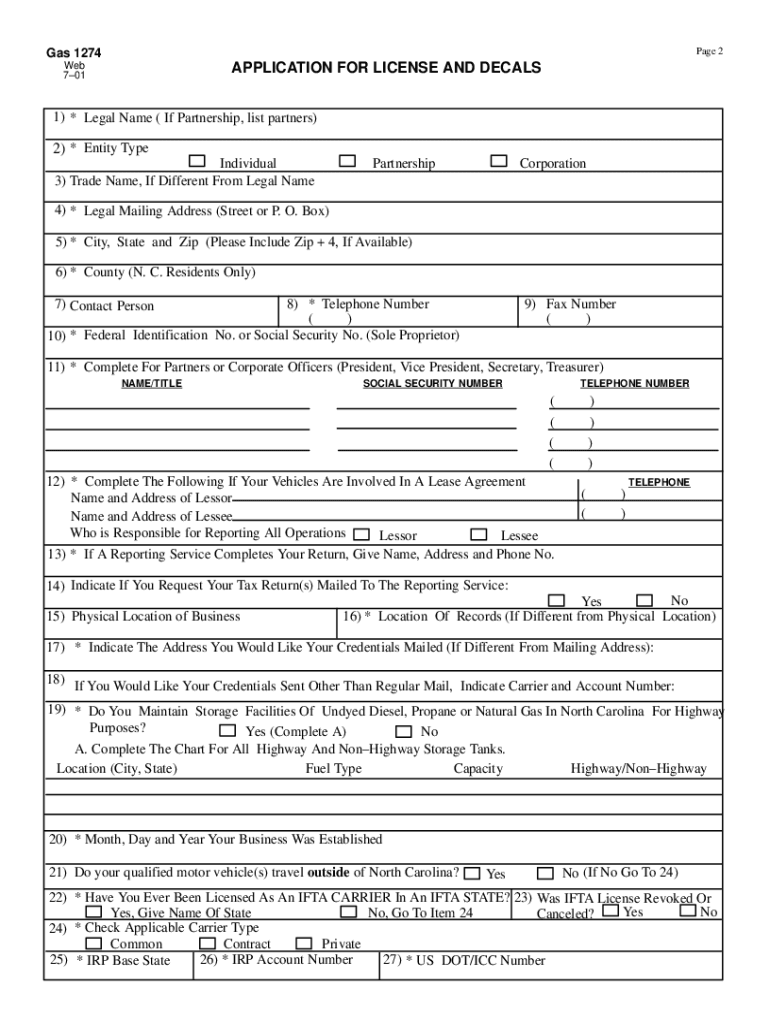
ONLY BATCH # APPLICATION FOR LICENSE AND DECALS ***THERE IS NO CHARGE FOR LICENSE AND DECALS*** Decals are required for Qualified Motor Vehicles . A Qualified Motor Vehicle means a motor vehicle used, designed or maintained for the transportation of persons or property and: 1. having 2 axles and a gross vehicle weight or a registered gross vehicle weight exceeding 26,000 pounds; 2. having 3 or more axles regardless of weight; or 3. used in combination when the weight of such c.
Loading

Open form follow the instructions

Easily sign the form with your finger

Send filled & signed form or save
How to fill out the Nc Fuel Sticker Application online
This guide provides detailed instructions on completing the Nc Fuel Sticker Application online. By following these steps, users can ensure a smooth application process.
Follow the steps to successfully submit your application.
- Click ‘Get Form’ button to access the application and open it in your preferred document editor.
- Begin by providing your legal name in the designated field. If you are applying as a partnership, please include the names of all partners.
- Select your entity type by marking the appropriate option: Individual, Partnership, or Corporation.
- If applicable, enter your trade name in the appropriate field if it differs from your legal name.
- Fill out your legal mailing address, including the street address or P.O. Box.
- Provide your city, state, and ZIP code. It is recommended to include the ZIP + 4 code, if available.
- Indicate your county if you are a resident of North Carolina.
- Enter the name of the contact person for this application.
- Provide a telephone number where the contact person can be reached.
- Fill in the federal identification number or your social security number if you are a sole proprietor.
- If applicable, complete the sections for partners or corporate officers by providing their names, titles, social security numbers, and telephone numbers.
- If your vehicles are involved in a lease agreement, fill in the name and address of both the lessor and lessee, and indicate who is responsible for reporting operations.
- If you utilize a reporting service to complete your return, provide their name, address, and telephone number.
- Indicate whether you would like your tax return(s) mailed to the reporting service.
- Enter the physical location of your business.
- If the location of records is different from the physical location, provide that address.
- Specify the address where you would like your credentials mailed, if different from your mailing address.
- If you prefer your credentials to be sent by another method, indicate the carrier and account number.
- Indicate if you maintain storage facilities of undyed diesel, propane, or natural gas in North Carolina for highway purposes, and complete the chart for all storage tanks.
- State the month, day, and year your business was established.
- Indicate whether your qualified motor vehicle(s) travel outside of North Carolina.
- Answer whether you have ever been licensed as an IFTA carrier in another jurisdiction.
- If your IFTA license was revoked or canceled, provide the name of the state.
- Check the applicable carrier type: Common, Contract, or Private.
- Provide your IRP base state.
- Fill in your IRP account number.
- Enter your US DOT/ICC number.
- Indicate whether any of your qualified motor vehicles are licensed with the North Carolina Division of Motor Vehicles.
- IFTA carriers must complete the section identifying jurisdictions in which they plan to operate qualified motor vehicles and indicate bulk storage by fuel type.
- Specify the number of qualified motor vehicles requiring decals, ensuring to choose either IFTA or NCHFUT decals.
- Review the information entered to ensure accuracy. Sign the application, provide the date, and enter your title and telephone number.
- Once all fields are completed, save your changes, then proceed to download, print, or share the application as needed.
Complete your Nc Fuel Sticker Application online today to ensure compliance and secure your decals.
Experience a faster way to fill out and sign forms on the web. Access the most extensive library of templates available.
Related content
This application must be completed by any business operating as an intrastate or...
1. List the eleven inspection areas inspector mechanics must check during a safety...
▫ Fuel or oil carried by the vehicle for its own use. Involvement. 00 - No is used if...
Get answers to your most pressing questions about US Legal Forms API.
How do I set up an IFTA account in NC?
Setting up an IFTA account in North Carolina involves completing the Nc Fuel Sticker Application. You will need to provide some personal and vehicle information. Once your account is established, you will need to ensure regular reporting of your fuel usage and travel distances to maintain compliance.
What do you need to get IFTA stickers?
To get IFTA stickers, it's crucial to prepare a few specific items. You will need the Nc Fuel Sticker Application, documentation for your vehicles, and a record of your travel distances. Once you have these documents in order, your application can be submitted easily to receive your stickers.
Who is required to have a fuel sticker in NC?
In North Carolina, all commercial vehicles that operate across state lines must have a fuel sticker. If your vehicle is subject to the International Fuel Tax Agreement (IFTA), you need to complete the Nc Fuel Sticker Application. This requirement extends to vehicles over 26,000 pounds or those transporting hazardous materials.
What is the penalty for fuel tax decals in NC?
In North Carolina, failing to display fuel tax decals can lead to penalties, including fines. This can result in enforcement actions against you if you are found operating without the required Nc Fuel Sticker Application. Maintaining compliance protects you from such penalties and ensures you stay on the right side of the law.
How do I get IFTA stickers in NC?
To obtain IFTA stickers in North Carolina, you need to complete the Nc Fuel Sticker Application. This application can typically be found on the North Carolina Department of Revenue website. Once completed, submit the form along with any required fees. After processing, your IFTA stickers will be mailed directly to you.
How much is a ticket for no IFTA sticker?
The fines for operating a vehicle without an IFTA sticker in North Carolina can range significantly, depending on the situation. Generally, you may face fines that can add up quickly, resulting in financial strain. Thus, it's always wise to ensure you submit your Nc Fuel Sticker Application and display the required decals on your vehicle.
What are the requirements for IFTA in NC?
To comply with the IFTA regulations in North Carolina, you need to have an active IFTA account. This includes providing details about your vehicles and business operations. Additionally, you must maintain accurate records of your fuel purchases and mileage in each state. Completing the Nc Fuel Sticker Application is an essential step to get your IFTA sticker.
How to file IFTA in NC?
Filing IFTA in North Carolina involves compiling your fuel and mileage data for the reporting period. With the Nc Fuel Sticker Application, you can complete your filing online, making it quick and efficient. Remember to check for any updates on tax rates and filing requirements from the NC Department of Revenue. Accurate filings help ensure you remain compliant with state regulations.
How to file IFTA?
To file IFTA, you’ll need to prepare a report detailing your fuel usage and miles driven in each jurisdiction. Using the Nc Fuel Sticker Application can streamline this filing process, allowing you to submit your report electronically. Make sure to keep thorough records to support your claims and facilitate filing. Regular filing helps maintain compliance and avoids unnecessary fines.
How to set up IFTA account in NC?
Setting up an IFTA account in North Carolina involves obtaining a Fuel Tax License from the North Carolina Department of Revenue. Use the Nc Fuel Sticker Application to navigate through the registration process online. Ensure you provide accurate vehicle information and mileage records for a successful application. Once registered, you can file your taxes electronically and stay compliant effortlessly.
Use professional pre-built templates to fill in and sign documents online faster. Get access to thousands of forms.
If you believe that this page should be taken down, please follow our DMCA take down process here.
This form is available in several versions. Select the version you need from the drop-down list below.