Open form follow the instructions
Easily sign the form with your finger
Send filled & signed form or save
How to fill out the Er1 Form online
This guide provides easy-to-follow instructions for completing the Er1 Form online. Whether you are an employer or an authorized representative, understanding the form's components is essential for proper submission.
Follow the steps to successfully fill out and submit the Er1 Form.
- Click ‘Get Form’ button to access the form and view it in the online editor.
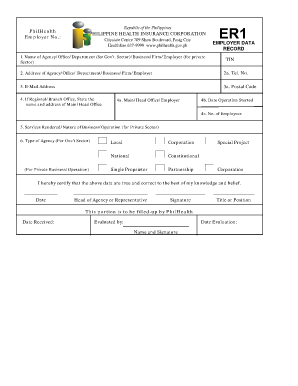
- Enter the name of your agency, office, department, or business in the designated field. This information is critical for identification purposes.
- Input the Tax Identification Number (TIN) associated with your agency or business. Ensure accuracy to prevent delays.
- Provide the complete address of your agency, office, department, or business, including city and postal code. This ensures that your details are correctly recorded.
- Fill in the telephone number and email address of the agency or business. This information is vital for communication.
- If applicable, state the name and address of your main or head office if you operate a regional or branch office.
- Indicate the beginning date of your operations. This date helps establish your business timeline.
- Mention the total number of employees currently working in your agency or business.
- Detail the services rendered or the nature of your business operation, specifically if you are in the private sector.
- Select the appropriate type of agency based on your operations, whether government or private, and provide necessary certifications.
- At the end of the form, certify that the data you entered is accurate to the best of your knowledge by signing and indicating your title or position.
- Finally, save your changes, and download, print, or share the completed form as necessary.
Complete your Er1 Form online today for a seamless documentation process.
Experience a faster way to fill out and sign forms on the web. Access the most extensive library of templates available.
Related content
The IEP team must include information about academic achievement and functional...
This form is to be attached to the List of Potential Reviewers sent to the Dean and...
Pattern Set is a function that lets you assign your favorite pat- terns to each of the...
Get answers to your most pressing questions about US Legal Forms API.
How to claim your St. Louis earnings tax refund?
To claim your St. Louis earnings tax refund, complete the required forms, typically including the St. Louis City income tax return. Utilize the Er1 Form to identify any exemptions that may increase your refund. Be sure to follow local guidelines for submitting your claim correctly and promptly.
What is the easiest way to fill out a tax return?
The easiest way to fill out a tax return is by using user-friendly software or online services that guide you through each step. Consider integrating the Er1 Form into your process to manage exemptions efficiently. Furthermore, ensure you have all necessary documents ready for a smooth experience.
Where do I file my MA form 1?
You should file your MA Form 1 with the Massachusetts Department of Revenue. Complete the return clearly, and utilize the Er1 Form for any applicable tax exemptions. Ensure you follow the instructions for submission to avoid any delays or issues with your filing.
How to fill out tax form e-1R?
To fill out tax form e-1R, start by entering your personal details, including your name and address. This form can be used alongside the Er1 Form to claim exemptions where applicable. Once you fill in the required information, review it carefully before submitting to ensure it meets state regulations.
Do I have to file a St. Louis City tax return?
Yes, if you work or reside in St. Louis City, you need to file a local tax return. This includes completing the St. Louis City income tax return, ensuring you report all necessary income. Using the Er1 Form can help you manage your exemptions, making the process smoother.
How to fill out Employee Withholding Certificate form?
To fill out the Employee Withholding Certificate form, gather your personal details, such as your name and Social Security number. Use the Er1 Form to accurately report your withholding allowances, which reflects your tax situation. Double-check the completed form for any errors before submitting it to your employer.
What tax form do I use for a non-resident in Missouri?
For a non-resident in Missouri, you should use the Form MO-NRI, which is specifically designed for non-resident taxpayers. Additionally, if applicable, utilize the Er1 Form to claim any exemptions you may qualify for. This can help streamline your tax filing process and ensure compliance with local tax laws.
How to fill out employee withholding tax exemption certificate?
To fill out the employee withholding tax exemption certificate, start by providing your personal information, including your name and Social Security number. Use the Er1 Form to specify your tax exemptions based on your financial situation and dependents. Ensure you review your entries for accuracy before submitting the form to your employer.
How to fill out medical authorization form?
To fill out a medical authorization form properly, begin with your personal details, including your name and contact information. Specify what medical information you are authorizing to be shared, and ensure you sign and date the form appropriately. If you need assistance, UsLegalForms provides templates and helpful resources for navigating this process.
How to file er 1?
To file the Er1 Form, complete it with the necessary information and either submit it to your employer or electronically file it if your workplace offers that option. Be sure to check the submission deadlines set by your employer, as timely filing helps avoid any tax-related issues. Utilizing resources from UsLegalForms can simplify the filing process for you.
Use professional pre-built templates to fill in and sign documents online faster. Get access to thousands of forms.
If you believe that this page should be taken down, please follow our DMCA take down process here.