We use cookies to improve security, personalize the user experience, enhance our marketing activities (including cooperating with our marketing partners) and for other business use.
Click "here" to read our Cookie Policy. By clicking "Accept" you agree to the use of cookies. Read less
Read more
Accept
Loading
Form preview
  • US Legal Forms
  • Form Library
  • More Forms
  • More Multi-State Forms
  • 64 8 2020

Get 64 8 2020-2025

How it works

  1. Open form

    Open form follow the instructions

  2. Easily sign form

    Easily sign the form with your finger

  3. Share form

    Send filled & signed form or save

How to fill out the 64 8 online

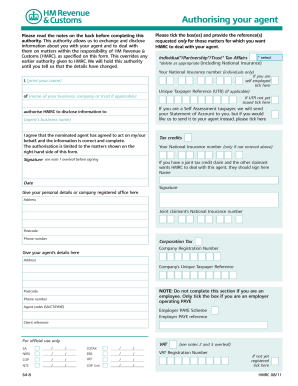
The 64 8 form authorizes your agent to manage your tax affairs with HM Revenue & Customs (HMRC). Completing this form online allows for a streamlined process in granting your agent permission to act on your behalf.

Follow the steps to fill out the 64 8 form online.

  1. Press the ‘Get Form’ button to access the 64 8 form and open it in your online editor.
  2. Begin by reviewing the notes provided on the back of the form to understand its purpose and implications.
  3. Indicate the type of authority you wish to authorize for your agent by ticking the applicable box (individual, partnership, or trust) and providing any requested references.
  4. For individuals, enter your National Insurance number in the specified field.
  5. If you are self-employed, make sure to tick the appropriate box.
  6. Print your name in the designated area to formally authorize your agent.
  7. Fill in your Unique Taxpayer Reference (UTR) if applicable, and provide the name of your business, company, or trust.
  8. If your UTR has not yet been issued, ensure that you tick the designated box.
  9. If you want your agent to receive your statement of account, tick the appropriate box.
  10. Authorize HMRC to disclose information to your agent by providing their business name.
  11. Confirm that the nominated agent has agreed to act on your behalf by checking the relevant box.
  12. Sign the form in the indicated area after ensuring that your information is correct.
  13. Complete sections for tax credits or corporation tax if relevant to your situation, including your agent's details and company registration number.
  14. After filling out all necessary information, review the form for accuracy and completeness.
  15. Finally, save your changes, and give options to download, print, or share the completed form as needed.

Start filling out your 64 8 form online today.

Get form

Experience a faster way to fill out and sign forms on the web. Access the most extensive library of templates available.
Get form

Related content

West Virginia Code | §64-8-1
ARTICLE 8. AUTHORIZATION FOR DEPARTMENT OF TRANSPORTATION TO PROMULGATE LEGISLATIVE RULES...
Learn more
Case 64-8
An engineering firm inserted in a magazine which circulates primarily to business...
Learn more
Model 12-64 Basic Flow Switch and Model 8-66 Basic...
Use standard ESD precautions when handling the control circuit. See Chapter 2...
Learn more

Related links form

Jain Heritage School Jhs Referral Form - Trillium Health Partners Regional Nephrology Clinic Referral Form - Trillium Health Partners The Carlo Fidani Peel Regional Cancer Centre Patient Referral ...

Questions & Answers

Get answers to your most pressing questions about US Legal Forms API.

Contact support

Yes, 64 is divisible by 8. When you divide 64 by 8, the result is 8, which shows there is no remainder. This property indicates that 8 is a factor of 64. Understanding divisibility can enhance your mathematical skills and help you tackle more complex operations.

If you want to find 64 plus 7, the calculation is straightforward. Adding these numbers together gives you 71. This method brings clarity to simple addition problems. Keeping practice in addition can make you more proficient in dealing with larger numbers.

To conceptualize 64 and 8 together, you can think about forming the equation 64 = 8 × 8. This illustrates how 8 is a factor of 64. Understanding this relationship helps in balancing equations and solving algebraic expressions. You can even explore more examples using the US Legal Forms platform for a better grasp.

Dividing 64 by 8 involves determining how many times 8 can be taken away from 64. When you calculate this, you will discover that 64 divided by 8 equals 8. This operation reflects basic division, which is a fundamental skill. Practicing such calculations can strengthen your arithmetic skills.

To set up the equation for 64 divided by 8, you can write it as 64 ÷ 8. This expression indicates that you are trying to find out how many times 8 can fit into 64. Once you perform the calculation, you will find the quotient, which is 8. This method of division is straightforward and easy to apply.

The square root of 64 is 8 because 8 multiplied by 8 equals 64. Understanding this relationship is valuable for many mathematical applications. By knowing this, you can solve various problems involving squares and roots. Embracing this concept can make math feel more accessible.

To find your agent code, refer to the original notification you received from the tax authority when your agent was approved. If you cannot find this information, contacting your tax authority directly is a good idea. Remember that US Legal Forms can assist you with any documentation and queries related to agent codes.

Completing the 64 8 form involves filling in specific sections, including your personal details, your agent's information, and signing the form. Take extra care to ensure all information is accurate and complete to avoid delays. For a step-by-step guide and accessible resources, consider using the US Legal Forms platform, which can simplify your experience.

Your agent code is typically provided by the tax authority upon registration or authorisation. If you are unsure about where to look, check your initial registration paperwork or your agent’s documentation. Utilizing US Legal Forms can also streamline this process, providing guidance to retrieve necessary codes and information.

Online authorisation does not replace the 64 8 form but serves as an alternative method to manage authorisations. While both options allow you to designate an agent for tax purposes, many users prefer the simplicity of the 64 8 form for documentation. US Legal Forms can help you navigate these options and ensure compliance with the latest regulations.

Get This Form Now!

Use professional pre-built templates to fill in and sign documents online faster. Get access to thousands of forms.
Get form
If you believe that this page should be taken down, please follow our DMCA take down processhere.

Industry-leading security and compliance

US Legal Forms protects your data by complying with industry-specific security standards.
  • In businnes since 1997
    25+ years providing professional legal documents.
  • Accredited business
    Guarantees that a business meets BBB accreditation standards in the US and Canada.
  • Secured by Braintree
    Validated Level 1 PCI DSS compliant payment gateway that accepts most major credit and debit card brands from across the globe.
Get 64 8
Get form
Form Packages
Adoption
Bankruptcy
Contractors
Divorce
Home Sales
Employment
Identity Theft
Incorporation
Landlord Tenant
Living Trust
Name Change
Personal Planning
Small Business
Wills & Estates
Packages A-Z
Form Categories
Affidavits
Bankruptcy
Bill of Sale
Corporate - LLC
Divorce
Employment
Identity Theft
Internet Technology
Landlord Tenant
Living Wills
Name Change
Power of Attorney
Real Estate
Small Estates
Wills
All Forms
Forms A-Z
Form Library
Customer Service
Terms of Service
Privacy Notice
Legal Hub
Content Takedown Policy
Bug Bounty Program
About Us
Help Portal
Legal Resources
Blog
Affiliates
Contact Us
Delete My Account
Site Map
Industries
Forms in Spanish
Localized Forms
State-specific Forms
Forms Kit
Legal Guides
Real Estate Handbook
All Guides
Prepared for You
Notarize
Incorporation services
Our Customers
For Consumers
For Small Business
For Attorneys
Our Sites
US Legal Forms
USLegal
FormsPass
pdfFiller
signNow
airSlate WorkFlow
DocHub
Instapage
Social Media
Call us now toll free:
+1 833 426 79 33
As seen in:
  • USA Today logo picture
  • CBC News logo picture
  • LA Times logo picture
  • The Washington Post logo picture
  • AP logo picture
  • Forbes logo picture
© Copyright 1997-2025
airSlate Legal Forms, Inc.
3720 Flowood Dr, Flowood, Mississippi 39232
Form Packages
Adoption
Bankruptcy
Contractors
Divorce
Home Sales
Employment
Identity Theft
Incorporation
Landlord Tenant
Living Trust
Name Change
Personal Planning
Small Business
Wills & Estates
Packages A-Z
Form Categories
Affidavits
Bankruptcy
Bill of Sale
Corporate - LLC
Divorce
Employment
Identity Theft
Internet Technology
Landlord Tenant
Living Wills
Name Change
Power of Attorney
Real Estate
Small Estates
Wills
All Forms
Forms A-Z
Form Library
Customer Service
Terms of Service
Privacy Notice
Legal Hub
Content Takedown Policy
Bug Bounty Program
About Us
Help Portal
Legal Resources
Blog
Affiliates
Contact Us
Delete My Account
Site Map
Industries
Forms in Spanish
Localized Forms
State-specific Forms
Forms Kit
Legal Guides
Real Estate Handbook
All Guides
Prepared for You
Notarize
Incorporation services
Our Customers
For Consumers
For Small Business
For Attorneys
Our Sites
US Legal Forms
USLegal
FormsPass
pdfFiller
signNow
airSlate WorkFlow
DocHub
Instapage
Social Media
Call us now toll free:
+1 833 426 79 33
As seen in:
  • USA Today logo picture
  • CBC News logo picture
  • LA Times logo picture
  • The Washington Post logo picture
  • AP logo picture
  • Forbes logo picture
© Copyright 1997-2025
airSlate Legal Forms, Inc.
3720 Flowood Dr, Flowood, Mississippi 39232