Loading
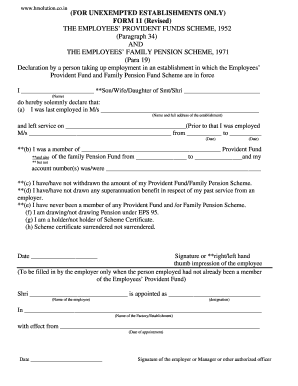
Get Pf Form 11 Old Download 2020-2026
How it works
-

Open form follow the instructions
-

Easily sign the form with your finger
-

Send filled & signed form or save
How to fill out the Pf Form 11 Old Download online
Completing the Pf Form 11 Old Download is crucial for individuals taking up employment in establishments where the Employees' Provident Fund and Family Pension Fund Scheme are applicable. This guide offers step-by-step instructions to help you accurately fill out the form online.
Follow the steps to complete the Pf Form 11 Old Download effectively.
- Press the ‘Get Form’ button to retrieve the form and open it in your online editor.
- Begin by entering your name in the first blank, specifying if you are the son, wife, or daughter of the named individual. Fill in their name in the corresponding field.
- In the next section, provide the name and full address of the last establishment you were employed with, alongside the date you left that service.
- Document any prior employment by including the name of the previous establishment and the start and end dates of your tenure there.
- Indicate whether you were a member of a Provident Fund and whether you were part of the Family Pension Fund, specifying the timeframe for each, and include your account number(s), if applicable.
- State whether you have withdrawn the amount of your Provident Fund or Family Pension Scheme.
- Indicate if you have received any superannuation benefits from a previous employer.
- Confirm if you have ever been a member of any Provident Fund and/or Family Pension Scheme.
- Specify if you are currently drawing a pension under EPS 95 and if you hold a Scheme Certificate.
- Complete the section regarding the surrendering of the Scheme Certificate, if pertinent.
- Enter the date and affix your signature or thumb impression in the designated area.
- If applicable, the employer or authorized officer must fill out the section detailing the name of the employee, their designation, and the establishment's name, along with the date of appointment. This should be signed by the employer or authorized officer.
- Once completed, you can save your changes, download the filled-out form, print it, or share it as needed.
Start filling out your Pf Form 11 Old Download online today.
You can download PF Form 11 from the EPFO website, typically located in the 'Forms' or 'Downloads' section. This form is important for new employees and can be instrumental in formalizing your PF account details. Ensure you complete it correctly for seamless processing.