Loading

Open form follow the instructions

Easily sign the form with your finger

Send filled & signed form or save
How to fill out the Macys Com Easyreturn online
Returning or exchanging a purchase with Macy’s is straightforward with the Macys Com Easyreturn form. This guide will provide step-by-step instructions to help you complete the return process efficiently.
Follow the steps to complete the Macys Com Easyreturn form
- Press ‘Get Form’ button to access the form. This will allow you to open the document in the editor.
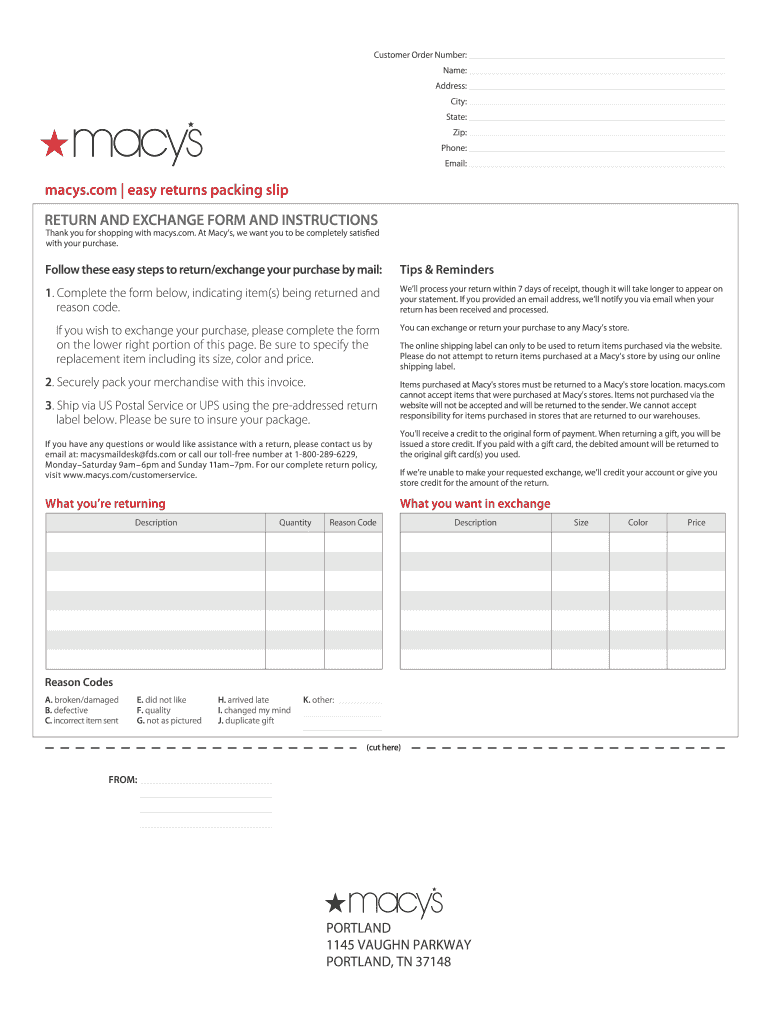
- In the first section, enter your customer order number. This number is essential for processing your return.
- Next, indicate the item(s) you are returning. Clearly describe each item, including quantity.
- If you are requesting an exchange, complete the lower section of the form by specifying the replacement item, including its size, color, and price.
- Securely pack your merchandise with the completed form and any necessary documents. Use the pre-addressed return label to mail your package via US Postal Service or UPS.
Complete your Macys Com Easyreturn form online for a seamless return process.
Experience a faster way to fill out and sign forms on the web. Access the most extensive library of templates available.
Related content
THREE EASY RETURN AND EXCHANGE OPTIONS Use your receipt. Use a Macy's return label. 0r try...
Get answers to your most pressing questions about US Legal Forms API.
How do I return an online order?
Returning an online order to Macy's can be done in a few easy steps. You should log into your account and follow the prompts given on the Macys Com Easyreturn page. This process will help you return your order seamlessly.
How to make an exchange at Macy's?
To make an exchange at Macy's, you can either visit a physical store or use their online platform. When you use the Macys Com Easyreturn, you will find clear instructions that guide you through making your desired exchange quickly and efficiently.
How do I return to Macy's online?
Returning an item online to Macy's is simple. Start by visiting the Macy's website and navigating to the return section. Utilizing the Macys Com Easyreturn feature streamlines the process, allowing you to submit your return with ease.
Can I exchange a gift at Macy's?
Yes, you can absolutely exchange a gift at Macy's. If you have a gift receipt, it can facilitate the exchange process. Utilize the Macys Com Easyreturn feature to ensure a straightforward experience while exchanging your gift.
How strict is Macy's return policy?
Macy's return policy is designed to be fair, yet it does have specific guidelines. Generally, items must be returned within 90 days for a full refund. Understanding the terms can simplify using the Macys Com Easyreturn feature.
Can I exchange a perfume at Macy's?
Yes, you can exchange a perfume at Macy's. However, keep in mind that the product should be in its original packaging and unused. This approach helps you take advantage of the Macys Com Easyreturn feature effectively and ensures a smooth exchange.
Can I return something to Macy's that I bought online?
Yes, you can return items purchased online to Macy's with ease using the Macys Com Easyreturn system. Start by accessing your order details in your Macy's account, then follow the return instructions provided. Make sure to package the item securely and include the return slip. This way, you can complete your return without any complications.
How do I return something I bought online?
To return something you purchased online, visit the Macys Com Easyreturn portal. Start by signing into your account, locating your order, and selecting the item you wish to return. Follow the simple prompts to print your return label and packing slip. Once packaged appropriately, drop it off at your nearest carrier location.
How do I return an online order to Macy?
Returning an online order to Macy's requires a few simple steps. Start by visiting Macys Com Easyreturn for a smooth overview of the process. You can initiate the return online and either ship the item back or return it at a store. Keep your order confirmation handy to facilitate the return.
How to do an exchange on Macy's?
Exchanging an item at Macy's can be done either in-store or online. Visit Macys Com Easyreturn for detailed steps about the exchange process. Make sure to have your original receipt and the item in its original condition. Once your return is processed, you can quickly select a new item for your exchange.
Use professional pre-built templates to fill in and sign documents online faster. Get access to thousands of forms.
If you believe that this page should be taken down, please follow our DMCA take down process here.