Get Texas Fillable Paper Tags Form 2020-2026
How it works
-

Open form follow the instructions
-

Easily sign the form with your finger
-

Send filled & signed form or save
How to fill out the Texas Fillable Paper Tags Form online
Filling out the Texas Fillable Paper Tags Form online can simplify the process of registering a vehicle temporarily. This guide will provide you with clear, step-by-step instructions to ensure every required section is completed accurately.
Follow the steps to accurately complete the Texas Fillable Paper Tags Form.
- Click ‘Get Form’ button to obtain the form and open it in the editor.
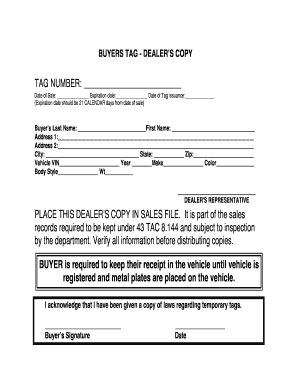
- Fill in the 'Tag Number' field with the appropriate number assigned to the temporary tag.
- Enter the 'Date of Sale' in the specified format.
- Complete the 'Expiration date' section, marking it 21 calendar days from the date of sale.
- In the 'Buyer’s Last Name' and 'First Name' fields, input the legal names of the buyer.
- Provide the buyer’s 'Address 1' and 'Address 2' (if applicable), along with the 'City,' 'State,' and 'Zip' code.
- Document the 'Vehicle VIN,' 'Year,' 'Make,' 'Color,' 'Body Style,' and 'Weight' in the corresponding fields.
- Ensure that the 'Dealer's Representative' section is filled out if required.
- Sign in the 'Buyer’s Signature' section to acknowledge receipt of the temporary tag laws.
- Record the 'Date' of signing.
- Review all filled sections for accuracy.
- After completing the form, save changes, download, print, or share the form as necessary.
Don't delay—complete your Texas Fillable Paper Tags Form online today.
The new law regarding temporary license plates in Texas aims to simplify the registration process and enhance vehicle identification. This law includes updated requirements for temporary tags, including the use of the Texas Fillable Paper Tags Form for efficient application. Understanding these changes can help car owners comply with state regulations and avoid fines. Always stay informed to ensure your temporary tag meets current legal standards.